Table of Contents >> Show >> Hide
- What Is the iPod Shuffle?
- A Brief History of the iPod Shuffle
- Key Features That Made the iPod Shuffle Special
- How to Use an iPod Shuffle in 2025
- Pros and Cons Compared to Modern Options
- Buying an iPod Shuffle Today: What to Know
- Tips to Keep Your iPod Shuffle Running Smoothly
- Is the iPod Shuffle Still Worth It?
- Real-World iPod Shuffle Experiences
- Conclusion
If you’ve ever clipped a tiny metal rectangle to your hoodie and felt instantly 30% cooler, you’ve probably met the iPod shuffle. This little screen-less music player was Apple’s minimalist answer to “I just want my songs, no drama.” Even though Apple discontinued the shuffle in 2017, it still has a loyal fanbaseand a surprisingly practical role in 2025.
In this guide, we’ll walk through what the iPod shuffle is, its history, how the different generations compare, how to use one today with modern computers, what to watch out for if you’re buying used, and tips to keep it running as long as possible. Think of it as a love letter and survival manual for the world’s most famous tiny music brick.
What Is the iPod Shuffle?
The iPod shuffle is a tiny digital audio player Apple sold from 2005 to 2017. Unlike most other iPods, it uses flash memory instead of a hard drive and has no displayjust simple buttons and a clip-on design (on most generations). It was designed around one core idea: stop staring at a screen and just listen.
The first iPod shuffle was announced in January 2005, and the fourth (and final) generation arrived in 2010. Apple officially discontinued the product line in July 2017 as it shifted focus to the iPhone, iPod touch, and streaming services like Apple Music.
Over four generations, the shuffle grew smaller, gained a clip, experimented with button-free design, and then wisely brought the buttons back. By the end, it had become a near-perfect “gym, commute, and travel” companion for people who didn’t want notifications constantly interrupting their playlists.
A Brief History of the iPod Shuffle
1st Generation (2005): The Gum Stick Era
The original iPod shuffle looked like a white USB stickroughly the size of a pack of gum. It came in 512 MB and 1 GB capacities and plugged directly into a USB port for syncing and charging. There was no screen, no click wheel, and no fancy menus. You could play tracks in order or shuffle them randomly. That was it, and honestly, that simplicity was part of the charm.
This generation was ideal for people who wanted a cheap, rugged way to carry a subset of their iTunes library, especially for workouts or travel. Apple advertised it as an easy way to “shuffle your songs” and rediscover tracks you’d forgotten you owned.
2nd Generation (2006): The Clip-On Revolution
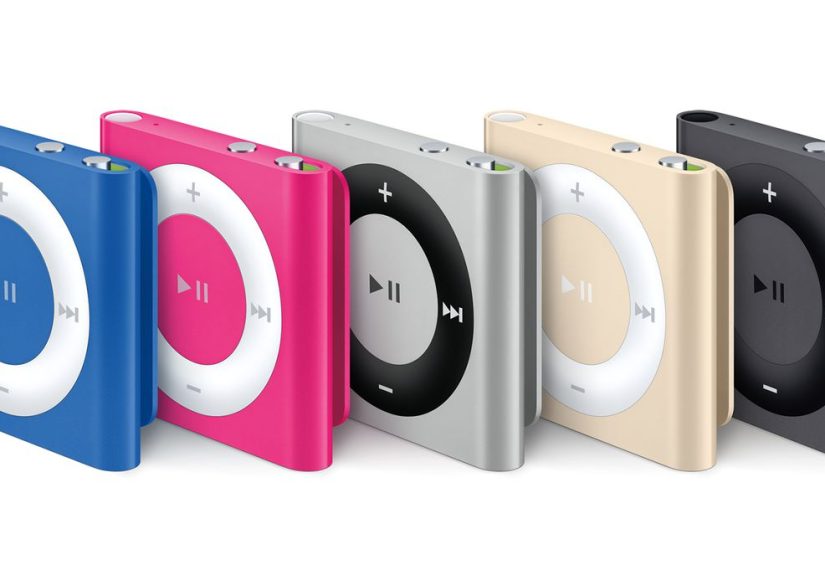
The second-generation iPod shuffle is the one many people picture when they hear “shuffle”: a tiny brushed aluminum square with a big circular control pad and a built-in clip on the back. Apple even called it “the most wearable iPod ever.”
Key changes included:
- A built-in clip so you could attach it to clothes, bags, or lanyards.
- A much smaller and lighter bodytruly pocket- and gym-friendly.
- A dock for syncing and charging via USB instead of a built-in connector.
- Capacities eventually reaching up to 2 GB in multiple colors.
This design basically defined the shuffle brand: colorful, wearable, and focused on physical controls.
3rd Generation (2009): The Button-Free Experiment
The third-generation iPod shuffle was Apple’s boldestand most controversialexperiment. Apple removed the playback buttons entirely from the device. Instead, you controlled playback using the buttons on the included headphones and used a feature called VoiceOver to hear track names and playlists spoken aloud.
On paper, it was futuristic. In real life, people hated being locked into Apple’s special headphones, and many missed having simple on-device controls. The 3rd gen is interesting from a design-history standpoint, but it’s probably the least-loved version among long-time fans.
4th Generation (2010–2017): The Best of Both Worlds
With the fourth-generation iPod shuffle, Apple basically said, “Okay, you were right.” The buttons came back, the clip stayed, and VoiceOver was refined. The result was a near-ideal balance of simplicity and smart features.
Highlights of the 4th gen iPod shuffle include:
- 2 GB of storage (around 500 songs, depending on file size and length).
- Up to about 15 hours of battery life per charge.
- Physical playback, volume, and VoiceOver buttons on the front and top.
- A tiny square design with a clip, available in multiple colors across the years.
Apple kept this design until the line was discontinued in 2017, which tells you how well it worked.
Key Features That Made the iPod Shuffle Special
1. Ultra-Portable Clip-On Design
The clip is really the star of the show. Whether you’re running, lifting, cleaning the house, or commuting, the shuffle stays out of your way. No bouncing phone in your pocket, no armband, no fear of dropping a giant glass rectangle on the treadmill.
2. Screen-Free, Distraction-Free Listening
No screen means no endless scrolling, no checking notifications, and no temptation to “quickly” open social media. An iPod shuffle is basically a dedicated audio bubble: music, podcasts, or audiobooks without the mental clutter of a smartphone.
3. Simple Physical Controls
On the 2nd and 4th gen models, the large circular control pad makes it easy to play/pause, skip tracks, and adjust volume by feel. That’s a big deal when you’re on a run or biking and don’t want to look down at a screen.
4. VoiceOver (4th Gen)
VoiceOver lets the shuffle speak song titles, artist names, playlists, and battery status in multiple languages. Press the VoiceOver button to hear what’s playing or to jump between playlists without needing a display. It’s surprisingly handy when you’ve loaded the device with hundreds of tracks.
5. Solid Battery Life
Depending on the generation, Apple rated the iPod shuffle for roughly 10–15 hours of audio playback. The 4th gen in particular is rated for up to 15 hours, which is plenty for a week’s worth of workouts or a couple of long trips on a single charge.
How to Use an iPod Shuffle in 2025
Yes, you can absolutely still use an iPod shuffle today. It won’t stream Spotify or Apple Music directly, but it works perfectly as a local music player for MP3, AAC, and other supported audio files.
Step 1: Install iTunes (or Use Finder on Newer Macs)
- On Windows: Download and install iTunes from Apple or the Microsoft Store.
- On macOS Catalina and later: There’s no dedicated iTunes app; instead, you sync devices using Finder. The basic logic is the same: connect, select the device, choose what to sync.
Once iTunes (or Finder) recognizes your iPod shuffle, you’ll see it appear as a connected device.
Step 2: Load Music and Playlists
- Import or drag your music into your iTunes library if it’s not already there.
- Connect the iPod shuffle via its USB cable or dock.
- Click the device icon and go to the Music tab.
- Choose whether to sync your entire library or selected playlists, artists, albums, and genres.
- Click Apply or Sync to transfer songs.
You can also manually drag individual songs or playlists to the shuffle if you prefer total control. Just remember to eject the device before unplugging to avoid data corruption.
Step 3: Understand the Switches and Buttons
Most iPod shuffles have a three-position switch on the top or side:
- Off
- Play in order
- Shuffle (random order)
On the front, the circle control pad lets you play/pause, skip tracks, and change volume. On 4th gen models, a separate button activates VoiceOver to call out song names and playlists.
Step 4: Charging and Status Lights
The iPod shuffle charges via USB. Plug it into your computer or a USB power adapter. The tiny status light is your best friend here:
- Green: High battery level.
- Orange (solid): Charging.
- Orange (blinking): Syncing or being used as a disk.
- Red: Low battery.
- Blinking red: Critically low battery (plug it in ASAP).
If you see no light at all when it’s connected, double-check the cable and USB port.
Pros and Cons Compared to Modern Options
Pros
- Distraction-free: No notifications, messages, or appsjust audio.
- Rugged and tiny: Great for gyms, running, cycling, and kids.
- Easy controls: You can change tracks without looking down at a screen.
- Battery efficiency: It focuses only on audio, so a small battery goes a long way.
Cons
- No native streaming: Everything must be loaded via a computer.
- Limited storage: 2 GB max on later models is tiny by modern standards.
- Discontinued: No new units from Apple and no official repairs.
- Old connectors and software: Requires iTunes/Finder and wired syncing.
Buying an iPod Shuffle Today: What to Know
Since Apple no longer sells the iPod shuffle, you’re limited to used and refurbished units from online marketplaces, local classifieds, and refurbishers. Many listings still highlight the 4th gen model as “perfect for workouts” thanks to its long battery life and simple buttons.
What to Check Before Buying
- Battery health: Ask how long a full charge lasts. A very old battery may only give you a couple of hours.
- Buttons and switches: Make sure play/pause, skip, and the power/shuffle switch work reliably.
- Clip condition: A loose or broken clip can make the device much less convenient.
- Visible damage: Deep dents or corrosion around the headphone jack or connector are red flags.
- Included accessories: The original USB cable or dock is useful, though third-party replacements are available.
Also, be wary of listings that seem suspiciously cheap or “new in box” in large quantitiesespecially if they use generic stock photos. Counterfeits and mislabeled devices are not unheard of for discontinued Apple products.
Tips to Keep Your iPod Shuffle Running Smoothly
- Top off the battery occasionally: Lithium-ion batteries prefer regular use. If you store the shuffle for long periods, recharge it every few months.
- Avoid moisture: Sweat-resistant is not the same as waterproof. Don’t clip it directly to soaked clothing or expose it to heavy rain.
- Use quality cables: Cheap USB cables can cause unreliable charging or syncing issues.
- Sync clean files: Stick to supported audio formats (like AAC and MP3) to avoid playback problems.
- Eject properly: Always eject the iPod shuffle from iTunes/Finder before unplugging to prevent file system errors.
Is the iPod Shuffle Still Worth It?
If you live on streaming, love giant lossless libraries, or want everything on one device, the shuffle will feel limited. But if you want something tiny, tough, and distraction-free, it still has a real role in 2025:
- As a dedicated workout playerclip it on and go.
- As a backup audio device for travel, hikes, or long flights.
- As a kid-friendly music player that doesn’t connect to the internet.
- As a nostalgia gadget that still does its job surprisingly well.
The iPod shuffle may be a retired Apple product, but it’s far from useless. In many ways, it solves a modern problem: too many screens, not enough simple, focused tools.
Real-World iPod Shuffle Experiences
To really understand the iPod shuffle, imagine a typical morning run. Instead of fiddling with your phone, unlocking the screen, closing three apps, and dismissing two notifications, you just pinch a tiny clip, press play, and you’re moving. No endless scrolling to find the “perfect” playlist. Whatever’s on therethat’s today’s soundtrack.
Many people use the shuffle as a kind of intentional music filter. Because storage is limited, you’re forced to curate. Maybe you load one playlist for lifting, one for long runs, one for commuting, and one with podcasts. VoiceOver on the 4th gen makes it easy to bounce between them. Instead of 20,000 tracks you barely know, you carry a small set of songs you actually listen to.
Another underrated benefit is how it changes social situations. At the gym, a phone can be a distraction magnetyou look down, you see a text, then an email, then a notification, and suddenly your rest between sets turns into a 10-minute scroll. With a shuffle, there’s nothing else to check. It quietly removes a whole layer of digital noise.
The shuffle also works well for focused tasks like studying, chores, or deep work. Load it with instrumental tracks or lo-fi playlists, plug in wired earphones, and leave your phone in another room. If your phone isn’t in your hand, it’s much harder for a “quick” check to eat half an hour. The tiny device becomes a tool for focus instead of another portal to distraction.
Parents sometimes lean on old iPod shuffles as kid-friendly players. There’s no app store, no messages, no accidental purchasesjust audio. You can load age-appropriate songs, audiobooks, or language-learning tracks and hand it over with a simple set of on-ear controls. Kids get music and stories, adults get peace of mind.
Travelers often love the shuffle as a backup. If your phone battery dies on a long bus ride or flight, the shuffle is still there with hours of music ready. Because it’s so small and inexpensive on the used market, you’re less anxious about losing it in a hostel, a rental car, or the bottom of a hiking pack.
Finally, there’s the nostalgia factor. For a lot of people, the iPod shuffle was their first “personal” music playersomething they chose, loaded, and customized themselves. Holding one in your hand today is like flipping through an old photo album, except instead of pictures, you’re revisiting playlists that defined entire phases of your life. In a world of cloud libraries and algorithmic recommendations, that feels strangely refreshing.
Conclusion
The iPod shuffle was never meant to be the most powerful gadget in Apple’s lineup. It was meant to be small, simple, and funand it nailed that brief for over a decade. From the gum-stick original to the polished 4th gen clip-on, it gave millions of people a way to take their music anywhere without dragging a screen and a notification center along for the ride.
Even though Apple discontinued the shuffle years ago, it still has a place in 2025 as a distraction-free music companion, a workout workhorse, a kid-friendly audio player, and a surprisingly durable little nostalgia machine. If you’re willing to live without streaming and do a bit of old-school syncing, the iPod shuffle can still earn its spot on your headphone cableor on the edge of your hoodietoday.