Table of Contents >> Show >> Hide
- First, a quick reality check: “Two accounts” means “two villages you can switch between”
- Method 1 (Recommended): Use Supercell ID to create and switch between two accounts
- Method 2: Use Android Multiple Users or Guest Mode (separate phone profiles)
- Method 3: Use Samsung Secure Folder (or built-in “Dual Apps” features)
- Method 4: Work Profile (advanced, but powerful)
- Do you need Google Play Games to manage two accounts?
- Common mistakes (and how to fix them without panicking)
- Best practices: keep both accounts safe (especially if you value your sanity)
- Quick example setup (copy this and thank yourself later)
- FAQ
- Conclusion
- Player Experience: What It’s Like Managing Two Villages on One Phone (Real-World Tips)
- SEO Tags
You want two Clash of Clans accounts on one Android phone. Totally normal. One village for “serious” trophy pushing, one village for “I swear I’m just testing a base design” (and then somehow you’re level 12 walls deep at 2 a.m.).
The good news: Clash of Clans fully supports switching between multiple accounts on a single device. The even better news: you don’t need sketchy apps, weird hacks, or a second phone taped to your phone like a tech lasagna. The best approach is to use Supercell ID and make sure each village is saved to its own login.
First, a quick reality check: “Two accounts” means “two villages you can switch between”
On Android, you typically run one Clash of Clans app installation. That app can load different villages depending on which account you’re logged into. So you’re not “running both at once” as much as you’re switching between themlike changing hats, except the hat is a fully upgraded Town Hall.
Method 1 (Recommended): Use Supercell ID to create and switch between two accounts
If you want the safest, simplest, most “future-you won’t hate present-you” method, this is it. Supercell ID is designed to save your progress and let you switch between multiple accounts on one device.
What you need
- Two email addresses (one for each Supercell ID). Tip: use emails you control long-term.
- Clash of Clans installed and updated.
- A few minutes (or one training potion’s worth of attention span).
Step 1: Connect your first (current) village to Supercell ID
- Open Clash of Clans and tap the gear icon (Settings).
- Find Supercell ID and tap Disconnected (or Connect).
- Choose Register (or sign in if you already have one).
- Enter your first email address and complete the verification code step.
- Confirm you’re connected. This is your safety belt. Don’t skip it unless you enjoy chaos.
Step 2: Create your second village (your “alt”) on the same phone
Now that your main is safely attached to Supercell ID, you can create a second account without risking your first.
- Go back to Settings (gear icon).
- Tap Supercell ID (it should show you’re connected).
- Open the Supercell ID panel and choose Log out.
- After logging out, the game will offer options like Log in with Supercell ID or Play without Supercell ID.
- Select Play without Supercell ID to start a fresh village.
- Complete the short tutorial until you can access Settings again.
- Now connect this new village to a second Supercell ID using a different email. (Settings → Supercell ID → Register → enter email #2 → verify.)
Step 3: Switch between your two accounts anytime
Once both villages are connected to their own Supercell IDs, switching becomes easy:
- Open Settings (gear icon).
- Tap Supercell ID.
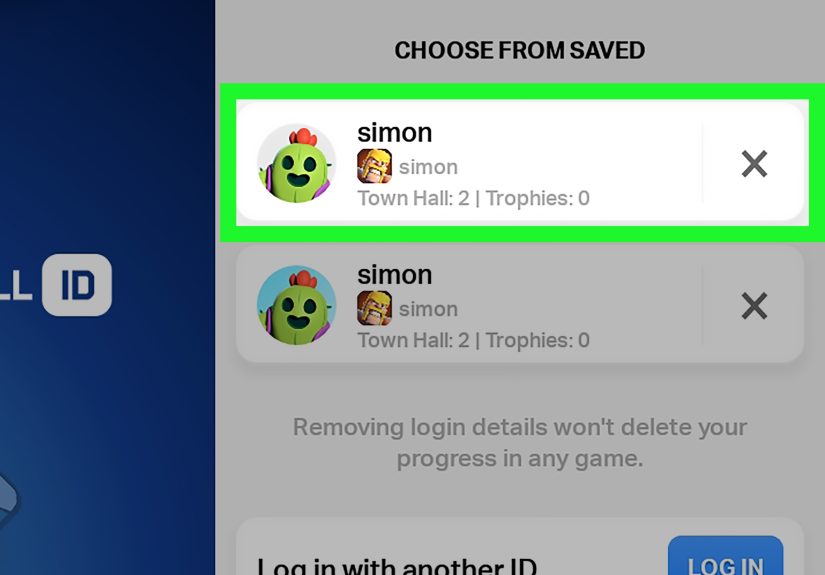
- Use the switch account option (you’ll see your saved accounts). Pick the village you want, confirm, and the game reloads into that account.
Make switching less annoying: label your accounts
If the account list starts looking like “email1,” “email1(2),” “why-do-I-have-4-emails,” do yourself a favor: name your villages clearly (e.g., “Main TH13” and “Alt Builder Base”). When you’re tired, you will absolutely click the wrong one otherwise.
Method 2: Use Android Multiple Users or Guest Mode (separate phone profiles)
Some Android devices let you create multiple user profiles (like having two mini-phones inside one phone). Each user can have their own app datameaning Clash of Clans can behave like it’s installed fresh for that profile.
Why this works
- Each Android user profile keeps separate app data.
- You can keep one profile for your main village and one for your alt.
- Great for shared devices or keeping “serious” and “casual” play separated.
How to set it up (general path)
- Open Android Settings.
- Go to System → Multiple users (or search “users”).
- Turn on Allow multiple users.
- Tap Add user (or enable Guest).
- Switch to the new user profile and open/install Clash of Clans.
- Log into the Supercell ID for that village (or create one).
Heads-up: Not every phone supports multiple users (and some carriers disable it). If you don’t see the option, it’s not youit’s your device being “helpful.”
Method 3: Use Samsung Secure Folder (or built-in “Dual Apps” features)
If you have a Samsung Galaxy, Secure Folder can act like a second, encrypted space where apps run separately. That means you can have one Clash of Clans outside Secure Folder and another copy inside iteach with separate data.
Samsung Secure Folder approach
- Open Settings → Security and privacy (wording varies) → Secure Folder.
- Set it up with a PIN/password/biometrics.
- Open Secure Folder and tap Add apps.
- Add Clash of Clans into Secure Folder (or install it inside Secure Folder).
- Open the Secure Folder version of Clash of Clans and connect it to your second Supercell ID.
This is a clean option because it doesn’t rely on random third-party “cloners.” It’s also handy if you want your alt account tucked away behind an extra locklike hiding snacks from siblings, except the snacks are your Builders.
Other brands: “Dual Apps,” “Parallel Apps,” “App Clone,” etc.
Many Android manufacturers include a built-in feature that creates a second copy of certain apps. Names vary by brand (and sometimes by mood), but the idea is the same: separate app data, separate logins.
- Xiaomi/Redmi/POCO: Dual Apps
- OnePlus/Oppo/Realme: App Cloner / Clone Apps
- Huawei: App Twin
- Samsung: Secure Folder (and sometimes other tools depending on model)
If your phone offers a built-in cloning feature, prefer that over third-party cloning apps. And regardless of method, still connect each village to its own Supercell ID so you can recover it later.
Method 4: Work Profile (advanced, but powerful)
A Work Profile separates work apps and data from personal apps and data on the same device. It’s usually created by an organization (school/company) or a device-management setup, but the key concept is separation: apps inside the Work Profile run in their own container.
If you already have a Work Profile on your phone, you may be able to install Clash of Clans in the work side (depending on policy) and sign into a different Supercell ID there. If you don’t already have a Work Profile, setting one up just for gaming can be more hassle than it’s worthMethod 1 is simpler for most players.
Do you need Google Play Games to manage two accounts?
Not necessarily. On Android, Google Play Games can be involved in game sign-in, but for Clash of Clans, Supercell ID is the most straightforward way to handle multiple accounts on one device. Think of Supercell ID as your “master key” for switching villages safely.
Common mistakes (and how to fix them without panicking)
“My village disappeared!”
Most of the time, your village didn’t disappearyou’re just logged into a different account (or you started a fresh village). Go to Settings → Supercell ID and switch back to the correct account. If your main was connected, it’s still there waiting for you like a loyal troop.
“It keeps loading the wrong village when I open the game.”
This happens if the app auto-signs into the last used account. Fix: open Settings, switch to the account you want, and make sure you’re logged into the correct Supercell ID before closing the game.
“I tried to use the same email for both villages.”
Each Supercell ID is tied to an email, and each village should be linked properly. Use two different emails for two different Supercell IDs. Easy win.
“I want to ‘unlink’ an account so I can reuse it.”
In general, treat linking like tattoo ink: plan before you commit. If you’re trying to reorganize accounts, do it carefully and avoid risky account transfers. The safest setup is: one village = one Supercell ID = one email.
Best practices: keep both accounts safe (especially if you value your sanity)
- Enable Supercell ID Account Protection if it’s available in your region. This adds extra security (like SMS verification and recovery codes) to help protect your account.
- Store recovery codes securely (offline is ideal). Not in a random screenshot pile named “misc.”
- Never share verification codes with anyone. Not “support,” not “a clanmate,” not “a totally legit giveaway host.”
- Avoid shady third-party cloning apps. If your phone has a built-in method (Secure Folder, Dual Apps), use that instead.
- Don’t buy/sell accounts. Aside from being risky, it can also make account recovery impossible if something goes wrong.
Quick example setup (copy this and thank yourself later)
Here’s a clean, low-drama way to do it:
- Main village: Connected to Supercell ID with email [email protected]
- Alt village: Connected to Supercell ID with email [email protected]
- Switching: Settings → Supercell ID → Switch → tap the account you want
FAQ
Can I play both accounts at the same time on one phone?
Usually noone instance of the app loads one village at a time. Using Secure Folder or dual-app features may let you run a second copy of the app, but performance varies by device, and you’ll still be switching attention between them.
Will I get banned for having two accounts?
Having multiple accounts is common and generally supported as long as you play fairly and follow the game rules. The big red flags are cheating tools, account sharing/selling, and anything that breaks fair play.
What’s the safest method overall?
Supercell ID is the safest baseline. If you also want separation, add Android Multiple Users (where available) or Samsung Secure Folder (on Galaxy devices).
Conclusion
If you only remember one thing: connect each village to its own Supercell ID. From there, switching accounts on one Android device is simple, supported, and way less stressful than it sounds. Want extra separation? Use Android’s multiple users (if available) or Samsung Secure Folder. Either way, you’ll be running two villages like a responsible ruler… or like a caffeinated goblinyour call.
Player Experience: What It’s Like Managing Two Villages on One Phone (Real-World Tips)
In practice, having two Clash of Clans accounts on one Android phone feels less like “double the fun” and more like “double the number of times you forget which account has the good runes.” But once you get a rhythm, it’s genuinely usefuland can even make the game feel fresh again.
A lot of players start an alt for one of three reasons: (1) to donate troops to themselves, (2) to experiment with strategies without risking trophies, or (3) to relive that early-game glow where a new cannon feels like a major life event. The first week is usually the messiest because you’re still building the habit of checking which account you’re on before you do something permanentlike spending gems, starting a long upgrade, or accidentally requesting troops from the “wrong” clan chat and then realizing your alt is wearing the clan badge like it stole it.
The smoothest setups tend to be the simplest: two Supercell IDs, clearly named villages, and a consistent routine. For example, many players keep their main account as the “default” and only switch to the alt for specific tasks: donating, friendly challenges, Clan Capital attacks, or experimenting with base designs. That way, you’re not bouncing back and forth every five minutes like you’re running an air-traffic control tower for Barbarians.
If you use a Samsung phone, Secure Folder can be a game-changer (pun absolutely intended). People often describe it as giving the alt account a “separate space” so it feels less tangled with the main. Notifications can be managed separately, and the extra lock is great if you share your phone with family. The only downside is that you’re managing two versions of the game, which can mean a bit more storage and a tiny performance hit on older devicesespecially during big battles when your phone is already working overtime to animate 43 troops, a siege machine, and your dignity leaving your body.
Android’s multiple user profiles can feel even cleaner because it’s true separation, but availability varies a lot. When it does work, players like it because it creates a clear boundary: you switch user profiles, open the game, and you’re in the other “world.” It’s especially handy for parents or shared devices, but even solo players use it as a psychological trick: “This profile is for serious play, that profile is for experiments.” It’s basically adulting, but for base layouts.
The biggest “I wish someone told me this sooner” lesson is about account safety. Players who run multiple accounts are also the ones most likely to forget which email is tied to which village, or to lose track of recovery steps. The smart move is to keep a simple note (offline or in a secure password manager) that says: “Main village → email A” and “Alt village → email B,” plus any recovery codes if you enable extra protection. Once you do that, switching accounts stops being stressful and becomes just another part of your routinelike collecting resources, checking upgrades, and pretending you totally meant to leave that builder idle.