Table of Contents >> Show >> Hide
- The Short Answer: Typical Ring Battery Life
- What Exactly Is a “Ring Battery”?
- What Really Controls How Long a Ring Battery Lasts?
- How Long Does a Ring Battery Last Over Its Lifetime?
- Real-World Examples of Ring Battery Life
- How to Make Your Ring Battery Last Longer
- Signs Your Ring Battery Might Need Replacing
- FAQ: Quick Answers About Ring Battery Life
- Real-Life Experiences: Living With a Ring Battery Day to Day
- Final Thoughts: So, How Long Does a Ring Battery Last?
If you’ve ever stared at your Ring app, saw “Battery at 9%,” and thought,
“Not today, burglar,” this guide is for you. Ring advertises that its
rechargeable batteries can last for “months between charges,” but real life
includes kids, delivery drivers, porch pirates, squirrels, and the
occasional wandering raccoon. All of them love triggering your camera.
So, how long does a Ring battery really last, and what can you do to make
it stretch as far as possible? Let’s break down what Ring promises, what
users experience, and how to squeeze every last drop of power out of that
little blue pack.
The Short Answer: Typical Ring Battery Life
When people ask, “How long does a Ring battery last?” they usually mean:
“How long between charges?” For most Ring battery-powered devices (like the
Ring Video Doorbell, Ring Battery Doorbell Plus, Stick Up Cam Battery, and
Spotlight Cam Battery), the realistic answer is:
- Light activity: 6–12 months on a single charge
- Average suburban doorstep: about 2–4 months
- Busy street or high-traffic area: 3–8 weeks
- Freezing temperatures + tons of motion: sometimes just a few weeks
Ring’s own guidance and retailer FAQs often estimate
6–12 months with “normal use”, while independent reviewers
and real-world users report anywhere from a couple of months to nearly a
full year, depending on how crazy their front porch gets.
The big takeaway: the battery is capable of months of use, but your
settings, weather, and Wi-Fi conditions decide whether you see “months”
or “why am I charging this thing again already?”
What Exactly Is a “Ring Battery”?
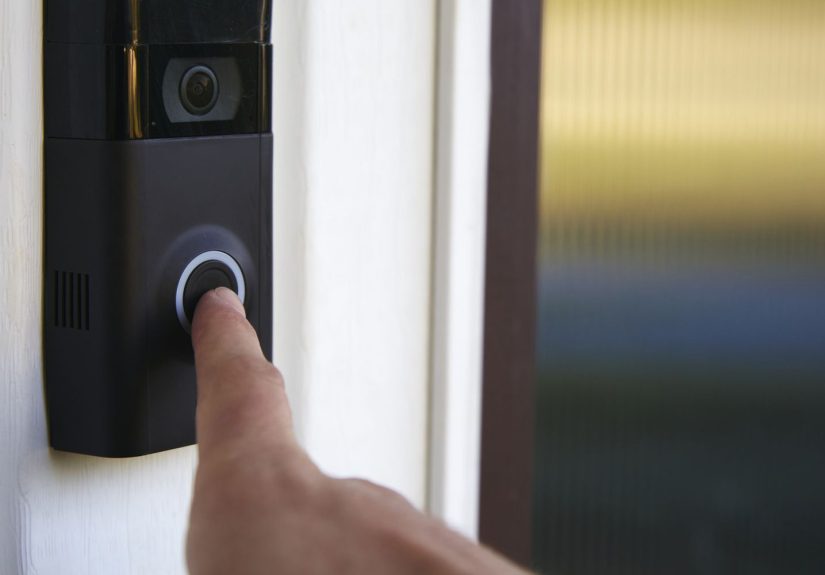
Just to be clear, we’re talking about the Ring smart home brand from Amazon
the one that makes video doorbells, security cameras, and alarmsnot
the battery inside a smart ring you wear on your finger.
Ring uses rechargeable lithium-ion battery packs in several devices:
- Ring Battery Video Doorbell & Battery Doorbell Plus
- Ring Video Doorbell 2/3/4 (battery models)
- Ring Stick Up Cam Battery / Spotlight Cam Battery
- Some Ring Alarm accessories, like the keypad
Many of these share the same removable pack, so understanding how that one
battery behaves will help you predict battery life across multiple devices.
What Really Controls How Long a Ring Battery Lasts?
Ring’s marketing is the “best case scenario.” Real-world battery life is
like a recipe: change one ingredient and the whole dish comes out
differently. Here are the main factors that decide whether you’re charging
every month or twice a year.
1. Motion Events and Live View: The Number-One Drain
Your Ring device doesn’t use much energy just sitting there, watching your
porch. It burns power when it has to wake up, record video, and send it over Wi-Fi.
That happens when:
- Motion is detected in your zones
- Someone presses the doorbell button
- You open Live View from the app
- Linked devices trigger each other (doorbell triggers camera, etc.)
Put your doorbell on a quiet cul-de-sac with only a handful of visitors a
day and you might get many months out of a charge. Put it on a busy urban
street with cars, pedestrians, and constant deliveries, and the battery can
drop noticeably every day.
As a rough guide, if your device is recording dozens of events per day, expect
to charge more often. If you’re closer to a few events a day, battery life
improves dramatically.
2. Video Settings and Power-Hungry Features
Some features make your video look great but also make your battery sigh
deeply:
- HDR (High Dynamic Range): clearer images in weird lighting, more processing power
- Pre-Roll and Snapshot Capture: extra frames before and between events mean more activity
- Longer recording length: 60-second clips drain more than 20-second clips
If your battery life is disappointing, trimming clip length,
disabling optional extra features, or turning down video “luxuries”
can turn a 3-week charge into a 2–3-month charge in some homes.
3. Wi-Fi Signal Strength
Wi-Fi doesn’t just affect how smooth the video looks; it also affects how
long the battery lasts.
When signal is weak, your Ring device may:
- Try repeatedly to reconnect
- Re-send video data
- Time out and retry events
All of that wastes power. If the RSSI in your Ring app is consistently
poor, adding a Wi-Fi extender, repositioning your router, or using a Ring
Chime Pro or mesh system can reduce unnecessary battery drain.
4. Weather and Extreme Temperatures
Lithium-ion batteries have feelings, and they hate extreme cold.
In low temperatures:
- The battery appears to “drain” faster
- Charging slows down or pauses around freezing
- At very low temperatures, the device may temporarily stop working
Ring warns that at around freezing temperatures, batteries may no longer
charge properly, and in extreme cold they can shut down until they warm
back up. On the flip side, very high heat isn’t great either and can shorten
overall battery lifespan over the years.
5. Whether You Use Solar or Hardwiring
Some Ring devices support solar panels or can be hardwired to an
existing doorbell transformer. Important detail: even when hardwired, the
battery usually still does the heavy lifting, and the wires just provide a
slow trickle charge.
If your device is in a sunny spot with a compatible solar panel, you may
rarely (or never) have to manually remove the battery. If it’s in the
shade, or the wiring isn’t delivering enough power, you’ll still be doing
the battery-swapping shuffle every so often.
How Long Does a Ring Battery Last Over Its Lifetime?
So far we’ve talked about battery life between charges. But what
about the battery’s overall lifespanhow many years until it’s noticeably worse?
Ring community and support information suggests that under good conditions,
Ring’s rechargeable packs can handle roughly hundreds of full charge cycles,
which typically translates to about 3–5 years of normal use before their
capacity noticeably declines.
If you:
- Charge the battery gently (don’t leave it on the charger for days)
- Avoid constantly running it to 0%
- Protect it from extreme heat and cold as much as you reasonably can
…you’ll likely get several years of service before you see “I used to last
3 months and now I barely make it one.”
The good news: replacement Ring battery packs are widely available, so
you’re not stuck buying a whole new doorbell or camera when the battery
ages out.
Real-World Examples of Ring Battery Life
To give you a feel for the range, here’s what users and reviewers commonly
report:
- A battery doorbell on a quiet suburban porch, with moderate motion
sensitivity and short clips, lasting around 3–6 months per charge - A Stick Up Cam Battery watching a backyard with occasional motion lasting
6–12 months - A doorbell facing a busy sidewalk or apartment hallway dropping from 100%
to near empty in 3–6 weeks, especially if motion zones are wide and
notifications are frequent - Devices in freezing climates struggling to hold a charge and needing
more frequent recharges during winter, even if they last far longer
in warmer months
None of this means your battery is “bad” on its ownit just means your
environment is demanding. The more your Ring is working, the more often
you’ll be charging.
How to Make Your Ring Battery Last Longer
Fortunately, you don’t have to just accept short battery life. With a few
smart tweaks, you can often double (or at least significantly extend) how
long your Ring battery lasts between charges.
1. Tame Your Motion Zones and Sensitivity
This is the single most powerful tweak. In the Ring app:
- Limit motion zones to just your porch or doorwayavoid busy streets
- Turn down motion sensitivity so every passing car doesn’t trigger a clip
- Disable motion alerts you don’t really need (you can still record without alerting)
Less motion detection means fewer wake-ups, fewer recordings, and longer
battery life. You also get fewer “Person detected: it was just your
neighbor’s dog again” notifications.
2. Shorten Recording Length and Adjust Motion Frequency
In the settings, you can reduce clip lengthsay from 60 seconds to 20 or
30 secondsespecially if most events are quick doorbell presses or walk-bys.
You can also tweak how often the device can be retriggered. Choosing less
aggressive “motion frequency” options can stop your camera from recording
back-to-back clips when someone is hanging out in view.
3. Turn Off Unnecessary Extras
If you’re struggling with battery life, consider temporarily disabling:
- HDR video
- Pre-roll (where available)
- Snapshot Capture at very frequent intervals
These features are nice-to-have, not must-have. You can always re-enable
them later once your battery routine feels manageable.
4. Improve Wi-Fi Strength
If your Ring app shows weak signal to the device, improving Wi-Fi can help
both video quality and battery life. Try:
- Moving your router a bit closer to the door or camera
- Upgrading to a mesh Wi-Fi system if your house is large
- Adding a Wi-Fi extender or Ring Chime Pro
Fewer dropped connections and retries mean less wasted battery power.
5. Add Solar or Keep a Spare Battery
For cameras in sunny spots, a Ring-compatible solar panel can keep
your battery topped up and dramatically reduce manual charging. Even if
solar doesn’t fully power the device year-round, it can delay how often you
need to pull the battery out.
A very practical upgrade is a second Ring battery. Keep one in
the device and one on the charger. When the installed battery runs low,
swap it in secondsno waiting while your only battery charges.
6. Charge and Store the Battery the Right Way
A few simple habits help keep your battery healthy:
- Charge indoors at room temperaturedon’t charge a frozen battery
- Disconnect once it’s fully charged (no need to leave it plugged in for days)
- Try not to run it down to 0% every time; topping up around 20–30% is easier on lithium-ion
These habits don’t just help between chargesthey also help the battery
last more years overall.
Signs Your Ring Battery Might Need Replacing
Even the best-treated battery eventually gets tired. You might need a new
pack if:
- Battery percentage plummets far faster than it used to, even with the same settings
- The device dies suddenly from, say, 40% to 0%
- Battery life is poor in all seasons, not just winter
- You’ve already optimized motion zones, Wi-Fi, and video settings with minimal improvement
If your battery is several years old and these symptoms show up, a fresh
Ring pack is often cheaper (and much less annoying) than constantly
micromanaging settings.
FAQ: Quick Answers About Ring Battery Life
How often will I need to charge my Ring battery?
Most people end up charging their battery every 1–4 months, depending
on traffic, climate, and settings. If you live somewhere warm and quiet,
you might go closer to 6–12 months. If your front door is busier than a
coffee shop, expect more frequent charging.
Does hardwiring my Ring doorbell mean I never have to charge?
Not necessarily. Hardwiring typically provides a trickle charge, not
full-time power like a wired-only device. In mild climates with moderate
use, you may never have to remove the battery. In cold weather or
high-traffic situations, you may still need to charge occasionally.
Is something wrong if my battery only lasts a few weeks?
Not always. A few weeks can be normal for:
- Very busy doorways with dozens of daily events
- Harsh winter conditions
- Maxed-out video features and long recordings
Try adjusting your motion settings and features before assuming the battery
is defective.
Real-Life Experiences: Living With a Ring Battery Day to Day
On paper, “6–12 months of battery life” sounds like a dream. In reality,
most Ring owners end up learning the rhythms of their battery the same way
you learn how long your phone really lasts: not by the spec sheet, but by
watching what happens over a few months.
Imagine three neighbors on the same street:
Neighbor #1 lives at the quiet end of the cul-de-sac. Their Ring doorbell
catches the mail carrier, a couple of Amazon deliveries, and the occasional
friend or family member. They’ve dialed in their motion zones so passing
cars don’t trigger alerts. For them, the battery percentage creeps down so
slowly that charging every 3–6 months feels normal. They almost forget the
battery exists.
Neighbor #2 is on the corner house facing a busier street. Their doorbell
sees cars, dog walkers, joggers, and delivery folks all day long. At first,
they left the default motion zones wide open. Their phone pinged constantly,
and the battery dropped from 100% to 30% in just a few weeks. After some
frustration (and one “Didn’t this thing say up to a year?” comment), they
tightened the motion zones, shortened clip length, and turned off a couple
of extra features. Suddenly, they were charging every two months instead of
every few weeks. Same device, same housejust smarter tuning.
Neighbor #3 lives somewhere cold. In summer, their Ring works like a dream,
and the battery lasts for months. Then winter hits. Temperatures drop, and
the app starts warning that the battery can’t charge properly in the cold.
The battery seems to drain faster and needs more frequent recharges. This
neighbor learns a winter routine: when the battery gets low, they bring it
inside to warm up before charging, keep a spare battery on hand, and accept
that winter means more attention, while summer lets them relax.
Across all three situations, a few common lessons show up:
- Your porch is unique. What a reviewer gets in a test house might not
match your super-busy front step, and that’s okay. Expect to adjust. - Settings matter, a lot. Tweaking motion zones, sensitivity, and clip
length can feel like magic. The difference between “constant alerts and
weekly charges” and “a quiet, reliable system” often comes down to a
couple of sliders in the app. - Seasons change the rules. If you’re in a cold climate, your winter
and summer battery life may look like two different products. - A second battery is sanity insurance. The small upfront cost of a
spare pack often pays for itself the first time you swap in a fresh one
in ten seconds instead of taking your doorbell offline.
Once you get used to your Ring’s rhythmhow quickly it drains in your
specific environment and how often you need to chargeit becomes just
another quiet part of your smart home. You’ll still see the occasional low
battery warning at the worst possible moment (usually right before you go
on vacation), but with the right habits, you’ll spend more time reviewing
crisp doorbell footage and less time hunting for that tiny charging cable.
Final Thoughts: So, How Long Does a Ring Battery Last?
In a perfect world, a Ring battery can and does last months between charges.
In the real world, your exact number depends on how often your Ring wakes
up, how demanding your settings are, what your Wi-Fi looks like, and what
the weather is doing outside your front door.
Expect to charge every 1–4 months in typical conditions, less if your home
is quiet and sunny, more if it’s busy and freezing. With smart motion
settings, reasonable video features, good Wi-Fi, and maybe a solar panel or
spare pack, your Ring battery becomes predictable and low-maintenance
instead of a constant surprise.