Table of Contents >> Show >> Hide
- What This “Tiny Game Boy Photo Frame” Actually Is
- Why Grayscale Hits Different
- Inside the Build: Tiny Hardware Doing Big Nostalgia
- How the Photos Get In There
- Why This Beats a Regular Digital Photo Frame
- If You Want to Build Your Own Tiny Game Boy Photo Frame
- Mini Nostalgia Tech: The Tiny Device Trend Is Real
- of On-the-Go Experiences With a Tiny Grayscale Photo Frame
- Conclusion
Somewhere between “I should really back up my photos” and “I miss when technology had buttons,” there’s a sweet spot.
It’s a place where memories are low-resolution on purpose, where four shades of gray can feel more emotional than a 48-megapixel sensor,
and where your camera roll doesn’t need the cloudjust a pocket.
Enter the tiny Game Boy photo frame: a miniature, handheld digital frame designed to show classic Game Boy Camera images
exactly the way they deserve to be seenpixel-perfect, unapologetically crunchy, and proudly monochrome.
It’s not trying to compete with modern digital frames. It’s trying to make you smile in the grocery line.
What This “Tiny Game Boy Photo Frame” Actually Is
The idea is simple and weirdly brilliant: build a super-small digital photo frame that displays
Game Boy Camera photos at their native look and feelno smoothing, no AI upscaling, no “enhance!”
Just pure, nostalgic pixels.
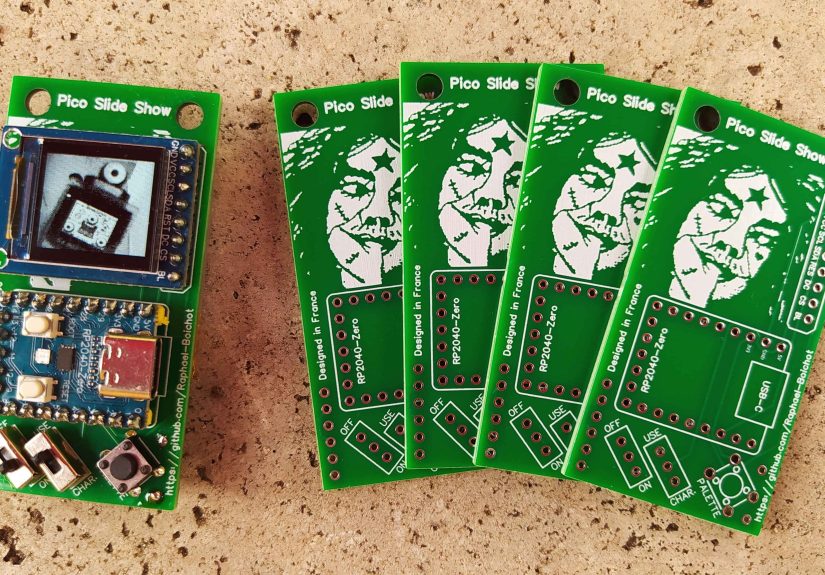
One of the best-known takes on this concept is a microcontroller-based build that uses an RP2040 board and a tiny 128×128 TFT display.
Game Boy Camera images are 128×112, which means they can be shown without stretchingleaving a little border area that feels
like a deliberate design choice rather than a compromise. (In retro projects, “happy accident” is basically a feature.)
The result: a pocketable frame that can cycle through a whole gallery of your old-school photosstreet shots, selfies,
pets, friends, and that one picture of a lamp you took in 1999 because you were out of film and chaos is eternal.
Why Grayscale Hits Different
Modern photos are incredible, but they’re also… noisy. Not visuallyemotionally. Unlimited storage means unlimited clutter.
A tiny grayscale photo frame does the opposite. It forces curation. It makes each image feel like a tiny artifact.
Like something you’d find in a drawer labeled “Important Stuff I Forgot I Had.”
Four Shades, Infinite Vibes
The Game Boy Camera look is defined by constraints: low resolution, limited contrast, and classic dithering patterns.
Those limitations do two things at once:
- They simplify the imagefaces become shapes, light becomes mood.
- They stylize the imageevery photo gets that unmistakable “Game Boy” signature.
In a world where your phone can shoot in HDR, RAW, and “cinematic mode,” choosing 128×112 grayscale pixels is a statement.
It says: “I’m here for feelings, not fidelity.”
Inside the Build: Tiny Hardware Doing Big Nostalgia
Most tiny Game Boy photo frame builds revolve around the same set of ingredients: a small microcontroller with enough memory,
a compact display, a simple input method (buttons/switches), and a power source that doesn’t turn your keychain into a brick.
The Brain: RP2040 Power in a Micro Package
The RP2040 ecosystem is popular for maker projects because it’s fast, capable, and well-supported.
It can drive small TFT displays smoothly, manage storage, and handle image data without feeling like it’s running uphill in flip-flops.
In practical terms, it’s powerful enough to do the “digital frame” job while staying tiny and affordable.
The Screen: Pixel-Perfect on Purpose
A small 128×128 TFT display is an ideal match for this concept. When your source images are 128×112, you get:
- No stretching (which would ruin the crisp pixel aesthetic).
- No interpolation (which would blur the dithering and soften the charm).
- A natural border (perfect for a Game Boy-inspired “frame” look).
The screen becomes less of a display and more of a tiny window into a specific era of photographywhere your “filter”
was essentially “hardware limitations and vibes.”
Power: Small Battery, Surprisingly Long Nostalgia Sessions
Many builds use a compact LiPo battery (often around 500mAh in hobby projects) paired with a small charging module.
That’s usually enough for hours of occasional viewingexactly how a pocket photo frame gets used in real life:
quick glances, short show-and-tell moments, and the occasional “wait, let me find the one where the dog looks like a cryptid.”
Controls: One Button Is a Whole Philosophy
Tiny frames don’t need a full UI. A minimalist approach works best:
- A power switch (because pocket devices deserve boundaries).
- A button to change palettes or modes (because grayscale can be art-direction grayscale).
- Optional debug or configuration behavior (for builders who enjoy tinkering as a lifestyle).
How the Photos Get In There
Here’s where the project becomes extra fun: your photos aren’t coming from your phone camera roll.
They’re coming from Game Boy Camera saves or Game Boy Printer outputsmeaning you’re dealing with retro formats,
palettes, and workflows that feel like digital archaeology (but with more tiny cables).
Path A: Use Printer-Style Outputs
The Game Boy Camera is famously connected to the Game Boy Printer ecosystem.
If you can output images through a printer workflow (including modern printer emulator approaches),
you can often get 4-color, 2-bits-per-pixel images that are perfect for a tiny frame.
Many maker tools and emulator workflows export in predictable formatsmaking them easy to crop, convert, and embed.
This route is especially appealing if you already enjoy the “print pipeline” lookthose classic borders,
the retro contrast, and the feeling that your photo has been processed by a friendly 1990s robot.
Path B: Dump Saves and Convert
Another approach is working directly from saved imageseither from original hardware via cartridge dumping tools,
or from emulator save files. This is where conversion scripts shine.
Builders often use a lightweight conversion workflow that:
- Reads save data or extracted images.
- Maps the pixels into a strict 4-shade palette.
- Encodes the image data into a format the microcontroller can store efficiently.
- Compiles the whole gallery into firmware or a data blob.
The fun part: once you’re in a conversion pipeline, you can curate a “best-of” gallery.
The dangerous part: you will absolutely lose an evening deciding which 30 photos deserve to live in your pocket forever.
Path C: Upgrade Your Camera Workflow (If You’re Deep in the Hobby)
The Game Boy Camera community is incredibly active, and modern homebrew can extend what the camera can dofaster transfers,
better ergonomics, alternate palettes, and expanded storage approaches.
If you’re already comfortable with retro hardware and soldering, there are workflows that let you treat Game Boy Camera photos
like a real photo practice instead of a novelty.
For most people, though, the tiny frame is a “best hits” device: pick your favorite images, convert them once, and enjoy.
Why This Beats a Regular Digital Photo Frame
A normal digital photo frame is designed to disappear into your living room. This is designed to be noticed.
It’s the difference between a framed family portrait and a sticker-covered notebook you carried in high school.
One is decor. The other is identity.
And there’s something quietly satisfying about a device that doesn’t require a companion app, doesn’t ask for Wi-Fi,
and doesn’t try to become part of your “smart home.” It’s a tiny object with one job:
show grayscale memories and make people say, “Waitwhat is that?”
If You Want to Build Your Own Tiny Game Boy Photo Frame
This is the part where your inner maker perks up and your schedule quietly whimpers.
The good news: the concept is approachable. The better news: it’s one of those projects where the constraints
keep the scope from exploding into a six-month “side quest.”
A Practical Parts Checklist
- RP2040 board (compact form factor helps).
- 128×128 TFT display with a compatible controller and a supported library.
- Battery (small LiPo) and a charging module.
- One or two buttons plus a power switch.
- Enclosure (3D printed or carefully hacked from an existing shell).
Software Flow That Keeps You Sane
A smooth build process usually looks like this:
- Collect images (printer outputs, saves, or extracted files).
- Convert them into strict 4-color grayscale with correct dimensions.
- Encode into a compact data format for firmware embedding.
- Flash your build onto the microcontroller.
- Test and tweak palette options until it looks “right.”
If you’re new to display libraries, don’t panic: most of the heavy lifting is already solved in the ecosystem.
Your job is mainly about matching display settings, getting your image conversion consistent, and avoiding the classic
mistake of soldering something directly onto the part you need to access later. (The most traditional retro experience:
learning through mild regret.)
Mini Nostalgia Tech: The Tiny Device Trend Is Real
The tiny Game Boy photo frame fits into a broader wave of micro-sized nostalgia gadgetsdevices that are less about specs
and more about delight.
Tiny Keychain Consoles and Pocketable Oddities
If you’ve seen programmable keychain consoles with monochrome screens, you already get the vibe:
tiny hardware can feel surprisingly “complete” when it does one thing well. In many ways, a photo frame is even better suited
to the format than a game consoleno fast input required, no audio needed, just a screen and a story.
Old-School Digital Photo Keychains (Yes, They Existed)
Long before “retro tech” became a personality, there were keychain digital photo frames sold as novelty gadgets.
Many had tiny low-resolution screens and simple USB transfer workflows. Today’s maker-built frames are basically the
cooler, more thoughtful, more “I chose this chaos” version of that ideaespecially when they commit to a specific aesthetic
like the Game Boy Camera’s grayscale look.
of On-the-Go Experiences With a Tiny Grayscale Photo Frame
Picture this: you’re waiting in linecoffee shop, airport, DMV, wherever time goes to take a nap. You pull out what looks like
a tiny toy, and instead of doomscrolling you click a button and a grainy grayscale photo appears. It’s not sharp. It’s not bright.
It’s not trying to sell you anything. And that’s exactly why it feels good.
A tiny Game Boy photo frame changes how you share memories. You’re not handing someone your phone (a device that contains your
banking apps, your messages, and at least one screenshot you forgot existed). You’re handing them a dedicated little gallery.
The moment becomes simple: “Herelook at this.” And suddenly you’re swapping stories instead of swiping through distractions.
The grayscale aesthetic does something sneaky: it invites interpretation. A photo of your friend at a concert turns into a
dramatic silhouette. A snapshot of your dog becomes a tiny creature of legend. The limitations make everything feel more intentional,
even if the original image was taken because you accidentally hit the shutter while trying to adjust the contrast.
The best part is the micro-ritual. You don’t “browse.” You cycle. You click through images one at a time like you’re flipping
a tiny album. That pace makes you linger. You notice details you’d never notice in a fast phone scrollthe shape of a hat,
the way light hits a wall, the weirdly poetic grain that makes ordinary moments feel like found footage from a kinder timeline.
People also react differently. A phone photo is normal. A tiny Game Boy photo frame is a conversation magnet. Someone will ask.
Someone will smile. Someone will say, “Wait… is that a Game Boy?” and then you get to explain the whole delightful premise:
it’s a digital frame, but it’s built to display Game Boy Camera images, because nostalgia deserves its own hardware.
And yes, you’ll curate. Hard. You’ll swap galleries depending on moodfriends one week, travel the next, pets forever.
You might even keep a “greatest hits” set that never changes, like your personal museum exhibit titled
“Life, But Smaller and in Four Shades.”
Over time, it becomes less like a gadget and more like a pocket companion. You pull it out when you need a little comfort,
a little humor, or a reminder that memories don’t have to be perfect to be meaningful. Sometimes, all it takes is a tiny screen,
a few pixels, and a grayscale moment that still knows how to punch you right in the feelings.
Conclusion
A tiny Game Boy photo frame is proof that the best tech isn’t always the newestit’s the most intentional.
When you carry your grayscale memories in a pocket-sized frame, you’re not chasing resolution.
You’re choosing a format that makes every image feel like a keepsake.
If you love retro aesthetics, maker projects, or just the idea of a photo gallery that doesn’t come with notifications,
this tiny frame is the perfect blend of nostalgia and modern DIY.