Table of Contents >> Show >> Hide
- At a Glance: The 8 Best Tablet Keyboards of 2022
- How We Picked the Best Tablet Keyboards (Without Overthinking It… Much)
- 1) Logitech Combo Touch Best Overall Tablet Keyboard for iPad (2022)
- 2) Apple Magic Keyboard Best Premium Keyboard Case for iPad Pro & iPad Air
- 3) Apple Magic Keyboard Folio Best for the iPad (10th Gen / 2022)
- 4) Samsung Book Cover Keyboard Slim Best Tablet Keyboard for Galaxy Tab S8 (2022)
- 5) Surface Pro Signature Keyboard Best for Windows Tablet Productivity
- 6) Brydge MAX+ Best Clamshell-Style iPad Keyboard (Laptop Feel)
- 7) Keychron K3 Best Mechanical Keyboard for Tablet Users
- 8) Logitech Keys-To-Go Best Ultra-Portable Tablet Keyboard (Travel Pick)
- Buying Guide: What to Look for in a Tablet Keyboard
- FAQ
- Conclusion
- Real-Life Experiences (): Living With Tablet Keyboards in 2022
Tablets in 2022 were having a bit of an identity crisis (in a good way). Your iPad wanted to be a laptop. Your Galaxy Tab wanted to be a desktop (hello, DeX). Your Surface Pro insisted it was “totally a PC” while balancing on your knees like a baby giraffe. And the accessory that decides whether this all feels magical or mildly annoying? The keyboard.
This guide rounds up the 8 best tablet keyboards of 2022the ones that actually made typing, shortcuts, trackpads, and on-the-go work feel less like punishment and more like “okay, I can finish this doc before my latte gets cold.” We’ll break down what each keyboard is best for, what it costs you in weight and convenience, and which one fits your specific tablet life.
At a Glance: The 8 Best Tablet Keyboards of 2022
| Pick | Best For | Works With | Why It Wins |
|---|---|---|---|
| Logitech Combo Touch | Most people (iPad productivity) | Various iPad models | Kickstand + detachable keyboard + trackpad |
| Apple Magic Keyboard | Premium iPad “laptop” feel | iPad Pro / iPad Air models (varies) | Best trackpad + excellent typing + USB-C pass-through |
| Apple Magic Keyboard Folio | Base iPad users (late 2022) | iPad (10th gen / 2022) | Two-piece design + trackpad + function row |
| Samsung Book Cover Keyboard Slim | Galaxy Tab work and school | Galaxy Tab S8 family (model-specific) | Light, snappy setup, built for Samsung’s workflow |
| Surface Pro Signature Keyboard | Windows-first tablet owners | Surface Pro line (compatibility varies) | Backlit keys + big touchpad + strong laptop vibe |
| Brydge MAX+ | Clamshell iPad “mini-laptop” fans | iPad Pro sizes (model-specific) | Hinge design + big trackpad + backlit keys |
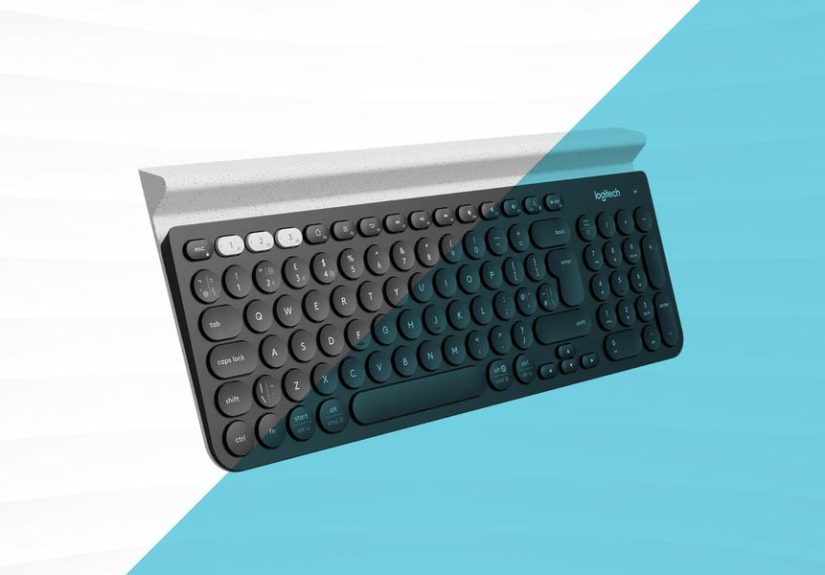
| Keychron K3 (Wireless Mechanical) | Mechanical-keyboard people | iPadOS / Android / Windows / Mac | Low-profile mechanical feel + multi-device Bluetooth |
| Logitech Keys-To-Go | Travel + minimalist setups | Apple devices (and more) | Ultra-thin, sealed keys, toss-in-a-bag easy |
How We Picked the Best Tablet Keyboards (Without Overthinking It… Much)
“Best” depends on what you do and where you do it. So these picks are based on real-world performance factors that matter in daily use:
- Typing feel: key spacing, travel, stability, and fatigue over long sessions.
- Trackpad quality: accuracy, palm rejection, gesture support (especially on iPadOS).
- Stand and viewing angles: because a keyboard is only as good as the screen angle you can actually use.
- Connection and power: Smart Connector convenience vs Bluetooth flexibility vs battery anxiety.
- Portability: weight, thickness, and “will I actually carry this?” honesty.
- Value: cost relative to what you get (and what you give up).
1) Logitech Combo Touch Best Overall Tablet Keyboard for iPad (2022)
If you want the “turn my iPad into a laptop” experience without paying premium-luxury pricing, the Logitech Combo Touch was one of 2022’s easiest recommendations. It’s a keyboard case with a detachable keyboard, a multi-angle kickstand, and a trackpadwhich means it can switch from typing mode to sketch mode to “Netflix-and-pretend-I’m-learning” mode fast.
Why it made the list
- Kickstand freedom: lots of angles, stable on a desk, and usable on the couch.
- Detachable keyboard: remove it when you don’t need it (your lap will thank you).
- Trackpad included: iPadOS gestures feel natural, especially for editing docs and spreadsheets.
Trade-offs
- Weight: it adds bulkbecause protection and productivity come with a calorie count.
- Lap typing: kickstands are great on a table; on your knees, they’re… a negotiation.
Best for: students, remote workers, writers, and anyone who wants a keyboard case that feels like it was designed by someone who has actually used an iPad for work.
2) Apple Magic Keyboard Best Premium Keyboard Case for iPad Pro & iPad Air
The Apple Magic Keyboard is what happens when Apple decides your tablet should feel like a high-end laptop… and prices it accordingly. In 2022, it remained the gold standard for trackpad quality and that satisfying “this is basically a MacBook now” vibe. The floating cantilever design looks cool and holds the iPad in a way that feels more balanced than many folio cases.
Why it made the list
- Top-tier trackpad: precise cursor control and gestures that feel smooth and predictable.
- Excellent typing: stable deck, backlit keys, and a more “real keyboard” feel than most cases.
- USB-C pass-through: charge the iPad through the keyboard and keep the iPad port free.
Trade-offs
- Price: the biggest con is the receipt.
- Protection: it protects front/back reasonably, but it’s not a rugged “drop it in a backpack with a water bottle” case.
- Angles: you get adjustability, but not the wide range a kickstand case can offer.
Best for: iPad power users, frequent typists, and people who want the best trackpad experience on iPadOS.
3) Apple Magic Keyboard Folio Best for the iPad (10th Gen / 2022)
Late 2022 brought a big redesign for the base iPad, and Apple answered with the Magic Keyboard Folio: a two-piece setup with a detachable keyboard and a back panel that includes a kickstand. It’s more flexible than Apple’s older all-in-one folio approaches, and it gives base iPad users a real shot at “light laptop” productivitywithout jumping to an iPad Pro.
Why it made the list
- Two-piece versatility: detach the keyboard when you’re reading or drawing.
- Trackpad + function row: helpful shortcuts for brightness, volume, and morevery laptop-like.
- Stable on a desk: the kickstand makes it feel more workstation-ready than a simple folio.
Trade-offs
- Lap use: like most kickstand designs, it’s happiest on a flat surface.
- Cost vs iPad price: it can feel weird spending a big chunk of the iPad’s cost on a keyboardyet here we are.
Best for: base iPad owners who write a lot, students who need a “paper + laptop” hybrid, and anyone who wants Apple integration without an iPad Pro budget.
4) Samsung Book Cover Keyboard Slim Best Tablet Keyboard for Galaxy Tab S8 (2022)
Samsung’s Galaxy Tab S8 line was built to be productivity-friendly in 2022, and the Book Cover Keyboard Slim leans into that mission: a lightweight case that snaps on, adds a built-in keyboard, and keeps things simple for on-the-go typing. If you live in Google Docs, email, and school portalsand you’re on Androidthis is one of the cleanest “made for the tablet” options.
Why it made the list
- Lightweight design: easier to carry than many full keyboard cases.
- Big keys: comfortable spacing helps reduce typos.
- Made for Galaxy Tab workflows: works nicely for multitasking and Samsung’s desktop-style features.
Trade-offs
- Trackpad varies: some Samsung keyboard covers include trackpads (often on higher-end versions); the “Slim” version may prioritize portability over trackpad features depending on the exact model.
- Premium pricing for an accessory: common theme with first-party keyboard covers.
Best for: Galaxy Tab S8 users who want a slim, official keyboard cover for school, work, and travel.
5) Surface Pro Signature Keyboard Best for Windows Tablet Productivity
The Surface Pro Signature Keyboard (and related Type Cover options) is the reason many people could treat a Surface like a real laptop in 2022. You get backlit keys, a large touchpad, and a design that attaches cleanlyturning “tablet mode” into “email mode” in seconds. Some models include pen storage and charging, which is genuinely useful if you’re a note-taker or sketcher.
Why it made the list
- Laptop-like typing: solid key feel and a layout that doesn’t make you relearn your hands.
- Big touchpad: Windows gestures and precision feel natural.
- Premium materials: especially on signature variants with softer finishes.
Trade-offs
- Compatibility matters: Surface keyboards and connectors vary by generationbuy the one made for your specific Surface model.
- Cost: it’s a “this should be included” accessory that often isn’t.
Best for: Surface Pro owners who want the most seamless Windows tablet-to-laptop experience.
6) Brydge MAX+ Best Clamshell-Style iPad Keyboard (Laptop Feel)
If you like the idea of your iPad opening like a laptophinge and allthe Brydge MAX+ is basically that fantasy made real. Unlike folios that rely on kickstands, this one gives you a more traditional “screen + keyboard” posture. It also includes a large trackpad and backlit keys, with battery life that can stretch nicely when you don’t blast the backlight 24/7.
Why it made the list
- Clamshell design: feels more laptop-like for desk work.
- Large trackpad: roomy and comfortable for gestures.
- Battery options: strong endurance when backlighting is kept reasonable.
Trade-offs
- Heavier setup: hinges and metal don’t weigh nothing.
- Bluetooth dependency: pairing and charging are part of the routine.
- Not universal: fit and compatibility depend on your exact iPad model and size.
Best for: iPad users who want the closest thing to a laptop form factorespecially for typing-heavy workflows.
7) Keychron K3 Best Mechanical Keyboard for Tablet Users
Not everyone wants a keyboard case. Some people want a keyboard that feels incredible, pairs with multiple devices, and makes typing fun again. In 2022, the Keychron K3 was a standout for tablet users who wanted a low-profile mechanical keyboard that could connect via Bluetooth and also work wired via USB-C. It’s compact, satisfying, and great if your tablet setup includes a stand or external monitor.
Why it made the list
- Mechanical feel (low-profile): more tactile and consistent than most ultra-thin travel keyboards.
- Multi-device switching: connect to a tablet, laptop, and phone and hop between them.
- Flexible connection: Bluetooth for portability, USB-C when you want zero lag.
Trade-offs
- No case protection: you’ll need a stand and a separate tablet cover if you travel.
- Bigger than pocket keyboards: still portable, but not “coat pocket portable.”
Best for: writers, coders, and mechanical keyboard fans who use iPad or Android tablets with a stand.
8) Logitech Keys-To-Go Best Ultra-Portable Tablet Keyboard (Travel Pick)
When you want a keyboard you can throw into a bag without babying it, the Logitech Keys-To-Go shines. It’s thin, light, and designed to move. It’s not trying to be a full laptop replacement keyboard; it’s trying to be the “I need to type a real paragraph, not a thumbs-only tragedy” solution.
Why it made the list
- Ultra-portable: great for travel, cafes, and “I’m working from the airport gate” days.
- Sealed keys: helps protect against crumbs, spills, and the chaos of daily life.
- Simple Bluetooth pairing: works across Apple devices and beyond.
Trade-offs
- Typing feel: shallow travel and compact spacing can be tiring for long sessions.
- No trackpad: you’ll use the touchscreen more (or bring a mouse/trackpad).
Best for: travelers, commuters, and minimalists who want a reliable keyboard without committing to a heavy case.
Buying Guide: What to Look for in a Tablet Keyboard
1) Compatibility (Yes, It’s Annoyingbut It Matters)
Tablet keyboards are often model-specific. iPad Pro 11-inch accessories may not fit iPad Air, and Surface keyboards vary by generation. Before you buy, match your exact tablet model and generationnot just the screen size.
2) Smart Connector vs Bluetooth
- Smart Connector (or pin connectors): no pairing, no charging, instant connection. Extremely convenient.
- Bluetooth: works across devices and brands, but you’ll manage battery and occasional reconnect quirks.
3) Trackpad or No Trackpad?
If you edit documents, manage spreadsheets, or do lots of multitasking, a trackpad is a big win. If you mostly type short bursts and tap the screen, you can save money and weight by skipping it.
4) Kickstand vs Hinge vs Folio
- Kickstand: best viewing angle range, best desk stability, sometimes awkward on lap.
- Hinge/clamshell: best “laptop” posture, often heavier.
- Folio: simple, lighter, sometimes fewer angles.
5) Weight and “Will I Actually Carry This?”
Keyboard cases can double your tablet’s “feels-like” weight. If you travel a lot, prioritize portability. If you mostly work at a desk, prioritize typing comfort.
FAQ
Are tablet keyboard cases worth it in 2022?
If you type more than a few paragraphs a day, yes. The difference between “thumb typing in a doc” and “real keyboard + shortcuts” is basically the difference between jogging and crawling.
What’s better for iPad: Magic Keyboard or Combo Touch?
Magic Keyboard usually wins for premium feel and trackpad precision. Combo Touch often wins for versatility (kickstand angles, detachable keyboard) and value. Choose based on how and where you work.
Can I use a regular Bluetooth keyboard with a tablet?
Absolutely. Pairing is easy, and it’s often the most flexible option if you switch between tablet, phone, and laptop. Just remember you’ll need a stand/case for screen positioning.
Conclusion
The best tablet keyboard in 2022 depends on your “tablet personality.” If you want an iPad that behaves like a laptop, you’ll probably land on the Combo Touch or Magic Keyboard. If you’re on Galaxy Tab S8 and want a clean, official setup, Samsung’s keyboard covers fit the workflow. If you’re a Surface user, the Signature Keyboard remains one of the best “tablet-to-laptop” transformations around. And if you just want to type anywhere without carrying a keyboard suitcase, Keys-To-Go (or a compact multi-device keyboard) keeps things light and practical.
Pick the one that matches your real lifenot your fantasy life where you always work at a clean desk with perfect posture and never spill coffee. (We all know how that goes.)
Real-Life Experiences (): Living With Tablet Keyboards in 2022
Let’s talk about the part reviewers don’t always say out loud: tablet keyboards change your habits. Not in a “new year, new you” waymore like a “wow, I just answered 17 emails on a tablet and didn’t hate it” way.
Experience #1: The Coffee Shop Test
In 2022, coffee shops became unofficial coworking spaces. If your keyboard case is stable on a tiny table, you feel unstoppable. If it wobbles, you start typing like you’re defusing a bomb. Kickstand cases (like Combo Touch-style designs) are fantastic on a flat surface because you can dial in the exact angle that prevents neck-craning. The downside shows up when the table is small and your space is basically “one muffin and a dream.” That’s when compactness mattersand suddenly the premium clamshell-style setups feel less silly and more like self-care.
Experience #2: The Couch Trap
Everyone thinks they’ll do “light work” from the couch. Then the couch eats your posture. This is where keyboard design becomes a personality quiz. If you’re using a kickstand setup, you’ll discover new yoga poses trying to keep the screen steady on your lap. If you’re using a hinge-style keyboard, you’ll feel more laptop-likeuntil you realize you’ve built a surprisingly heavy two-piece setup that now lives on your knees like a sleepy cat.
Experience #3: The “I Just Need to Write” Mode
For writingreal writing, not textinggood key spacing and predictable key travel beat almost everything else. In 2022, once you used a great keyboard with a trackpad, you stopped “pecking” at the screen and started flowing again. Editing is faster. Copy/paste feels normal. You can highlight text without smudging the screen like you’re polishing a window. It’s not glamorous, but it’s the difference between finishing an assignment at 10 PM and finishing it at midnight while bargaining with the universe.
Experience #4: Travel and the Bag Reality
Travel teaches brutal truth. If your keyboard case is heavy, you will leave it behind “just this once,” and then you’ll be stuck typing on glass during a layover. Ultra-portable keyboards shine here because they’re easy to pack and you don’t worry about them. They’re the unsung heroes of hotel desks, airport benches, and conference rooms where the power outlets are guarded like treasure.
Experience #5: The Shortcut Addiction
The most surprising part of using a tablet keyboard in 2022? You start using shortcuts. You stop reaching for the screen. You fly through tabs, search, and editing commands. Then you try to work without the keyboard and feel like you’ve been demoted to caveman status. “Why am I touching the screen like an animal?” you whisper, as your tablet quietly judges you.
The takeaway: the best tablet keyboard isn’t just an accessoryit’s the difference between “tablet for fun” and “tablet for real work.” Choose based on where you actually type, how long you type, and whether your daily routine is more desk… or more couch chaos.