Table of Contents >> Show >> Hide
- The Big Idea: A Stick PC With Big Dreams
- 2015: The Original Compute Stick (Bay Trail) Arrives
- 2016: The Refresh That Fixed the Basics (Cherry Trail)
- The “Actually Usable” Era: Core m3 and m5 Compute Sticks
- What People Actually Used the Compute Stick For
- Why the Compute Stick Didn’t Take Over the World
- The End of the Line (and the Legacy)
- Conclusion: A Tiny PC With a Big Personality
- of Compute Stick Experiences (The Good, the Weird, the Nostalgic)
- SEO Tags
There was a brief, glorious moment in the mid-2010s when the tech world looked at a TV’s HDMI port and thought,
“You know what this needs? A whole computer.” Not a streaming dongle. Not a set-top box. A full-on, honest-to-goodness PC
you could dangle off the back of a display like a tiny plastic bat. And Intelnever one to ignore an opportunity to
make something smaller, hotter, and more ambitious than it has any right to bedelivered the Intel Compute Stick.
If you’re smiling already, you’re probably remembering the same things I am: the thrill of Windows on a stick,
the scramble for a spare USB port, and the way a 32GB eMMC drive could evaporate under the gaze of Windows Update.
The Compute Stick wasn’t perfect (it was famously not perfect), but it was one of those charming tech experiments
that felt like a peek into a future where your “desktop” could literally fit in your pocket.
The Big Idea: A Stick PC With Big Dreams
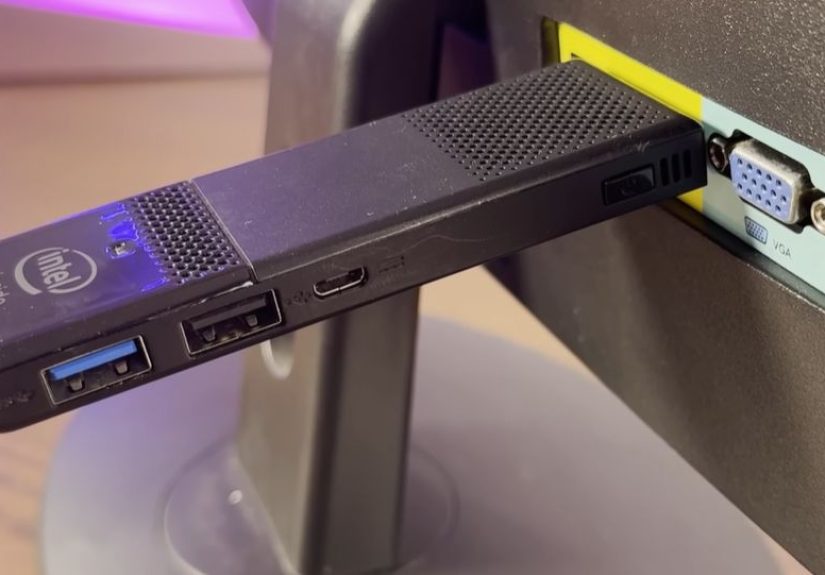
At its core, the Intel Compute Stick was a “stick PC”a mini PC shrunk into an HDMI dongle form factor. Plug it into an HDMI port,
power it via micro-USB, pair a keyboard and mouse, and suddenly that “dumb” TV or spare monitor could run a real operating system.
Not “mobile web.” Not “apps only.” A real desktop environment with real desktop software.
That promise was the Compute Stick’s superpower: it blurred the line between “display” and “computer.”
Any hotel TV could become your travel workstation. Any classroom projector could become a presentation machine.
Any office monitor could become a lightweight Windows endpoint. And in a world still figuring out cloud-first computing,
that flexibility felt borderline magical.
2015: The Original Compute Stick (Bay Trail) Arrives
The Starter Specs (and Why They Were Both Clever and Cruel)
The first widely known Compute Stick configuration landed with a quad-core Intel Atom (Bay Trail era),
2GB of RAM, and 32GB of eMMC storage, typically running 32-bit Windows 8.1 with Bing. A Linux/Ubuntu variant existed too,
cutting memory and storage to keep costs down. On paper, it was a complete PC in something barely bigger than an oversized USB drive.
In practice, those specs were a careful balancing act. Intel aimed for “good enough” performance for web browsing,
email, light productivity, and 1080p media playbackwhile keeping power draw low and the device affordable.
When it worked, it felt like a technological party trick you could use for real tasks.
Setup Reality: The Port Problem and the “Portable” Paradox
The Compute Stick was portable in the same way a “portable espresso machine” is portable: yes, you can carry it,
but you’re also carrying a collection of necessary supporting characters.
You needed power. You needed input devices. You often needed an HDMI extension so the stick would physically fit behind a TV.
And because early models effectively gave you one main USB port, you quickly learned the ancient IT truth:
“You will need a hub.”
This is where the Compute Stick became a personality test. If you enjoyed troubleshooting and improvising,
it was a fun challenge. If you wanted a simple plug-and-play experience, it could feel like you’d adopted a tiny,
needy robot that demanded adapters as tribute.
Performance: “It’s Fine” (Until You Ask It to Do Two Things)
Reviews from the era tended to agree on a theme: the Compute Stick could do basic tasks, but it wasn’t built for multitasking heroics.
A couple browser tabs? Sure. A document and some email? Fine. Heavy websites, big downloads, or background updates?
That’s where the stick would start reminding you that it was a fan-cooled (or thermally constrained) Atom system living in a tiny shell.
The bigger villain, though, was storage. Windows plus updates plus recovery files could leave surprisingly little usable space.
The kind of space where you’d install one big application and immediately start negotiating with your own Downloads folder.
2016: The Refresh That Fixed the Basics (Cherry Trail)
More Practical, Still Not a Mainstream Darling
Intel didn’t abandon the concept after the first wave. Instead, it did what Intel often does: iterate.
The 2016 refresh moved to a newer Atom platform (Cherry Trail) and, more importantly, addressed the real-life pain points:
better wireless, updated Bluetooth, andblessings upon blessingsmore usable ports, including USB 3.0.
This was the version that made the Compute Stick feel less like a novelty and more like an actual tiny PC you might
keep in a bag “just in case.” It still wasn’t fast, but it was less frustrating. And with improved Wi-Fi,
the “computer on a TV” dream started behaving like it had read the instructions.
The Storage Squeeze Gets Worse (Because Windows Never Misses a Chance)
Even as the experience improved, the 32GB eMMC reality remained. By the time Windows 10 updates piled on,
free space could become laughably scarce. The Compute Stick became a master class in digital minimalism:
store what you must locally, push everything else to a microSD card or the cloud, and be prepared to delete
something the moment Windows decides it needs a few gigabytes “real quick.”
The “Actually Usable” Era: Core m3 and m5 Compute Sticks
When Intel Put Real Laptop Energy Into a Dongle
Then came the versions that made people do a double-take: Compute Sticks built around Intel Core m processors.
Suddenly, this wasn’t just “TV email.” With Core m3/m5 configurations, 4GB of memory, and larger onboard storage,
the Compute Stick started punching above its weighthandling smoother productivity, better multitasking,
and more credible “this is my PC today” scenarios.
Intel also leaned into a more serious message: conference rooms, kiosks, thin clients, and business use cases.
The idea wasn’t only “turn your TV into a PC,” but “turn any display into a managed endpoint.”
In other words: tiny form factor, grown-up job.
The Price Tag: The Stick PC That Wandered Into Mini-PC Territory
Of course, Core m models carried a different vibe at checkout. As the Compute Stick got more capable,
it also got more expensiveand that’s where the market started getting awkward.
For the price of a higher-end Compute Stick, you could often buy a small mini PC with better cooling, more ports,
and fewer compromises. The Compute Stick’s selling point remained size and “hidden behind the TV” convenience,
but value became a debate instead of a slam dunk.
What People Actually Used the Compute Stick For
The Intel Compute Stick was never one thing to everyone. It was a Swiss Army gadgetexcept sometimes the scissors were tiny,
and the corkscrew required firmware updates. Still, in the right scenario, it was fantastic.
Classic Use Cases That Made Sense
- Travel PC: Toss it in a bag, plug into a hotel TV, and handle email, documents, and web access with your own keyboard/mouse.
- Conference room “instant PC”: Turn a display or projector into a quick collaboration station for presentations and demos.
- Digital signage and kiosks: A small, low-power Windows endpoint behind a display for basic signage loops or web dashboards.
- Thin client experiments: Pair it with remote desktop/VDI workflows where the heavy lifting lives on a server.
- Tinkering box: For people who like small computers, it was a fun platform to test lightweight setups, peripherals, and workflows.
Notice the pattern: the best Compute Stick jobs were the ones where you didn’t ask it to be a workstation.
You asked it to be a “good enough PC” that was easy to stash, hide, or deploy.
Why the Compute Stick Didn’t Take Over the World
Physics: Heat, Throttling, and the Limits of Tiny
Shrinking a PC into a stick is a thermal negotiation. Even with low-power chips, you’re putting CPU, storage,
memory, wireless, and I/O into a tiny enclosure with limited airflow. That means thermals matter, and sustained
performance can be hard to maintain. It’s not that the Compute Stick was “bad”it’s that it was always doing
a delicate balancing act with the laws of nature.
Convenience: The Accessory Tax
The Compute Stick’s portability was real, but incomplete. A stick PC without a keyboard, mouse, power,
and sometimes a hub is like a superhero without the cape: technically still the hero, but nobody’s impressed.
Streaming devices won because they were single-purpose and truly minimal. Mini PCs won because they were
flexible without being fragile.
The Market Moved: Streaming Got Better, Mini PCs Got Cheaper
Over time, TVs and streaming boxes got smarter, faster, and simpler. Meanwhile, the mini PC market exploded
with small, affordable machines offering better performance per dollar, more storage options, and easier setups.
The Compute Stick’s “wow” factor didn’t vanishbut it became less necessary.
The End of the Line (and the Legacy)
Intel eventually discontinued the Compute Stick family, and notably indicated there wasn’t a direct follow-on product
in the same form factor. That’s the quiet reality of experimental hardware: sometimes the idea lives on,
but the exact shape doesn’t.
Still, the Compute Stick left fingerprints on the broader mini-PC conversation. It helped normalize the idea that
“a computer can be invisible,” tucked behind displays and dedicated to a single task. It also reminded the industry
that usability matters as much as engineering bravado. People loved the concept, but they wanted fewer compromises.
And honestly? The Compute Stick deserves credit for being bold. It was a PC that looked at a Chromecast and said,
“Cute. Now watch me run a desktop OS and suffer bravely.”
Conclusion: A Tiny PC With a Big Personality
Remembering the Intel Compute Stick is remembering an era when tech companies were still taking wild swings at form factors.
Some of those swings become categories. Some become cult classics. The Compute Stick became a little of both:
a genuine product line that also feels like a charming artifact of a time when “PC in your pocket” sounded like the future.
If you owned one, you probably remember the small victories: getting Bluetooth to behave, freeing up storage,
finding the perfect compact keyboard, and realizing you could turn almost any screen into your screen.
And if you never owned one, the Compute Stick is still worth rememberingbecause it proved the idea was possible,
even if the world ultimately chose different paths to get there.
of Compute Stick Experiences (The Good, the Weird, the Nostalgic)
The most “Compute Stick” experience imaginable usually started the same way: you’d spot an HDMI port, get a little excited,
and then immediately remember you were about to assemble a tiny IT department on the spot. Step one: plug it in.
Step two: realize the TV is mounted flush to the wall and your stick is now playing a dangerous game of “will I fit?”
Step three: produce an HDMI extension cable like a magician pulling a rabbit from a hatexcept the rabbit is a cable,
and the audience is your own patience.
Then came power. Sometimes the TV’s USB port could help, sometimes it couldn’t, and sometimes it coulduntil it couldn’t.
You’d get a boot, feel victorious, and then watch a random reboot arrive the moment the system did anything remotely ambitious,
like connecting to Wi-Fi or thinking about Windows updates. That’s when you’d switch to the wall adapter and accept
that “a computer this small” still needed “a charger this real.”
Input devices were their own chapter. If you used a compact wireless keyboard with a trackpad, the Compute Stick felt like a
secret agent gadget. If you didn’t, you’d discover the ancient hierarchy of ports: keyboard, mouse, and then everything else
fights for third place. The moment you added a USB hub, the experience improved dramaticallylike adding a second lane to a road
that was previously a one-car bridge. You could finally plug in a flash drive without evicting your mouse.
And then there was storage: the long-running drama where Windows would politely ask for updates and then attempt to occupy
your entire 32GB drive like it had squatter’s rights. Owners learned tricks: delete old Windows installation files,
move media to microSD, keep apps minimal, and treat “Downloads” like it was radioactive. The Compute Stick turned normal
people into storage strategists. Somewhere, a minimalist lifestyle guru is still proud.
But when everything clicked, it was genuinely fun. You could build a “travel desktop” that didn’t care what laptop you owned.
You could run a presentation from a device the size of a candy bar. You could set up a small office dashboard behind a monitor
and forget it was thereuntil someone noticed and asked, “Wait, is that… a PC?” The joy wasn’t that the Compute Stick replaced
a real desktop. The joy was that it made computing feel modular and playful again.
In hindsight, the Compute Stick was a little like a concept car you could actually buy: not always practical,
occasionally temperamental, but undeniably cool. It taught a lot of people what mattered in tiny computingports, thermals,
wireless stability, storage headroomand it gave the rest of us a great story: the time Intel built a whole Windows PC
that you could lose in a jacket pocket (right next to the adapters you definitely did not lose).