Table of Contents >> Show >> Hide
- What the Apple Watch ECG Actually Does (and Doesn’t Do)
- Check That Your Watch and Region Support ECG
- How to Set Up the ECG App
- How to Take an Apple Watch ECG, Step by Step
- Understanding Your Apple Watch ECG Results
- Tips for Getting More Reliable ECG Readings
- How Accurate Is the Apple Watch ECG?
- Using Apple Watch ECG Data With Your Doctor
- Safety Limits and When Not to Use the ECG App
- Troubleshooting Common ECG Issues
- Real-World Experiences Using the Apple Watch ECG
- Final Thoughts: Let Your Watch Help, Not Stress You Out
The Apple Watch can do a lot of fun thingscount steps, track sleep, remind you to stand up
when you’re clearly already pacing in the kitchen. But one of its most powerful features is
the ECG app, which lets you record a medical-grade, single-lead electrocardiogram right from
your wrist. Used wisely, it can give you and your doctor helpful information about your heart
rhythm and help you spot issues like atrial fibrillation (AFib) earlier.
The key phrase there is used wisely. The Apple Watch ECG is a tool, not a
fortune teller. It has limits, it’s not for emergencies, and it’s not meant to replace your
cardiologist. Let’s walk through exactly how to use an Apple Watch ECG correctly, what the
results actually mean, and how real people are using this feature in everyday life.
What the Apple Watch ECG Actually Does (and Doesn’t Do)
First, a quick reality check. The Apple Watch ECG:
- Records a single-lead ECG, similar to lead I on a traditional ECG machine.
- Classifies your rhythm as sinus rhythm, atrial fibrillation
(AFib), high heart rate, low heart rate, or
inconclusive on classifiable recordings. - Is designed for people age 22 and older.
- Is cleared mainly to help detect or monitor AFib and normal rhythm, not every possible heart
rhythm problem.
Just as important is what it cannot do:
- It cannot detect a heart attack. If you have chest pain, pressure, or
trouble breathing, skip the watch and call emergency services. - It can’t diagnose strokes, blood clots, high blood pressure, heart failure, or high
cholesterol. - It is not meant for people with a pacemaker, ICD, or other implanted cardiac
devices. - It is not meant to replace full medical care, change medications on your own, or give you a
final diagnosis.
Think of the Apple Watch ECG as a very handy, portable screening and monitoring
tool. It can raise a flag that you and your doctor can then investigate properly with
a full medical workup.
Check That Your Watch and Region Support ECG
Before you try to record an ECG, make sure you actually have the right hardware and software:
- Compatible models: Apple Watch Series 4 or later and Apple Watch Ultra
models support the ECG app. Apple Watch SE models don’t include ECG. - Software: Update your iPhone to the latest iOS version and your Apple Watch
to the latest watchOS version. - Region: The ECG app is only available in certain countries and regions.
Availability is controlled by your watch’s region setting and local regulatory approvals. - Age: Again, the ECG feature is intended for users who are
22+ years old.
If you don’t see the ECG app on your watch after updating everything, it’s usually either a
region issue or you’re using a model that doesn’t support ECG.
How to Set Up the ECG App
Most of the setup happens on your iPhone in the Health app. Here’s the quick rundown:
- On your iPhone, open the Health app.
- Tap Browse at the bottom.
- Choose Heart > Electrocardiograms (ECG).
- Tap Set Up ECG App, then follow the on-screen instructions. You’ll see
important safety informationdon’t just speed-tap through it. - At the end of onboarding, the ECG app will be installed and activated on your Apple Watch.
Once setup is complete, you’ll find the ECG app icon on your watch like any other app. You’re
now ready to record your first reading.
How to Take an Apple Watch ECG, Step by Step
Before you start: Set yourself up for a clean reading
ECGs are a bit like selfies: good lighting (and in this case, good contact) matters. For the
best results:
- Wear your watch snugly on the wrist you selected in settings, not sliding up
and down your arm. - Make sure your skin and the back of the watch are clean and dry.
- Sit down, relax, and rest your arms on a table or in your lap.
- Avoid taking an ECG right after intense exercise, when you’re shivering, or when you’re
moving around a lotmotion can create “noise” in the signal.
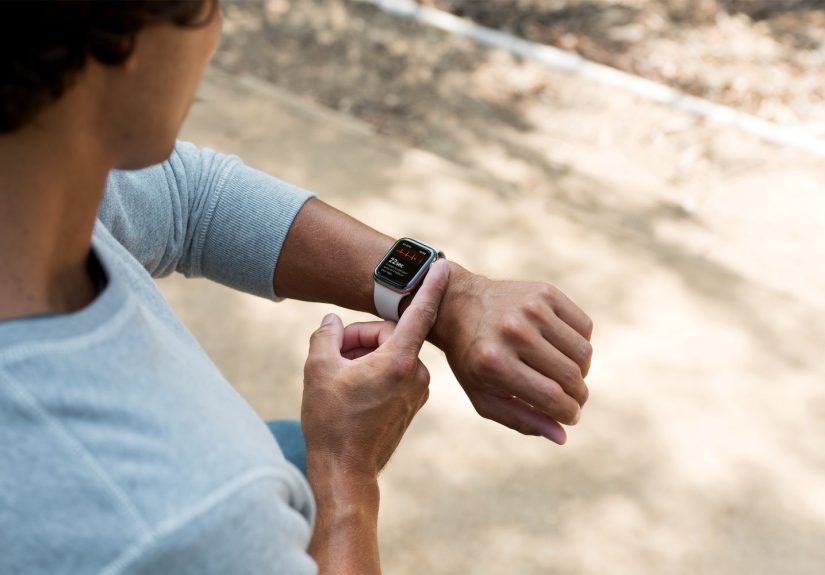
Recording the ECG
- Open the ECG app on your Apple Watch.
- Rest your watch-wearing arm on a table or your lap. Try to keep your shoulders and arm still.
- With the hand opposite your watch, gently place your fingertip (usually your
index finger) on the Digital Crown. - Don’t press the crown down; just touch it and keep your finger there. You’re basically
completing an electrical circuit through your arms and chest. - A countdown will appearhold still for 30 seconds while the ECG records.
After the 30-second timer finishes, the watch will display your result and save the full ECG
waveform to the Health app on your iPhone.
After the reading: Where your ECG goes
When you’re done:
- You’ll see a brief classification on the watch (for example, “Sinus Rhythm” or
“Atrial Fibrillation”). - The full ECG, including the waveform and classification, is stored in the
Health app on your iPhone under Heart > ECG. - From there, you can export the ECG as a PDF and send or show it to your
doctor.
Understanding Your Apple Watch ECG Results
The ECG app doesn’t just show squiggly lines; it also tries to interpret the rhythm. Here’s
what the most common classifications mean in plain language.
Sinus Rhythm
“Sinus rhythm” means the watch thinks your heart’s electrical signals are starting in the
normal place (the sinus node) and following a regular pattern. In other words, your heart
rhythm looks normal for this 30-second snapshot.
That’s reassuring, but it doesn’t guarantee your heart is always perfect. Some arrhythmias come
and go, and the watch can only see what happens during the recording.
Atrial Fibrillation (AFib)
AFib is a common rhythm problem where the upper chambers of the heart (atria) beat in a rapid,
irregular, and often chaotic way. The Apple Watch ECG is particularly focused on spotting signs
of AFib.
If your watch flags a recording as AFib:
- Don’t panic, but take it seriously.
- Save or export the ECG and contact your doctor or a cardiologist to review
it. - Seek urgent care if AFib is accompanied by symptoms like chest pain, severe shortness of
breath, or feeling faint.
High or Low Heart Rate
Sometimes the app may tell you that your rhythm looks regular, but your heart rate during the
recording is very high or very low. Heart rate alone doesn’t equal dangerathletes, for
example, often have low resting ratesbut unexpected extremes (especially with symptoms) are a
good reason to talk with your doctor.
Inconclusive
“Inconclusive” doesn’t mean “bad”; it simply means the app can’t classify what it’s seeing with
enough confidence. Reasons include:
- Too much movement or poor contact with the skin.
- Heart rate outside the range the app can confidently interpret.
- Other rhythm patterns the Apple Watch isn’t designed to classify.
If you get frequent inconclusive readings, double-check your technique. If they continue even
with good techniqueespecially if you have symptoms like palpitations or dizzinessbring the
recordings to a healthcare professional.
Tips for Getting More Reliable ECG Readings
A few small tweaks can dramatically improve the quality of your Apple Watch ECG:
- Fit matters: Adjust your band so the watch is snug but comfortable. If it
slides, it can break electrical contact. - Stay still: Rest both arms and avoid talking or laughing during the
30-second recording (save the jokes for afterward). - Warm up: Cold hands and wrists can reduce signal quality. If you’re chilly,
warm your hands a bit before recording. - Avoid electrical “noise”: Try not to rest your wrist on electronics or metal
surfaces that might cause interference. - Know your notifications: Heart health notifications (like irregular rhythm
alerts) are separate from ECG readings but work together. Make sure they’re set up properly
in the Health app.
How Accurate Is the Apple Watch ECG?
For something you wear on your wrist, the Apple Watch ECG holds up surprisingly well against
traditional equipment. Clinical research has found:
- High sensitivity and specificity for detecting AFib when compared to
standard 12-lead ECGs in many studies. - Good agreement between heart rate measurements from the watch’s ECG and traditional
clinic-based ECG readings. - Occasional false positives and false negativesno device is perfect, especially when
measuring through only a single lead.
Bottom line: For AFib screening and rhythm snapshots, the Apple Watch ECG is generally
considered reliable enough to be clinically useful when used as intended, but
it does not replace full diagnostic testing.
Using Apple Watch ECG Data With Your Doctor
The real magic happens when you don’t just look at your ECG on your wrist, but actually
share it with your healthcare team. A few smart habits:
- Export ECGs as PDFs: In the Health app on your iPhone, open an ECG, tap the
share icon, and send it as a PDF via email, patient portal, or print it out. - Include context: Note what you were doing, what you felt, and any symptoms
(palpitations, lightheadedness, shortness of breath) at the time of the recording. - Look for patterns, not single blips: One odd reading can be noise. Several
similar readings over days or weeks are more clinically meaningful. - Use it to ask better questions: Instead of “My watch says something is
wrong,” you can say, “Here are three ECGs that showed AFib around bedtimewhat does this
mean?”
Most cardiologists now see wearable data regularly. Some will even point out when your watch
caught an early episode that otherwise might have gone unnoticed. Others might gently remind
you not to obsess over every tiny variation. Both perspectives are valuable.
Safety Limits and When Not to Use the ECG App
To keep things safe, keep these rules in mind:
- Not for emergencies: Don’t use the watch to decide whether to call 911. If
you think you’re having a heart attack or stroke, don’t waste time opening apps. - Not with pacemakers or ICDs: The ECG app is not intended for people with
implanted cardiac devices. - Age limit: The ECG feature is intended for users 22 and older.
- Don’t self-treat: Never start, stop, or change heart medications based
solely on Apple Watch readings. Always talk with your doctor first. - Avoid during heavy activity: The app is designed for recordings while you’re
at rest, not running a 5K or moving vigorously.
Following these guardrails helps you get the benefits of the Apple Watch ECG without drifting
into “Dr. Google” territory.
Troubleshooting Common ECG Issues
The app says “Poor Recording” or keeps stopping
Try these quick fixes:
- Reposition the watch so the back is flat against your skin.
- Clean the back of the watch and your wrist, then dry thoroughly before recording.
- Relax your fingers and shouldersmuscle tension can create noise.
- If you have a very hairy wrist (it happens), try tightening the band slightly so the sensors
make consistent contact.
You don’t see the ECG app on your watch
- Confirm you’re using a supported model (Series 4 or later, or Ultra).
- Check that your iPhone and watch are fully updated.
- Open the Health app and make sure you completed the ECG onboarding under
Heart > Electrocardiograms (ECG). - If you’re traveling or living in a region where ECG isn’t approved yet, the feature may be
restricted.
You’re anxious about what the readings mean
This is incredibly common. Wearable health data can be a blessing and a stressor. A few tips:
- Set boundariesdon’t take ECGs every hour just because you can. Focus on specific situations
(when you feel palpitations or as your doctor recommends). - Use your watch as a tool to spark conversations, not a judge of your long-term health.
- If you find yourself obsessing over readings, let your doctor know. They can help you
interpret the data and may suggest a healthier monitoring routine.
Real-World Experiences Using the Apple Watch ECG
Beyond the specs and instructions, what is it actually like to live with Apple Watch ECG in
everyday life? Users and clinicians report a mix of success stories, surprises, and a few
growing pains.
“My watch told me to call my doctor” moments
Many Apple Watch owners first discover the ECG feature when they feel something “off” in their
chestextra thumps, flutters, or a rapid, irregular beat. They run an ECG, see a possible AFib
classification, and send the PDF to their doctor. In more than a few cases, this has led to:
- Earlier diagnosis of AFib, sometimes before it caused serious symptoms.
- Medication adjustments or anticoagulation to lower stroke risk.
- More formal testing, like Holter monitors or longer-term patch ECGs, to confirm the pattern.
Clinicians often describe these wearables as a way to catch “silent” AFibepisodes that might
otherwise go unnoticed for months or years.
Tracking patterns over time
Other users find the ECG most useful not for one dramatic reading, but for spotting trends:
- Someone with known AFib might take an ECG when they feel an episode starting and again when
it settles, sharing those pairs of readings with their cardiologist. - People recovering from procedures (like ablation) may use the watch to keep an eye on whether
AFib episodes are getting shorter or less frequent. - Some users discover that episodes are more common with poor sleep, heavy alcohol intake, or
high stress, which can motivate lifestyle changes.
In those situations, the Apple Watch becomes part of a feedback loophelping people see how
habits and triggers show up in their heart rhythm.
Data overload and false alarms
Of course, not every experience is perfect. A few patterns keep popping up:
- False positives: Occasionally, noise or unusual rhythms get labeled as AFib,
only for a cardiologist to confirm that everything looks fine. This can create anxiety, but
it’s also part of why follow-up with a professional is always recommended. - Anxiety from “too much information”: Some people start checking their ECG
multiple times a day, worrying about minor variations that aren’t clinically meaningful. - Clinician bandwidth: Doctors sometimes see patients arrive with stacks of
ECG PDFs. Most are normal or only mildly abnormal, which can be reassuring but also time-
consuming to review.
The sweet spot usually comes when patients and doctors agree on how often to
use the ECG, what situations should trigger a reading, and
how the results will be used in decision-making.
How clinicians tend to view watch ECGs
Cardiologists and primary care doctors increasingly see wearable ECGs as:
- A useful early warning system, especially for AFib and other common
arrhythmias. - A way to capture rhythm during symptoms, something that often doesn’t happen
during a short clinic ECG. - A source of extra data that’s helpful when interpreted in the right contextbut potentially
confusing if patients try to decode it alone.
Most professional guidance emphasizes the same theme: the Apple Watch ECG is best used as a
partner to proper medical care, not as a replacement.
Final Thoughts: Let Your Watch Help, Not Stress You Out
The Apple Watch ECG is a remarkable piece of consumer tech: a 30-second reading from your
wrist, a shareable PDF for your doctor, and potentially an early warning for serious rhythm
issues like atrial fibrillation. Used thoughtfullywithin its limitsit can provide peace of
mind, helpful data, and better conversations at your next checkup.
Remember the essentials:
- Use a supported Apple Watch model and keep your software updated.
- Follow good technique for clean, reliable recordings.
- Understand what the results meanand what they don’t.
- Share concerning or repeated abnormal readings with your doctor. Don’t try to self-diagnose
or self-treat. - And above all, if you think you’re having a medical emergency, trust your body, not
your watch, and seek care immediately.
When you treat the Apple Watch ECG as a helpful assistant instead of a crystal ball, it becomes
exactly what it was meant to be: a smart, easy-to-use window into your heart health that fits
on your wrist.