Table of Contents >> Show >> Hide
- What You’ll Learn
- What “Formal” Really Means (and What It Doesn’t)
- Step 1: Start Before the GreetingWrite a Subject Line That Works
- Step 2: Choose the Right Formal Email Greeting
- Step 3: Nail the First Sentence (This Is Where Formal Emails Win or Lose)
- Step 4: Add Just Enough Context (Without Writing a Novel)
- Formal Email Opening Examples (Real Situations)
- Common Mistakes When Starting a Formal Email
- Quick Checklist: A+ Formal Email Openers
- Conclusion
- Real-World Experiences: What Actually Works in Busy Inboxes ()
Starting a formal email should be simple, but somehow it’s the part that makes even confident adults stare at the cursor like it owes them money. The good news: you don’t need “perfect.” You need clear, respectful, and easy to act on. This guide breaks down the exact pieces that make a formal email opener workplus examples you can copy without sounding like a robot in a blazer.
What “Formal” Really Means (and What It Doesn’t)
“Formal” doesn’t mean stiff, dramatic, or written like a 19th-century land dispute. In modern business email etiquette, formal means professional: you respect the reader’s time, you avoid slang and ambiguity, and you make your request easy to understand.
Think of it like showing up to a meeting on time with an agenda. You can still be warm, human, and even lightly upbeatjust not “hey bestie 😄.” Your opener should do three jobs quickly:
- Identify the message topic (subject line + first line)
- Establish tone (greeting + level of formality)
- Set the action (what you want them to do next)
Step 1: Start Before the GreetingWrite a Subject Line That Works
A formal email doesn’t begin with “Dear…”it begins with the subject line. The subject is the first decision your recipient makes: open now, open later, or open never (also known as “email purgatory”).
What a strong professional subject line looks like
- Specific: says what the email is about
- Short: readable on mobile
- Action-friendly: hints at what you need (review, approve, confirm, schedule)
Better subject lines (copy these):
Avoid vague subjects like “Question,” “Hello,” or “Important.” If your subject line is generic, your email is wearing pajamas to a board meeting. (And yes, some people will still read itbut why risk it?)
Step 2: Choose the Right Formal Email Greeting
Your greeting (also called a salutation) sets your tone instantly. In formal email writing, the safest move is: use a professional greeting + name + comma.
The safest “default” greetings
- Dear Mr./Ms./Dr. Last Name, (most formal; good for first contact)
- Dear First Name Last Name, (formal without guessing a title)
- Hello First Name, (professional, slightly less formal)
- Good morning/afternoon, First Name, (polite and warm; great for ongoing work)
What if you don’t know the person’s name?
If you can find the name in 30 seconds (LinkedIn profile, company site, email signature, meeting invite), do it. It’s worth it. But if you truly can’t, keep it professional and role-based:
- Dear Hiring Manager,
- Dear Admissions Committee,
- Hello Support Team,
- Dear [Department] Team,
A quick note on titles and names
When in doubt, don’t guess an honorific. “Dear Taylor Jordan,” beats “Dear Mrs. Jordan,” if you’re unsure. And if someone signs their reply with “Sam,” you’re generally safe switching to “Hello Sam,” in your next message.
Step 3: Nail the First Sentence (This Is Where Formal Emails Win or Lose)
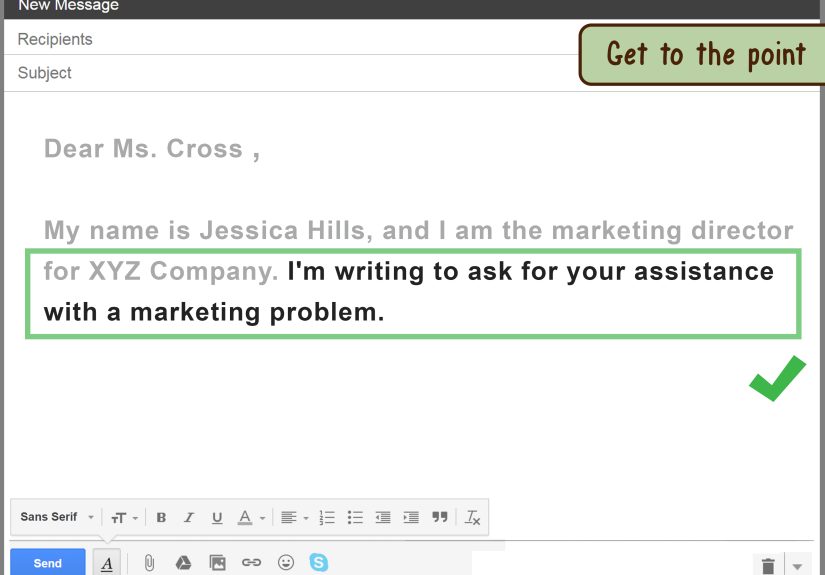
After the greeting, your first sentence should reduce confusion, not create suspense. In formal emails, the opener works best when it’s direct, courteous, and purpose-driven.
6 high-performing opening lines (with examples)
1) State your purpose immediately
2) Reference the last touchpoint (fast context)
3) Introduce yourself (when the recipient may not know you)
4) Lead with the action you need (politely)
5) Acknowledge the recipient’s time (without overdoing it)
6) Cold email opener that doesn’t feel spammy
Notice what’s missing? An essay. Also missing: overly dramatic throat-clearing like “I hope this email finds you well” repeated in every email forever. You can use a polite well-wish, but it works best when it’s specific (and not your autopilot catchphrase).
Step 4: Add Just Enough Context (Without Writing a Novel)
Here’s the sweet spot: one to three sentences that answer “Why are you emailing me?” and “Why now?” The goal is to prevent the reader from replying, “Wait… who are you and what is this about?” (aka the Email of Doom).
A simple formula that doesn’t feel templated
Context + Purpose + Next step. That’s it.
Make the “ask” easy to answer
If your recipient can respond with “Yes,” “No,” a date/time, or a short decision, you’ve written a strong professional email opener. If they need a meeting just to understand your question, your opener needs a tune-up.
Formal Email Opening Examples (Real Situations)
1) Job application / contacting a recruiter
2) Requesting a meeting with a client
3) Emailing a professor or academic staff
4) Following up after no response
5) Apologizing and resetting the tone
Common Mistakes When Starting a Formal Email
- Skipping the greeting: Starting with “Attached.” feels abrupt. Even one word“Hello”helps.
- Using the wrong tone too soon: “Heyyyy!” is for friends, not first-contact emails.
- Being vague on purpose: “Quick question” is rarely quick. Be specific.
- Over-apologizing: One apology is professional. Five apologies reads like panic.
- Writing a mystery novel: Your first paragraph shouldn’t hide the point like it’s a spoiler.
- Using ALL CAPS or too many exclamation points: In formal email writing, punctuation is seasoningnot a fire alarm.
Quick Checklist: A+ Formal Email Openers
- Subject line is clear and specific
- Greeting matches relationship and setting
- First sentence states purpose (or references context)
- Request is easy to answer
- Tone is professional, readable, and human
Conclusion
Starting a formal email isn’t about sounding fancyit’s about being easy to understand and easy to respond to. Use a clear subject line, a respectful greeting, and a first sentence that tells the reader why you’re emailing. Do that consistently, and your emails will get faster replies, fewer misunderstandings, and far fewer “Just circling back…” messages. (Your future self will thank you.)
Real-World Experiences: What Actually Works in Busy Inboxes ()
Let’s talk about what tends to happen in real workplaceswhere people are juggling meetings, chats, tasks, and an inbox that breeds new emails when the lights are off. Across common professional settings (recruiting, client services, academia, healthcare admin, and internal corporate teams), the same pattern shows up: the best email openers reduce “mental load” immediately.
One frequent scenario: a sender opens with a long courtesy paragraph (“Hope you’re doing well… hope your family is well… hope the weather is nice…”) and only then mentions the request. The recipient usually scans, misses the point, and mentally files it under “later.” When the sender rewrites the opener to lead with purpose“I’m reaching out to confirm Friday’s deadline and request approval on the attached draft” response time tends to shrink because the email is now actionable. Courtesy still matters, but it works best as a light touch, not a runway.
Another common experience: emails sent to someone powerful (a director, professor, physician, or busy client) often fail because the opener is timid or unclear. People try to be polite and end up vague: “Just checking in…” or “Wanted to touch base…” That sounds nice, but it doesn’t answer “What do you need from me?” A better opener politely names the action: “Could you approve the final version by Thursday so we can proceed?” It’s respectful, direct, and helps the recipient decide quickly.
Cold emails bring their own reality check. The opener that says “I hope this email finds you well” plus a generic pitch often gets ignored because it doesn’t feel tailored. But when the first sentence shows a real reason for reaching outsomething role-based and plausibleresponses improve. For example: “I noticed your team is hiring for customer support leadership, and I’m reaching out with a quick suggestion that may reduce onboarding time.” Even if the recipient says no, they at least understand the “why” instantly.
Then there’s the “replying in a thread” experience. People gradually drop greetings and context, and suddenly you’re five messages deep with a reply that begins, “Yes.” Yes to what? The opener fix is small: restart clarity when the topic shifts“Switching topicscan you confirm the budget cap for Q2?” It feels slightly more formal, but it prevents confusion, especially when threads are forwarded.
Finally, an underrated lesson from everyday email life: simple beats clever. A crisp subject line plus a respectful greeting plus a direct first sentence will outperform fancy phrasing almost every time. The goal isn’t to impress. The goal is to communicateclearly, professionally, and in a way that makes the next step obvious.