Table of Contents >> Show >> Hide
- The Short Answer: Can You Delete a Snapchat Message the Other Person Saved?
- What “Saved in Chat” Actually Means
- How to Delete Snapchat Messages the Other Person Saved
- What If the Other Person Saved a Snap, Photo, or Video?
- Can You Just “Unsave” the Message Instead?
- What Does Not Work
- Why a Deleted Message Might Still Appear for a Moment
- How Long Do Snapchat Messages Normally Stay?
- How to Reduce the Chances of This Happening Again
- Common Situations and What You Can Do
- FAQ
- Real-World Experiences: What This Usually Feels Like
- Final Thoughts
- SEO Tags
Snapchat is supposed to feel like the digital version of writing on a foggy bathroom mirror: fun, fast, and gone in a second. Then someone saves a message in chat, and suddenly your “lol okay” or that aggressively awkward typo is hanging around like it pays rent.
If you are trying to figure out how to delete Snapchat messages the other person saved, the good news is that you may still be able to remove some content. The less-fun news is that Snapchat has rules, limits, and a few annoying little caveats. In plain English: you can usually delete messages you sent, even if the other person saved them, but you cannot delete messages they sent. And if they already screenshotted something, copied it, or saw it on an old connection, your cleanup job may not be perfect.
This guide breaks it all down without the techno-mystery, the forum nonsense, or the fake “one weird trick” energy. Let’s clean up that chat.
The Short Answer: Can You Delete a Snapchat Message the Other Person Saved?
Yes, sometimes. If the message is your message, Snapchat lets you press and hold it and tap Delete. That applies to regular chat messages and certain media you sent in chat. The other person will still see that something was deleted, so this is not exactly an invisible ninja move. It is more like politely knocking over the evidence while everyone watches.
Here is the important distinction:
- If you sent the message: you can usually try to delete it.
- If they sent the message: you cannot delete it from the chat.
- If it is a saved Snap in a one-on-one chat: Snapchat says the sender keeps control, and in some one-on-one saved-content situations either person can delete saved chat media.
- If they took a screenshot or recorded the screen: Snapchat cannot magically crawl into their camera roll and erase it.
What “Saved in Chat” Actually Means
Before you start tapping like a panicked woodpecker, it helps to know what Snapchat means by a saved message.
In Snapchat, a chat message can be saved so it sticks around instead of disappearing on the normal timer. Saved messages usually show a gray background, which tells everyone in the conversation that the message has been kept. That means a saved message is not quietly living in the shadows. It is very much wearing a name tag.
Messages can also stay around longer when someone replies to them or reacts to them. In other words, a chat can become less “poof, gone forever” and more “surprise, this is now part of the décor.”
How to Delete Snapchat Messages the Other Person Saved
If the message is yours, follow these steps:
Step 1: Open Snapchat and Go to Chat
Launch Snapchat and swipe to the Chat screen. Open the conversation where the saved message appears.
Step 2: Find the Saved Message
Look for the message with the gray background or the message you know the other person saved. Double-check that it is actually your message. If it is theirs, this process stops here.
Step 3: Press and Hold the Message
Tap and hold the message. A pop-up menu should appear with options such as Delete, Save in Chat, Unsave in Chat, or similar wording depending on the content type and app version.
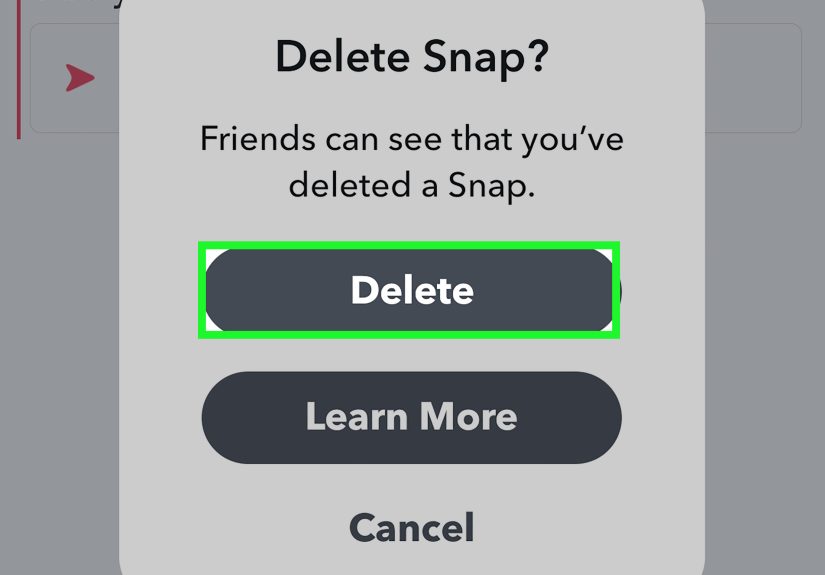
Step 4: Tap Delete
Choose Delete. Snapchat will ask you to confirm. Confirm the deletion.
Step 5: Understand What Happens Next
After you delete the message, Snapchat will try to remove it from its servers and the other person’s device. But the app also leaves a notice in the conversation that a message was deleted. So yes, the message may be gone, but your escape attempt leaves footprints.
What If the Other Person Saved a Snap, Photo, or Video?
This is where things get slightly more specific.
If you sent a Snap in chat and the other person saved it, Snapchat says the sender still maintains control over that Snap. In practical terms, that means you can usually press and hold the saved Snap and tap Delete.
In one-on-one chats, Snapchat also says saved chat media can sometimes be deleted by either side. But do not confuse that with total control over everything in the conversation. The safest rule is this: you can delete what you sent; you cannot delete what they sent; and you cannot erase anything they already copied outside Snapchat.
That last part matters more than most people want to hear. If they saved your message in chat, they may also have taken a screenshot or used another device to snap a picture of the screen. At that point, deleting inside Snapchat helps, but it is not a time machine.
Can You Just “Unsave” the Message Instead?
Sometimes. But “unsave” and “delete” are not the same thing.
If a message is saved in chat, tapping it may unsave it. That removes the saved status, which can let the message disappear according to the chat’s deletion settings. This works best when the message is still controlled by the normal chat timer and no other retention setting is keeping it around.
However, if the other person saved the message, unsaving it from your side may not be enough. And if you want the message gone as fully as Snapchat allows, Delete is the more direct option for content you sent.
What Does Not Work
When people get nervous, they start trying random settings like they are flipping switches in a submarine. Save yourself the drama. These methods do not reliably delete a saved message from the other person’s chat:
- Clearing the conversation from your chat feed. This only removes the conversation shortcut from your side. It does not delete saved or sent content.
- Blocking the person after sending the message. Blocking does not function like a retroactive content shredder.
- Logging out and back in just to force deletion. That may help with app glitches, but it does not create new deletion powers.
- Deleting the app from your phone. That removes the app from your device, not the message from theirs.
- Praying to the algorithm gods. Emotionally understandable. Technically unsupported.
Why a Deleted Message Might Still Appear for a Moment
You hit delete. You felt powerful. Then the other person says they can still see it. What gives?
Snapchat explains that deletion is an attempt to remove the content from its servers and friends’ devices, but it may not work instantly if someone has a poor internet connection or is using an old version of the app. So if the deleted message lingers briefly, it does not necessarily mean you did something wrong. It may just mean the app is being its usual dramatic self.
If that happens, try these practical fixes:
- Make sure your Snapchat app is updated.
- Ask the other person to update the app too, if appropriate.
- Close and reopen Snapchat.
- Check your connection and try again.
How Long Do Snapchat Messages Normally Stay?
Normally, Snapchat chats are designed to disappear. In one-on-one and group conversations, chats are deleted by default 24 hours after everyone has viewed them or 31 days after they were sent, whichever comes first. Users can also change chat deletion settings to After Viewing, 24 Hours After Viewing, 7 Days After Viewing, or Never, depending on the conversation.
That means saved messages can stay around much longer than casual users expect. One tiny tap can turn a temporary message into a semi-permanent roommate.
How to Reduce the Chances of This Happening Again
If your real goal is not just deleting one message but avoiding this whole sweaty-palms experience in the future, a few habits help a lot.
Think Before You Hit Send
Annoying advice? Absolutely. Also very effective. If a message would ruin your afternoon if it got saved, screenshotted, or forwarded, pause before sending it.
Use Chat Settings Wisely
Check the chat’s deletion settings. If a conversation is set to keep messages longer, remember that anything you send may stick around more than expected.
Avoid Sending Sensitive Details in Casual Chats
Addresses, passwords, account codes, financial details, and private photos do not belong in a chat you would not want preserved. Snapchat is not a shredder. It is just a messaging app with disappearing defaults and very human users on the other end.
Watch for the Gray Background
If you see that gray saved-message highlight, treat it like a tiny warning flag. The chat is no longer operating on pure autopilot.
Common Situations and What You Can Do
You Sent a Cringey Text and They Saved It
Best case: you can press and hold it, tap Delete, and Snapchat removes it while leaving behind a deletion notice. Not invisible, but cleaner than leaving the full message there forever.
You Sent a Photo Snap in Chat and They Saved It
If it is a saved Snap in chat, you as the sender usually still have deletion control. Press and hold the saved Snap, then tap Delete.
They Saved Their Own Message, Not Yours
You cannot delete it. You can only control the content you sent.
You Cleared the Conversation and the Saved Message Is Still There
That is normal. Clearing a conversation only removes it from your chat feed. It does not erase the actual saved content.
You Deleted the Message but They Already Saw It
Deleting still removes the message from the chat if Snapchat can sync it properly, but it cannot erase their memory. Sadly, no app update has solved that problem yet.
FAQ
Can I delete a Snapchat message if the other person saved it?
Yes, if you sent it. Press and hold the message and tap Delete. The other person will see that a message was deleted.
Can I delete messages the other person sent?
No. Snapchat does not let you delete messages sent by other Snapchatters.
Will deleting a message remove it from the other person’s phone?
Snapchat will try to remove it from its servers and their device, but it may not happen instantly in every case. Poor internet or an outdated app can delay things.
Does clearing a conversation delete saved messages?
No. Clearing a conversation only removes the chat from your feed. It does not remove saved or sent content.
Can the other person still have a copy after I delete the message?
Yes. They may have screenshotted it, photographed the screen, or copied it elsewhere. Deleting inside Snapchat cannot undo that.
Real-World Experiences: What This Usually Feels Like
In real life, most people end up searching for how to delete Snapchat messages the other person saved for one of three reasons: panic, regret, or a powerful mix of both. It usually starts with a message that felt harmless in the moment. Maybe it was too flirty, too blunt, too emotional, or maybe autocorrect took a simple sentence and transformed it into a legal argument. Then the other person saves it in chat, and suddenly that message feels less like a disappearing note and more like a framed certificate on the wall.
A common experience is the “wait, why is that still there?” moment. People assume Snapchat works like dry-erase marker. They send something, close the app, and believe time will handle the cleanup. But once a message is saved, reality taps you on the shoulder. That gray highlight means the chat has changed status. The message is no longer passing through. It has moved in, rearranged the furniture, and started acting permanent.
Another typical situation happens after an argument. Someone sends a heated message, immediately regrets it, and notices the other person saved it before they could breathe, much less think. At that point, deleting the message can feel less like using an app feature and more like trying to un-ring a bell. The delete option still helps, but people are often surprised that Snapchat leaves a note saying something was deleted. So the content may be gone, but the emotional chalk outline remains.
Then there is the post-date or post-breakup clean-up. Plenty of users go back through old chats hoping to tidy up messages that aged badly. Maybe a joke landed terribly in hindsight. Maybe a private detail no longer feels private. Maybe seeing it there is just plain uncomfortable. In those cases, the ability to delete your own saved message feels useful, but also a little humbling. It reminds you that digital conversations are rarely as temporary as they look when you first send them.
People also get frustrated when they clear the conversation and nothing important actually disappears. That is a classic Snapchat misunderstanding. The conversation vanishes from the feed, so for one beautiful second it feels like success. Then the saved content is still there, like a raccoon that figured out how to open the trash can. That is usually when users realize they needed Delete, not Clear Conversation.
The most practical takeaway from these experiences is simple: deleting helps, but prevention helps more. If a message would be a problem when saved, assume it can be saved. If it would be painful when screenshotted, assume screenshots are possible. Snapchat is useful, fast, and fun, but it is not a magic disappearing tunnel. The smartest users are usually the ones who enjoy the app while keeping one eyebrow raised.
Final Thoughts
If you are trying to delete Snapchat messages the other person saved, your best move is to act fast, open the chat, and use the Delete option on any message you sent. That is the cleanest official method Snapchat currently offers. Just remember the limits: you cannot delete their messages, clearing the conversation will not erase saved content, and any copied version outside Snapchat is outside your control.
So yes, you can sometimes clean up the chat. No, you cannot always clean up the consequences. Welcome to modern messaging, where everything is temporary until it very much is not.