Table of Contents >> Show >> Hide
- Cost-per-employee pricing: what it actually means (and why buyers don’t hate it)
- When cost-per-employee pricing is the “right kind of boring”
- Good examples of SaaS cost-per-employee pricing models (and what makes them good)
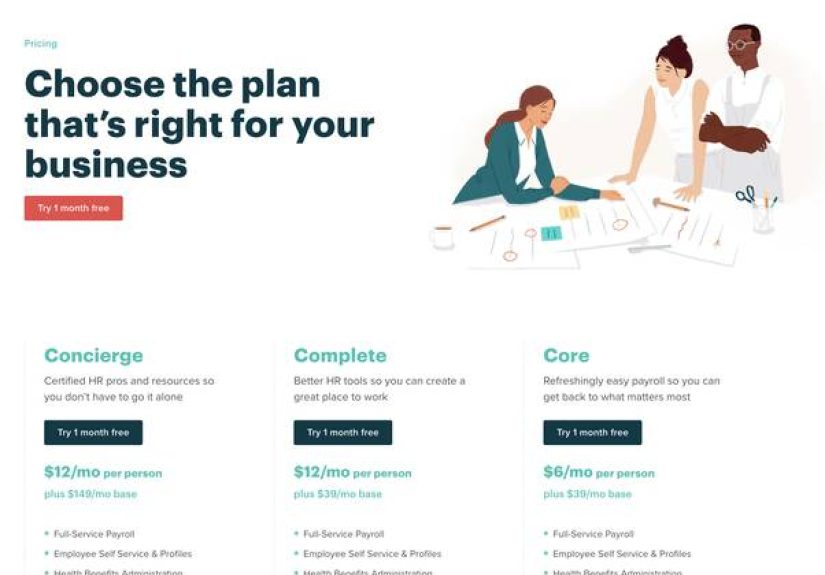
- Example A: Base fee + per employee (Payroll/HR “starter math”)
- Example B: Modular PEPM (Core platform + add-on modules)
- Example C: Employee-count tiers (bands that feel procurement-friendly)
- Example D: PEO / co-employment PEPM (Admin fee per employee)
- Example E: Global workforce PEPM (Payroll + compliance across borders)
- Example F: “Per active user” pricing (a smarter twist for collaboration tools)
- Example G: Productivity suites priced per user (the classic employee-adjacent model)
- Example H: Talent and performance tools priced per seat (often equals per employee)
- A quick list of recognizable “cost per employee” patterns buyers see in the wild
- How to compare per-employee pricing without getting tricked by “simple math”
- Common pitfalls (aka: how per-employee pricing can go sideways)
- Conclusion: the best cost-per-employee pricing models feel fair, forecastable, and hard to game
- of experience: what I’ve seen work (and what I’ve seen implode) with cost-per-employee SaaS pricing
- SEO tags (JSON)
If you’ve ever tried to price SaaS for a growing company, you’ve met the two ancient forces of the universe:
Finance (who wants predictability) and Reality (which refuses to sit still).
That’s why “cost per employee” pricingusually expressed as per employee, per month (PEPM)keeps showing up across HR,
payroll, IT, and even collaboration software. It scales with the business, feels “fair-ish,” and gives buyers a calculator-friendly number
they can explain to their boss without needing a PhD in Spreadsheetology.
In this guide, we’ll break down what “cost per employee” really means in SaaS, why it works, where it backfires,
and the best real-world examples of employee-based (and employee-adjacent) pricing modelscomplete with the patterns
you’ll want to copy and the traps you’ll want to avoid.
Cost-per-employee pricing: what it actually means (and why buyers don’t hate it)
In practice, “cost per employee” pricing usually lands in one of these families:
- Per employee per month (PEPM): You pay a fixed amount for each employee on the roster.
Sometimes it’s “active employees,” sometimes it’s “any employee in the system,” and sometimes it’s “anyone you’ve ever met” (kidding… mostly). - Base fee + PEPM: A monthly platform fee plus a per-employee charge. This is the SaaS equivalent of “cover charge + nachos.”
- Per seat / per user (employee-adjacent): Many workplace tools price per user per month.
If your users are employees (which they usually are), per-seat pricing behaves a lot like per-employee pricingjust with more knobs. - Tiered employee bands: Pricing changes at 1–25, 26–100, 101–500 employees, etc.
This keeps procurement calm and gives vendors volume-discount flexibility without publishing “the real number.”
The reason PEPM works is simple: employee count is a business metric that’s relatively stable, relatively measurable,
and relatively correlated to value for certain product categories (HRIS, payroll, benefits admin, onboarding, compliance).
If your product touches every employee record (even the ones who never log in), pricing per employee feels defensible.
When cost-per-employee pricing is the “right kind of boring”
PEPM shines when your product’s workload and value scale with headcount rather than clicks, storage, or transactions.
A few classic fits:
1) HR, payroll, and benefits: the “everyone is a record” universe
Payroll doesn’t care if someone is a power user. If they’re employed, they get paid (hopefully). HR compliance, tax forms,
onboarding checklists, benefits eligibility, and reporting all scale with people-count. That’s PEPM’s natural habitat.
2) IT and device ecosystems: employees drive accounts, access, and assets
Workforce IT platforms often map 1:1 to employees because identity, app access, and device assignment typically follow the person.
If the product’s job is to manage the employee lifecycle (join, move, leave), per-employee pricing is intuitive.
3) Collaboration tools: “per employee” in everything but name
Tools like chat and productivity suites often price per user/seat. In many companies, that’s basically “per employee,”
with a little wiggle room for contractors, interns, and “that one shared account we all pretend doesn’t exist.”
Good examples of SaaS cost-per-employee pricing models (and what makes them good)
Below are strong, real-world patterns you’ll see across SaaS pricing pages, buyer FAQs, and public plan breakdowns.
Notice how the best examples do two things well: they make the math simple and they make the value story obvious.
Example A: Base fee + per employee (Payroll/HR “starter math”)
One of the most common models in payroll SaaS is a monthly base price plus a per-employee fee. It’s friendly for small businesses
(you can start without a giant minimum) and predictable for finance (every new hire has a known marginal cost).
Why it’s good: the base fee covers core platform costs (support, compliance tooling, filings) while the per-employee fee scales
with processing load and “people complexity.”
- What it looks like: “$X / month + $Y per person.” Some vendors also split out contractor pricing, since contractors may have a different workload.
- Best for: startups, SMBs, and growing teams that want transparent unit economics (cost per new hire).
Example B: Modular PEPM (Core platform + add-on modules)
A modular PEPM model usually starts with a required core platform (the “system of record”) priced per employee per month.
Then you add optional modulespayroll, benefits administration, device management, expense managementalso often priced PEPM.
Why it’s good: buyers can start small and expand; vendors can align price with actual product surface area.
It also discourages the “we bought the whole suite but use 12% of it” syndrome.
- What it looks like: “Platform starts at $X PEPM. Add modules as needed (some may include a base fee).”
- Best for: companies that want one ecosystem across HR/IT/finance workflows without paying for everything on day one.
Example C: Employee-count tiers (bands that feel procurement-friendly)
Some HR platforms keep pricing simple by tying it to employee bands. For very small teams, you may see a monthly flat rate.
Once you cross a threshold, pricing shifts to per-employee per month.
Why it’s good: it reduces “penny math” for small teams and makes budgeting easier, while still allowing volume discounts as headcount grows.
- What it looks like: “Up to N employees: flat monthly price. Over N: PEPM with volume discounts.”
- Best for: small businesses that want a predictable minimum, and mid-market firms that want scaling economics.
Example D: PEO / co-employment PEPM (Admin fee per employee)
Professional employer organization (PEO) platforms frequently use per-employee pricing, because they’re delivering ongoing HR services
(and sometimes access to benefits) that scale with each covered employee. PEPM pricing here acts like an administrative fee per employee.
Why it’s good: it maps tightly to real operational support load and keeps the buyer’s costs proportional to the workforce covered.
Example E: Global workforce PEPM (Payroll + compliance across borders)
Global HR and payroll platforms often charge PEPM for services like global payroll processing, localized compliance support,
and in some cases PEO-style offerings in specific jurisdictions. The per-employee unit is practical because the “service” is the employee’s compliant employment.
Why it’s good: international complexity scales with people-count, and PEPM turns a scary, multi-country compliance problem into a single line item.
Example F: “Per active user” pricing (a smarter twist for collaboration tools)
In collaboration SaaS, “per active user” pricing is a clever compromise between pure per-seat and pure usage-based models.
You’re still paying a human-based unit (which budgets well), but you aren’t paying for people who never log in.
Why it’s good: it reduces the pain of shelfware, especially in large organizations where “assigned a license” does not guarantee “actually uses it.”
Example G: Productivity suites priced per user (the classic employee-adjacent model)
Office suites and identity tools commonly price “per user per month,” often with annual billing discounts.
This is basically cost-per-employee for many companies, because most employees need email, documents, and collaboration tools.
Why it’s good: it’s easy to compare across vendors and easy to forecast with hiring plans. CFOs love anything that can be expressed as:
“We’re hiring 12 people next quarter, so add 12 × $X to the budget.”
Example H: Talent and performance tools priced per seat (often equals per employee)
Performance management, engagement, and talent platforms frequently charge per seat/month, which in most implementations ends up matching employee count.
Some vendors also break out specialized roles (e.g., per manager pricing for coaching content) or add-ons priced PEPM.
Why it’s good: these tools often deliver value by reaching the full workforce (surveys, reviews, goals), so per-employee economics feel aligned.
A quick list of recognizable “cost per employee” patterns buyers see in the wild
- Payroll SaaS: base fee + PEPM (sometimes separate contractor pricing)
- HRIS platforms: PEPM (often with volume discounts) and/or small-company flat minimums
- Modular workforce platforms: core PEPM + module PEPM (+ occasional base fees)
- PEO services: per employee administrative fee, typically PEPM
- Workplace collaboration: per seat/month or per active user/month
- Talent suites: per seat/month, sometimes with role-based variations
How to compare per-employee pricing without getting tricked by “simple math”
PEPM looks straightforwarduntil it isn’t. Here’s the buyer-friendly checklist that keeps you from paying for surprise math:
1) Define “employee” the same way the vendor does
Ask: Is it all employees on the roster? Only employees paid in the month? Do unpaid owners count? Are contractors separate?
A PEPM number means very different things depending on what counts as a billable head.
2) Watch for base fees and minimums
Base fees aren’t evil. They’re often how vendors fund the “fixed costs” of compliance, support, and platform operations.
But you need to include them in your unit economics. A plan can look “cheap per employee” while being pricey for small teams due to a higher platform minimum.
3) Modular pricing can be a feature (or a budget leak)
Modular PEPM is great if you buy only what you need. It’s less great if every department adds “just one more module” until your invoice resembles a restaurant receipt
where someone ordered “one of everything.”
4) Annual vs monthly billing changes the real PEPM
Many SaaS vendors discount annual commitments. That’s normal. The trick is to compare apples to apples: take the annual contract value and divide it by 12
to get the effective PEPM. Your CFO will thank you. Quietly. In an email. Maybe.
5) Consider headcount volatility (and pricing that forgives it)
If you hire seasonally, or you have lots of interns/contractors, look for “active user” or “paid employees this month” billing logic,
or at least monthly true-ups. The best pricing model is the one that matches how your workforce actually moves.
Common pitfalls (aka: how per-employee pricing can go sideways)
- Paying for ghosts: If “employee” means anyone still in the directory, offboarding delays can inflate your bill.
Make offboarding a process, not a vibe. - License sprawl: Seat-based tools priced per user can balloon if you assign seats “just in case.”
Active-user pricing and quarterly seat audits help. - Bundles that hide PEPM: Some vendors quote a “total monthly” and the PEPM is implied.
Always back-calculate the unit cost so you can compare alternatives. - Ignoring implementation costs: Even if your PEPM is clean, implementation, onboarding, integrations, and training can be real line items.
(SaaS is software, but change management is a lifestyle.)
Conclusion: the best cost-per-employee pricing models feel fair, forecastable, and hard to game
The “best” examples of SaaS cost-per-employee pricing share the same DNA: buyers can predict the bill, vendors can map price to value,
and nobody has to invent a new unit of measurement like “messages-per-quarter-hour-adjusted-for-morale.”
If your product touches every employee record, PEPM is often the cleanest pricing story. If your product is used by only part of the workforce,
per-seat (or per active user) may be a better fit. And if you’re building in a complex space (like global payroll or PEO services),
a hybrid modelbase fee + PEPM + modular add-onscan be both rational and sustainable.
Bottom line: cost-per-employee pricing works when the value truly scales with people-count. When it does, it’s one of the simplest pricing models
buyers actually enjoy explaining. Which, in B2B, is basically a miracle.
of experience: what I’ve seen work (and what I’ve seen implode) with cost-per-employee SaaS pricing
After enough pricing conversations, you start to notice that “per employee per month” is less a billing metric and more a personality test.
The CFO likes it because it behaves like rent: predictable, boring, and therefore beautiful. The HR leader likes it because it scales with the workforce
and doesn’t punish them for being successful at hiring. And the founder likes it because it’s a clean story to tell on a pricing page without needing
a 12-tab calculator. Everybody winsright up until they don’t.
The first place I see teams stumble is definition drift. One company assumes “employee” means “anyone on payroll this month.”
The vendor assumes “employee” means “any profile in the system with a pulse at any point in the billing cycle.” Three months later, the buyer is
convinced they’re being charged for a small village of former interns who left during the summer. The fix is boring but effective: write down your
billable population rules, audit monthly, and make offboarding automatic. If your pricing is PEPM, your offboarding workflow is part of your cost-control strategy.
The second mistake is treating modular PEPM like a buffet. Modular platforms are fantastic when you intentionally select modules that solve
a real problem. They’re not fantastic when every team “just tries” a module because it sounds helpful, then forgets to turn it off. I’ve watched invoices
grow through pure enthusiasm: “We added device management, then expenses, then learning, then… wait, why is our bill twice the forecast?”
The practical answer: assign a single owner (often Finance Ops or People Ops) to approve modules, measure adoption, and retire what isn’t used.
SaaS doesn’t need to be emotional support software.
The third pattern is the small-company penalty. Base fees aren’t a scam; they often fund support and compliance infrastructure.
But for a 10-person company, a base fee can dominate the economics and make “cheap PEPM” irrelevant. If you’re small, ask vendors about minimums,
starter tiers, or flat-rate plans designed for small headcount. If you’re the vendor, consider a low-friction entry tier that avoids the “we love the product,
but the minimum is too high” objection.
Finally, the biggest “aha” moment for many teams is realizing that seat-based tools behave like per-employee pricing in practice.
Collaboration suites, chat tools, and productivity platforms might say “per user,” but your user list often mirrors your employee list.
That means the same disciplines apply: role-based licensing (who actually needs premium?), quarterly access reviews, and a plan for contractors and seasonal workers.
When teams treat licensing as a living systemnot a one-time setupthe cost-per-employee model becomes what it’s supposed to be:
a fair, scalable way to pay for software that grows with the business.