Table of Contents >> Show >> Hide
- Before You Stretch: Two Rules That Prevent Regret
- The “Do This at Your Desk” Setup
- 1) Chin Tuck (a.k.a. “Undo the Computer Neck”)
- 2) Upper Trapezius Stretch (Side Neck Stretch)
- 3) Levator Scapulae Stretch (a.k.a. “Smell Your Armpit,” Politely)
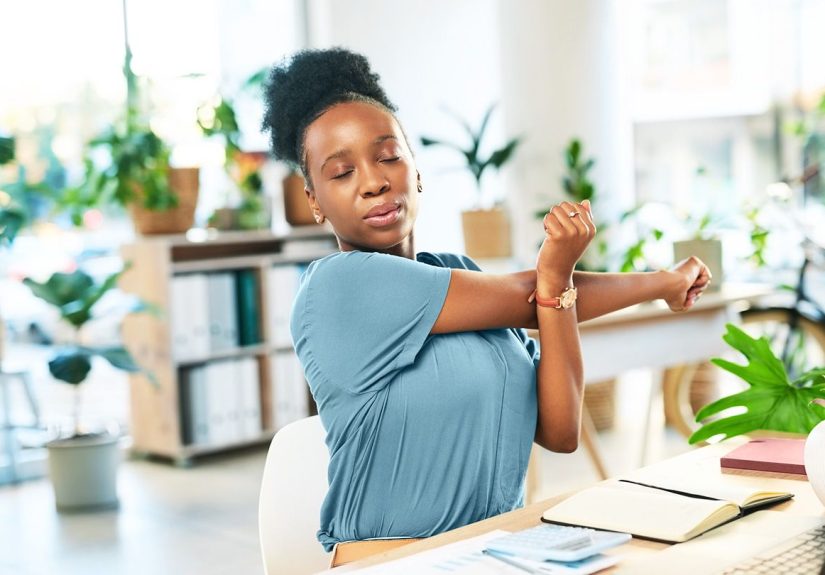
- 4) Cross-Body Shoulder Stretch
- 5) Doorway Chest Opener (Pectoral Stretch)
- 6) Seated Thoracic Extension Over Chair Back
- 7) Seated Spinal Twist (the Polite Desk Rotation)
- 8) Wrist + Forearm Stretch Sequence (for Typing, Mousing, and Doom-Scrolling)
- 9) Seated Figure-4 Stretch (Glutes/Piriformis)
- 10) Desk-Supported Hip Flexor Lunge (Plus a Hamstring Add-On)
- A Simple 5-Minute Desk Stretch Routine
- Common Desk-Stretch Mistakes (and How to Avoid Them)
- Conclusion: Your Desk Doesn’t Have to Win
- Experiences: What Desk Stretching Looks Like in Real Life ()
If your job involves a chair, a screen, and the slow realization that your shoulders are trying to become earrings, welcome. Desk life has perks (hello, climate control), but it also has a sneaky side quest: turning perfectly normal humans into hunched, tight, cranky statues.
The fix isn’t “become a yoga influencer by Friday.” It’s smaller, simpler, and way more doable: quick desk stretches that undo the greatest hits of sittingtight neck, clenched shoulders, stiff upper back, cranky wrists, and hips that feel like they’ve forgotten what walking is.
Below are 10 desk-friendly stretches you can do in business casual, on a video call, or while your coffee is doing its emotional support duties. They’re based on widely used stretching and ergonomics guidance from reputable U.S. healthcare organizations and workplace safety programs.
Before You Stretch: Two Rules That Prevent Regret
- Stretch for “mild tension,” not pain. You should feel a gentle pull, not sharp, burning, or zapping pain.
- Be boring on purpose: move slowly, breathe normally, and don’t bounce. Bouncy stretching is how you turn “a quick stretch” into “a weird limp.”
How long should you hold? A simple, evidence-based range is 10–30 seconds per stretch, repeated 2–4 times. If you’re older or very stiff, longer holds (up to about a minute) may be more effectivestill gentle, still pain-free.
How often? Think “snacks, not feasts.” Many ergonomics programs recommend microbreaksshort pauses (30–60 seconds) every ~20 minutes, or at least a few minutes each hour. Use those breaks for 1–2 stretches and a posture reset.
Quick safety note: If you have a recent injury, nerve symptoms (numbness/tingling that’s new or worsening), dizziness with neck motion, or pain that radiates down your arm/leg, talk with a clinician before going full stretch mode.
The “Do This at Your Desk” Setup
One-minute posture reset (optional, but powerful)
- Sit tall with both feet on the floor.
- Gently draw your ribs down (no superhero chest flare).
- Let shoulders drop away from your ears.
- Imagine the top of your head floating up like a balloon.
Now your stretches will actually target tight tissue instead of fighting your slouch like it’s a boss battle.
1) Chin Tuck (a.k.a. “Undo the Computer Neck”)
Targets: deep neck flexors; relieves forward-head posture tension.
How to do it
- Sit tall, eyes level.
- Keeping your chin level (no looking down), gently slide your head straight back as if making a double chin.
- Hold 5–10 seconds, then relax.
- Repeat 5–8 times.
Pro tip: Think “head back,” not “chin down.” Your neck should feel longer, not crunched.
2) Upper Trapezius Stretch (Side Neck Stretch)
Targets: upper traps; the “my shoulders live in my ears” muscle.
How to do it
- Sit on one hand (or hold the underside of your chair) to anchor that shoulder down.
- Gently tilt your head toward the opposite shoulder until you feel a stretch along the side of your neck.
- Hold 10–30 seconds. Breathe.
- Switch sides. Repeat 1–2 rounds.
Make it better: Keep your nose pointing forward. If you rotate your head, you’ll hit different tissues (not wrong, just different).
3) Levator Scapulae Stretch (a.k.a. “Smell Your Armpit,” Politely)
Targets: levator scapulae; often tight with stress and laptop hunching.
How to do it
- Turn your head about 45° to the right.
- Gently nod your chin down toward your right armpit.
- Let your right hand rest lightly on the back of your head for a tiny extra pull (tiny).
- Hold 10–30 seconds, then switch sides.
Common mistake: Yanking your head down. If you’re using “effort,” you’re overdoing it.
4) Cross-Body Shoulder Stretch
Targets: rear shoulder; helpful for mouse/keyboard posture and rounded shoulders.
How to do it
- Bring your right arm across your chest, roughly at shoulder height.
- Use your left forearm to gently pull the right arm closer to your chest (avoid pressing on the elbow joint).
- Keep shoulders down and chest relaxed.
- Hold 10–30 seconds, then switch.
Desk-friendly upgrade: Exhale as you ease into the stretch. Your nervous system likes exhaling. Your shoulders will, too.
5) Doorway Chest Opener (Pectoral Stretch)
Targets: chest muscles; combats rounded shoulders and tight pecs from sitting/typing.
How to do it
- Stand in a doorway (or a corner). Place forearms on the doorframe, elbows around shoulder height.
- Step one foot forward and gently lean your body through until you feel a stretch across the front of your chest.
- Hold 10–30 seconds. Switch which foot is forward for balance.
Make it safer: If your shoulders feel pinchy, lower your elbows a little and reduce the lean.
6) Seated Thoracic Extension Over Chair Back
Targets: upper back (thoracic spine); counters the “C-shaped” desk posture.
How to do it
- Sit with your mid-back against the top edge of your chair back (not your low back).
- Interlace fingers behind your head (elbows wide) or hug arms across your chest.
- Gently lean back over the chair edge, lifting your chest toward the ceiling.
- Hold 5–15 seconds, return to neutral, repeat 3–5 times.
Bonus: After each rep, do one slow shoulder-blade squeeze (like you’re holding a pencil between them) to “teach” the new posture.
7) Seated Spinal Twist (the Polite Desk Rotation)
Targets: mid-back and low-back rotation; eases stiffness from staying in one position.
How to do it
- Sit tall with feet planted.
- Place your right hand on the back of your chair and your left hand on your right thigh.
- Inhale to lengthen your spine; exhale to rotate gently to the right.
- Hold 10–20 seconds, return to center, switch sides.
Rule: Rotate from your ribs, not by cranking your neck. Your spine is a team sport.
8) Wrist + Forearm Stretch Sequence (for Typing, Mousing, and Doom-Scrolling)
Targets: wrist flexors/extensors; helps relieve forearm tightness.
A) Wrist extensor stretch (the “stop” sign)
- Extend your right arm in front of you, palm down.
- With the left hand, gently pull the right fingers down and back toward you.
- Hold 10–20 seconds; switch sides.
B) Wrist flexor stretch (the “reverse stop” sign)
- Extend your right arm, palm up.
- Gently pull fingers down toward the floor, keeping the elbow straight but not locked.
- Hold 10–20 seconds; switch sides.
Desk reality check: If you feel tingling in the hand, back off the intensity and keep your wrist more neutral.
9) Seated Figure-4 Stretch (Glutes/Piriformis)
Targets: glutes and deep hip rotators; the “sitting makes my hips cranky” zone.
How to do it
- Sit tall near the edge of your chair.
- Cross your right ankle over your left knee (making a “4” shape).
- Keep your back straight and gently hinge forward from the hips until you feel a stretch in your right glute.
- Hold 10–30 seconds; switch sides.
Modification: If your knee feels stressed, cross the ankle lower (closer to the shin) or reduce the forward hinge.
10) Desk-Supported Hip Flexor Lunge (Plus a Hamstring Add-On)
Targets: hip flexors (often tight from sitting); optional hamstring stretch.
How to do it (hip flexor)
- Stand and hold your desk lightly for balance.
- Step your right foot back into a comfortable lunge stance (heels down, back knee straight or softly bent).
- Tuck your pelvis slightly (think “zip up your jeans”), then gently shift forward until you feel the stretch at the front of the right hip.
- Hold 10–30 seconds; switch sides.
Hamstring add-on (optional)
- From the lunge, shift hips back and straighten the front leg.
- Keep your spine long and hinge forward slightly until you feel a stretch behind the front thigh.
- Hold 10–20 seconds; return to lunge; switch sides.
Why it works: Sitting shortens hip flexors, which can pull on posture and make your low back feel like it’s doing unpaid overtime.
A Simple 5-Minute Desk Stretch Routine
If decision fatigue is your brand (no judgment), do this sequence once mid-morning and once mid-afternoon:
- Chin tucks (5 reps)
- Upper trap stretch (20 seconds each side)
- Doorway chest opener (30 seconds)
- Seated thoracic extension (4 reps)
- Wrist stretch sequence (15 seconds each position, both sides)
- Figure-4 glute stretch (25 seconds each side)
Want the “nerd upgrade”? Pair your stretch break with the 20-20-20 eye rule: every 20 minutes, look about 20 feet away for 20 seconds. Your eyes are muscles tooand they are tired of staring at spreadsheets like they owe them money.
Common Desk-Stretch Mistakes (and How to Avoid Them)
1) Stretching like you’re trying to win a contest
Flexibility isn’t a personality trait. Go gentle, stay consistent, and let your range improve over weeksnot in one dramatic Tuesday.
2) Holding your breath
Breath-holding tells your body “danger,” which makes muscles guard. Slow breathing signals “safe,” which helps muscles let go.
3) Only stretching the “loud” area
Neck tight? Your chest and upper back often deserve attention too. Wrist pain? Forearms and shoulders may be part of the story. Think chains, not isolated links.
4) Doing nothing between stretches
Stretches help, but so does changing positions: sit, stand, walk, take calls standing, move your printer farther away, or do a lap when you refill water. Movement is the secret sauce your desk chair doesn’t want you to know about.
Conclusion: Your Desk Doesn’t Have to Win
Tight muscles at a desk job aren’t a moral failingthey’re a predictable result of staying in one position too long. The good news is that your body responds fast to small inputs. Ten to thirty seconds of gentle stretching, sprinkled throughout the day, adds up to noticeably less stiffness, better posture awareness, and fewer “why does my neck feel like concrete?” moments.
Start with two stretches you’ll actually do. Attach them to habits you already have (first coffee, lunch, last email). Then expand. Consistency beats intensityand it also looks less suspicious on Zoom.
Experiences: What Desk Stretching Looks Like in Real Life ()
Here’s the part nobody tells you: the hardest stretch is the one that requires you to remember you have a body while you’re staring at a screen. Most people don’t skip desk stretches because they hate flexibilitythey skip because they’re busy, focused, and suddenly it’s 4:57 p.m. and their shoulders are auditioning for a role as granite countertops.
In conversations with office workers and clinicians who coach desk-bound patients, the pattern is hilariously consistent. People start stretching for one of three reasons: (1) neck tightness that makes checking the blind spot while driving feel like a trust fall, (2) wrist/forearm soreness that turns typing into a tiny tragedy, or (3) hips that feel “stuck” the moment they stand up. They rarely begin with a grand wellness plan. They begin with a complaintand that’s fine. Complaints are data.
The biggest “aha” moment tends to happen within the first week, when someone realizes that one stretch isn’t magic, but frequent tiny breaks are. A 20-second neck stretch once a day is like watering a plant with a single ice cube. But doing a chin tuck and a chest opener a few times a day? Suddenly posture feels less like a fight. It’s not that the body becomes perfectly aligned; it’s that it stops living in one extreme shape for hours.
Another common experience: people discover their “surprise tight spot.” Someone starts stretching their neck, then tries the doorway chest opener and goes, “Oh. That’s where I’m stuck.” Others do the figure-4 stretch and realize their hips are basically holding a grudge from years of sitting. The lesson: discomfort isn’t always located where the stress originates. The front of the chest can contribute to neck tension. Tight hip flexors can make the low back feel overworked. Stretching becomes less about chasing pain and more about restoring balance.
The funniest (and most effective) real-world strategy is the “socially acceptable stretch.” People don’t want to look like they’re doing a full gym routine at their desk, so they pick stealth moves: chin tucks during a meeting, wrist stretches while waiting for a page to load, shoulder stretch during a phone call, a hip flexor lunge while the coffee machine gurgles like it’s having an existential crisis. Once those become normal, more obvious stretches feel less awkward.
Finally, many people learn that stretching works best when paired with tiny ergonomic tweaks. Raise the laptop so you’re not folding into it. Bring the keyboard closer so your shoulders don’t creep forward. Rest forearms lightly so wrists aren’t hovering in midair like they’re afraid of commitment. Then use your microbreak to reinforce the new position with one or two stretches. The experience becomes less “I have to fix my body” and more “I’m giving my body a fair chance.”
If you want a practical takeaway: pick a trigger (every time you hit “Send,” every refill, every 20 minutes), do one stretch, breathe, and return to work. Repeat often. Your muscles respond to repetition and your calendar will never hand you a free hour to stretch, so don’t wait for it.