Table of Contents >> Show >> Hide
- What Counts as a Photoshop Fail?
- Why Do Photoshop Fails Happen? (Hint: It’s Not Always “Bad at Photoshop”)
- How to Spot a Bad Photoshop Job (No Detective Badge Required)
- When “Fail” Turns Serious: Ethics, Trust, and Disclosure
- Funniest Photoshop Fail Hall of Fame: Scenarios We’ve All Seen
- Famous Real-World Photoshop Fails (and the Lessons They Left Behind)
- How to Avoid Becoming the Next Photoshop Fail
- Send Yours In: How to Share Your Funniest Photoshop Fails Responsibly
- What Your Favorite Photoshop Fail Says About You
- of Real-Life “Photoshop Fail” Experiences (That People Keep Having)
- Conclusion: Laugh Smart, Edit Smarter
Somewhere, right now, a perfectly innocent doorway is being gently bent into a sad banana shape.
A shadow is facing the wrong direction like it’s trying to leave the scene. A background pattern has been
cloned so many times it looks like a wallpaper glitch in a video game. And a hand? The hand has… opinions.
That, friends, is the magic of a Photoshop fail: a moment when editing tries to help, but accidentally
announces itself with a megaphone. This article is your funny, practical field guide to the internet’s
favorite genre of “wait… what am I looking at?” We’ll break down the most common types of bad Photoshop,
why they happen (spoiler: deadlines), how to spot them, how to avoid them, and how to share the laughs
without turning into the villain of someone else’s comment section.
What Counts as a Photoshop Fail?
A “Photoshop fail” isn’t just “someone edited a photo.” Editing can be art, correction, or storytelling.
A fail is when the edit is noticeable in a way that’s unintentional, distracting, or confusinglike the
image is whispering, “I have layers, and I’m not emotionally stable.”
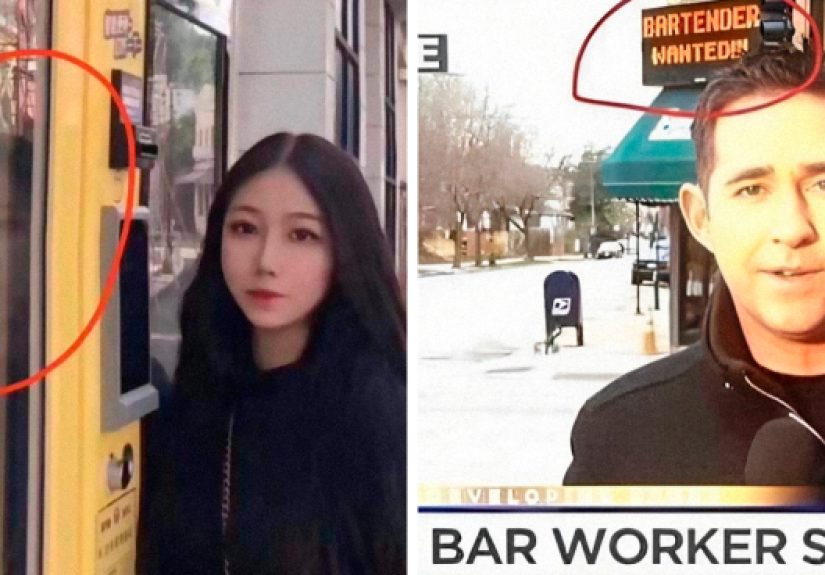
1) Warped Reality (a.k.a. The Curvy Doorframe Chronicles)
This is the classic: a straight line that suddenly becomes a noodle. It often happens when someone uses a
transform or liquify-style tool and forgets that the background has geometry. Doorframes, fences, tile grout,
brick patterns, and horizon lines are basically the lie detectors of the editing world.
- Typical giveaway: walls that look like they’re melting, bent railings, wavy mirrors, crooked text on posters.
- Why it happens: aggressive reshaping, rushed retouching, or editing on a tiny screen where subtle bends are easy to miss.
2) Clone Stamp Copy-Paste Chaos
The clone stamp (or healing tools) can be a lifesaveruntil it turns a crowd into a copy machine. When someone
removes an object or “cleans up” a background, repeating patterns can pop out like a chorus line.
- Typical giveaway: identical clouds, repeated bushes, duplicated faces in a crowd, and wallpaper patterns that look “looped.”
- Why it happens: cloning from the same area over and over, or smoothing textures so much that detail becomes a blur.
3) Lighting and Shadows That Don’t Agree
Lighting is picky. If a person is bright but the background is gloomy, or if a shadow falls left while the sun
screams “I’m on the right,” our brains noticefast. Bad shadows make an image feel “off,” even when you can’t
immediately explain why.
- Typical giveaway: shadows pointing different directions, missing contact shadows under feet, reflections that don’t match.
- Why it happens: compositing elements from different photos, or brightening/darkening subjects without matching the scene.
4) Perspective Problems and Giant Props
Perspective is the quiet math behind “that looks real.” When it’s wrong, you get the comedy of a coffee mug the
size of a toddler or a chair that seems to float in front of a table that should be closer.
- Typical giveaway: mismatched angles, objects with the wrong scale, floating items that should be grounded.
- Why it happens: resizing without considering depth, or pasting elements without matching camera angle and lens distortion.
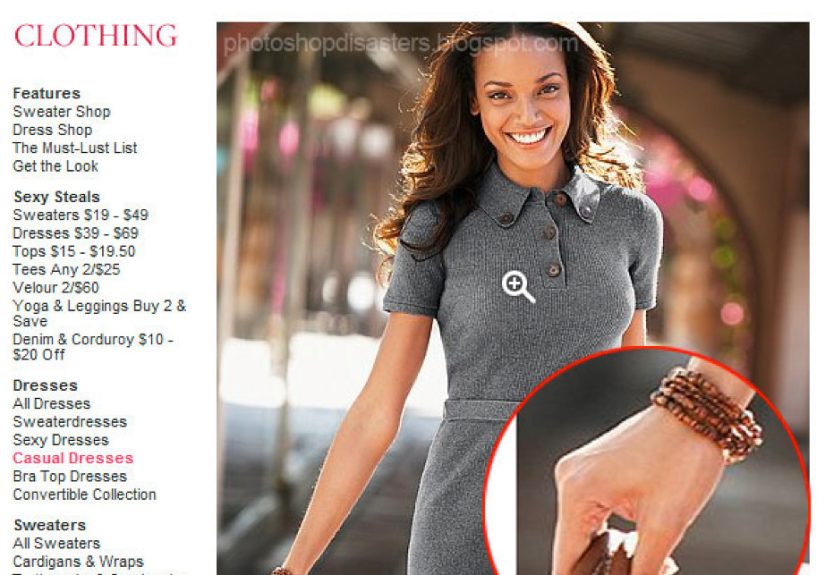
5) Anatomy Oops (The “Where Did That Finger Go?” Edition)
Sometimes the fail is human-shaped. Retouching can accidentally erase a knuckle, duplicate an elbow, or blur a
hand into a mitten. This can happen even without “beauty” editssimple cleanup around hair, jewelry, or clothing
can turn limbs into optical illusions.
- Typical giveaway: odd hands, extra joints, missing edges around hair, warped clothing seams.
- Why it happens: over-smoothing, sloppy masking, or editing at low zoom so details get overlooked.
Why Do Photoshop Fails Happen? (Hint: It’s Not Always “Bad at Photoshop”)
The internet loves to assume every Photoshop fail is created by someone who woke up and chose chaos. In reality,
most fails come from normal problems that hit normal humans:
- Deadlines: You can do fast, or you can do flawless. You rarely get both.
- Too many tools: Editing software is powerful, which means it’s also very good at letting you make mistakes efficiently.
- Small-screen editing: What looks fine on a phone can look like a crime scene on a 27-inch monitor.
- One more tweak syndrome: “Just a little more smoothing” becomes “I have accidentally removed reality.”
- Multiple hands in the kitchen: A designer, a marketer, and a manager can each request changes that pile up into weirdness.
- Compression and resizing: Web images can introduce artifacts that make edges look jagged or “cut out.”
How to Spot a Bad Photoshop Job (No Detective Badge Required)
If you want to enjoy Photoshop fails (or avoid being fooled by them), here’s what to look for. This isn’t about
paranoiait’s about noticing the “tells” that editing leaves behind.
Zoom in and scan the edges
The border between a subject and the background is where secrets live. Look for halos, jagged cutouts, blur that
doesn’t match the rest of the image, or hair that suddenly becomes a smooth helmet.
Check repeating patterns
Walls, grass, crowds, and clouds should be messy. If you can play “spot the duplicate” without trying, the clone
stamp probably got a little too confident.
Interrogate shadows and reflections
Shadows should match the light source, and reflections should behave consistently across shiny surfaces. If
something looks like it’s hovering, it might be missing a contact shadowthose small dark areas that anchor
objects to the ground.
Look for “impossible” geometry
Straight architectural lines are brutally honest. A wavy staircase railing or bent doorway often means an edit
affected the background.
Consider context: editorial vs. advertising vs. memes
A silly edit in a meme is one thing. An altered image used to represent real events is another. Context matters:
the same tool can be playful in art and harmful in journalism or public communication.
When “Fail” Turns Serious: Ethics, Trust, and Disclosure
Not every Photoshop fail is just a laugh. Sometimes editing crosses into misleading territoryespecially when an
image is presented as a truthful record (news, official communications, documentary work). Major journalism
organizations and photography groups have long-standing standards that emphasize accuracy and discourage
manipulations that change meaning.
In plain English: adjusting brightness so the photo looks like what you actually saw is one thing; adding,
removing, or reshaping elements in a way that changes what happened is another. The deeper the stakes, the more
important it becomes to label composites or illustrations clearly.
In marketing and social media, transparency is also becoming a bigger deal. Tools like content provenance and
“edit history” features can help audiences understand whether something was edited, AI-generated, or captured as-is.
That’s good for creators, brands, and everyone who’s exhausted by the daily game of “Is this real?”
Funniest Photoshop Fail Hall of Fame: Scenarios We’ve All Seen
Let’s talk about the greatest hitsthe kinds of editing mishaps that show up again and again because they’re so
easy to accidentally create.
The “Sucked Into a Vacuum” Background
Someone tried to slim a shirt or smooth a dress, and the wall behind them bends like it’s being pulled into a
black hole. The person looks fine. The universe around them… does not.
The “Infinite Limb”
A clone stamp meant for background cleanup accidentally duplicates part of an arm. Now you have an elbow with
commitment issues, or a forearm that seems to start in a different zip code.
The “Floating Shoe” (Missing Ground Contact)
The subject was cut out and pasted into a new background, but nobody matched the shadows. Feet don’t look like
they’re on the ground, so the whole person looks like they’re hovering.
The “Logo That Learned to Multiply”
A patterned shirt gets cleaned up, and suddenly the brand logo repeats in an oddly perfect grid. It’s not even
subtleyour eyes lock on and refuse to leave.
The “Blur Everything Until It’s 2007 Again”
Over-smoothing can erase texture so aggressively that faces (or product photos) look plastic. Skin, fabric,
and surfaces lose natural detailthen sharp teeth or eyelashes remain crisp, making the whole thing uncanny.
The “Architectural Fiction”
A real estate photo gets “improved” and ends up with a window that doesn’t match the wall thickness, a staircase
that can’t exist, or a kitchen island that blocks a doorway. Homebuyers may not know why it’s wrong, but they can
feel it.
Famous Real-World Photoshop Fails (and the Lessons They Left Behind)
The most talked-about Photoshop fails tend to come from big brandsbecause big audiences notice everything.
A couple of well-publicized examples highlight why quality control and restraint matter.
A retail image edit that went too far
In one widely reported case, a retailer faced backlash after a swimsuit image appeared to be edited in a way that
made the model’s body look distorted. The public response wasn’t just “lol”it raised questions about unrealistic
portrayal and sloppy execution. Lesson: if you’re editing bodies in product imagery, you’re playing on hard mode.
Double-check anatomy, and think carefully about whether the edit is necessary at all.
An ad that looked “cartoonish” instead of polished
Another widely covered incident involved a fashion ad where a model appeared dramatically altered. Beyond the
obvious “this looks fake” problem, it sparked discussion about beauty standards and the impact of extreme retouching.
Lesson: heavy-handed edits can damage credibility and invite criticismeven when the goal was “make it look better.”
How to Avoid Becoming the Next Photoshop Fail
If you edit photos for work, content, or fun, here’s how to protect yourself from accidental comedy. Think of this
as a pre-flight checklist for reality.
Work non-destructively
- Use adjustment layers instead of permanently changing pixels.
- Keep edits on separate layers so you can dial them back.
- Name your layers. Future You will send Past You a thank-you card.
Flip the image and step away
Mirroring your canvas can make mistakes jump out instantly. Also: take a break. Your brain adapts to what it’s
seeing, which is how you end up approving a slightly warped wall as “totally fine.”
Check at multiple zoom levels
Review at 25%, 50%, 100%, and “fit to screen.” A clone pattern might be invisible when zoomed in, but painfully
obvious when zoomed out.
Respect light and physics
If you’re compositing, match color temperature, contrast, grain, and (most importantly) shadows. Even subtle
mismatches can make an edit scream.
Have a “second set of eyes” moment
If it’s going publicespecially for a brandget someone else to check it. Fresh eyes catch floating earrings,
duplicated background objects, and mysteriously vanishing fingers.
Consider transparency tools
If you’re a creator who wants to build trust, look into adding attribution and editing info when you export.
Systems that attach “content credentials” can act like a digital nutrition label for your workhelpful for
audiences who want to know what they’re seeing.
Send Yours In: How to Share Your Funniest Photoshop Fails Responsibly
Laughing at editing mistakes can be harmless funif we keep it kind. If you’re collecting or sharing fails, here
are a few guidelines that keep the joke on the edit, not on a person:
- Focus on the technique, not someone’s body: roast the warped fence, not a human being.
- Avoid targeting minors or private individuals: share what’s already public and contextual.
- Blur names and personal info: protect people who didn’t ask to go viral.
- Get permission when possible: especially if it’s a friend’s photo or a smaller creator.
- Share what you learned: the best fails come with a “here’s how it happened” mini-lesson.
What Your Favorite Photoshop Fail Says About You
If you love the tiny detailslike repeated cloudsyou’re a pattern-spotter. If you love warped architecture,
you probably also enjoy “bad CGI animals” videos. If your favorite fails involve shadows, congratulations: you have
the soul of a lighting designer and the skepticism of a noir detective.
Photoshop fails are funny because they reveal the seams of image-making. They remind us that “perfect” images are
usually constructedand that a little imperfection is often more believable, more human, and honestly… more charming.
of Real-Life “Photoshop Fail” Experiences (That People Keep Having)
If you’ve ever tried editing a photojust onceyou’ve probably had a mini Photoshop fail moment, even if it never
escaped your camera roll. The most common experience people describe is the “looks fine… until it doesn’t” effect.
You’re zoomed in, carefully cleaning up a background, and everything feels professional. Then you zoom out and realize
you’ve cloned the same patch of wall three times like you’re building a suspiciously identical wallpaper empire.
Another classic experience is the confidence boost followed by instant regret: you discover a powerful tool (like a
reshaping brush, smoothing filter, or auto retouch option), and it works so well at first that you keep going. Ten
clicks later, the image has crossed an invisible line. The person still looks like themselves, but the background
has started to ripple, or the lighting has become oddly flat, or a textured sweater has turned into something that
resembles a wax sculpture. This is usually the moment people say, “Okay, I went too far,” and scramble backward
through their history panel like it’s a time machine.
People also talk about “device deception”: edits that looked great on a phone but weird on a larger screen. On a small
display, a slightly messy cutout edge can look clean. On a laptop, it becomes a bright halo around hairlike your subject
is glowing with mysterious editing energy. The opposite happens too: subtle compression artifacts or over-sharpening might
not stand out on a monitor, but on social platforms they can make skin look gritty or create jagged outlines around text.
That’s why a lot of creators develop a habit of previewing an image the way audiences will actually see it: on mobile,
on desktop, and sometimes even in the app feed itself.
Then there’s the “collaboration curveball.” A designer may deliver a clean, realistic editonly to get feedback like,
“Can you make it pop?” That vague request can lead to oversaturation, overly strong contrast, or heavy smoothing that
turns a natural image into something cartoonish. Many editors learn to translate “make it pop” into specific, controlled
adjustments: slightly brighter exposure, gentle contrast, targeted sharpening, and selective color balancerather than
global edits that flatten everything.
Finally, there’s the most relatable experience of all: the accidental comedy you catch just in time. You’re about to export,
you do one last scan, and you notice a floating earring, a duplicated plant, a missing edge on a sleeve, or a shadow that goes
in a different direction than every other shadow in the frame. It’s annoying, surebut it’s also how people get better.
The best Photoshop fails aren’t proof someone is hopeless. They’re proof someone is learning. And honestly, they make for
excellent group chat materialshared with kindness, and preferably with a caption that says, “I FIXED IT, I SWEAR.”
Conclusion: Laugh Smart, Edit Smarter
Photoshop fails are the internet’s way of reminding us that images aren’t magicthey’re choices. When those choices go wrong,
we get hilarious wavy walls and copy-paste crowds. When they go too far in high-stakes contexts, we get trust problems. The sweet
spot is simple: edit with intention, check your work like a skeptical friend, and when you share fails, keep the humor aimed at
the mistakenot the person.
Now it’s your turn: send me your funniest Photoshop fails. The weirder the shadow, the wavier the doorway, the more suspicious
the repeating cloudsbring it on. (But please, for the love of straight lines, don’t come for anyone’s self-esteem. Roast the pixels.)