Table of Contents >> Show >> Hide
- What This Build Actually Is (and Why It Feels So Refreshing)
- Anatomy of the Franken-Phone
- The Slider Mechanism: The Part That Separates a Meme From a Masterpiece
- Making Android Work on a Tiny Cover Screen
- What This Galaxy Z Flip 5 Mod Teaches Makers (Even If You Never Build One)
- Are QWERTY Slider Phones Coming Back?
- Could a Project Like This Become a Real Product?
- Experiences You’ll Have If You Try a Franken-Phone Build Like This (The Fun, the Frustration, the Victory Lap)
- Conclusion
Modern smartphones are incredible, yes. They can translate a menu, pay for your coffee, and take a portrait photo so sharp it can expose your soul
and your pores. But they can also feel… same-y. A lot of glass rectangles, a lot of identical swipes, a lot of “wow, another camera bump that
could double as a coffee table.”
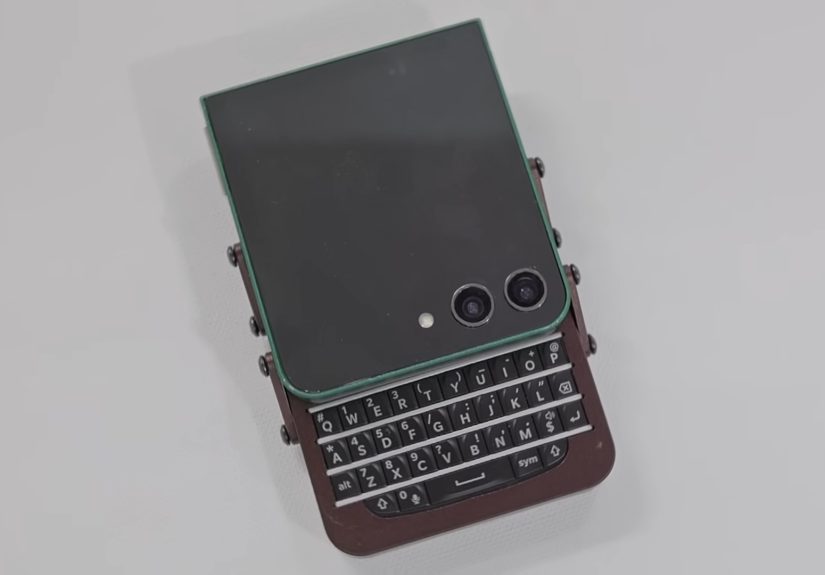
That’s why the internet collectively perked up when a maker nicknamed “Phonenstien” (because of course) took a broken Samsung Galaxy Z Flip 5 and
turned it into something delightfully retro: a QWERTY slider phone with a physical keyboard. Not a case. Not a concept render.
A real, working Franken-phone with a chunky metal slider mechanism, satisfying magnetic snap, and a tiny screen that suddenly becomes the main event.
This build is more than a nostalgia flex. It’s a clever lesson in repair, reuse, and how to design around the parts that actually survive when a modern
gadget fails. Let’s break down what makes this Galaxy Z Flip 5 mod so interestingand why it has every keyboard-loving millennial whispering,
“BlackBerry, is that you?”
What This Build Actually Is (and Why It Feels So Refreshing)
A foldable phone that stops foldingand starts thriving
The Galaxy Z Flip line is famous for its clamshell design: it folds shut like a compact mirror. The downside is the same thing that makes foldables fun
can also make them fragile. When the internal folding display dies, the phone’s biggest feature becomes a liability.
Here’s the twist: instead of mourning the inner screen, Phonenstien’s approach is basically, “Cool, we won’t use it.” The phone gets rebuilt around the
outer cover displaythe smaller screen that normally shows notifications, widgets, and quick actions. In this mod, that little screen
becomes the primary display, while the rest of the hardware is repackaged into a new form factor.
It’s not “reinventing the smartphone”it’s remixing it
The brilliance isn’t that the phone becomes some brand-new invention. The brilliance is that it keeps the original guts (processor, cameras, radios,
core internals) and changes the user experience by changing the physical design: a slider body, a real keyboard, and a screen that’s always accessible
without unfolding anything.
Anatomy of the Franken-Phone
The donor: a broken Galaxy Z Flip 5 (the parts that still matter)
Think of the donor phone as an organ donor for tech. Even if the internal OLED is “dead as disco,” there’s still a lot worth saving:
the motherboard, cameras, speakers, sensors, and the cover display. The project keeps what works and bins what doesn’t.
The keyboard: a BlackBerry Q10 brought back from the dead
The bottom half of the slider houses a BlackBerry Q10 keyboardone of the last great compact QWERTY phone keyboards.
Physical keys change how you use a device: more accuracy, fewer typos, and a tactile “click” that makes touch keyboards feel like typing on pudding.
The translator: turning key presses into phone input
A smartphone isn’t expecting a BlackBerry keyboard to show up at its doorstep like an uninvited cousin. To make it work, the keyboard connects to a
small microcontroller board that acts like a USB Human Interface Device (HID). In plain English: the phone thinks it’s talking to a
normal USB keyboard.
In the documented build, an Arduino Micro-class board based on the ATmega32U4 handles this role. That chip family is popular for HID projects because it
can present itself to a connected device as a keyboard (and even a mouse).
Power choices: battery + wireless charging so the USB port isn’t a tragedy
One practical compromise is that the phone’s USB port gets used for keyboard input. That sounds annoying until you remember:
this unit includes wireless charging, plus a MagSafe-style connector/ring for alignment. Suddenly, losing USB charging feels less like a
dealbreaker and more like a fair trade for a pocket-sized typing machine.
The Slider Mechanism: The Part That Separates a Meme From a Masterpiece
From prototypes to CNC aluminum
Plenty of DIY projects work in theory and feel terrible in the hand. This one is the opposite: the mechanism is a huge part of the charm.
After iterating with 3D-printed prototypes, the final enclosure is CNC-machined aluminumthe kind of material choice that instantly
makes a device feel like it belongs in the “special edition” aisle.
The “oh wow” detail: a four-bar linkage and magnetic snap
Instead of a flimsy, wobbly slide, the build uses a chunkier linkage system that guides the opening motion. Magnets provide a satisfying “snap”
at open and closebecause if you’re going to make a slider phone in 2026, it should feel like closing a luxury car door, not a plastic sandwich bag.
Cable management: where projects go to either succeed or emotionally collapse
Sliders are hard because motion and electronics don’t naturally get along. The phone needs reliable connections while the screen moves.
This build uses flexible circuitry (a thin flex PCB) to keep the keyboard and internals talking without turning every open/close into a game of
“will it short today?”
Making Android Work on a Tiny Cover Screen
Good Lock and MultiStar: the software cheat code
Hardware is only half the story. To make the cover screen behave like a real smartphone display, the build relies on Samsung’s customization ecosystem
specifically Good Lock and its MultiStar module. With the right settings, you can enable a launcher-style widget and run
apps that normally wouldn’t be available on the cover screen.
This matters because the whole concept depends on the cover display being more than a notification billboard. Once you can run messaging apps, maps,
music, authentication tools, and other essentials, that “small screen” stops being a limitation and starts being a design choice.
Real talk: tiny screens are great until you need to type
Running full apps on a compact display can be awkward. Buttons may be too small. Some layouts get squished. And on-screen keyboards can eat half the UI.
Which is exactly why this project’s physical keyboard isn’t a gimmickit’s the missing piece that makes the cover-screen-first idea actually usable.
Practical examples of what works well
- Messaging and email: A physical keyboard shines for quick replies and longer messages.
- Two-factor authentication: Viewing and copying codes is easy on a small screen with fewer distractions.
- Music and podcasts: Cover screens are perfect for play/pause, skipping, and quick browsing.
- Maps in a pinch: Useful for glanceable directionsless ideal for heavy route planning.
- Camera selfies: A cover display paired with rear cameras can be a surprisingly great combo.
What This Galaxy Z Flip 5 Mod Teaches Makers (Even If You Never Build One)
1) Design around what fails
Most people treat a dead internal screen as the end of the road. This build treats it as a design constraint.
That mindset“what still works, and what can I build around it?”is the heart of smart upcycling.
2) Physical interfaces still matter
Touchscreens are flexible, but they’re not always efficient. A physical keyboard gives you muscle memory, tactile feedback, and the confidence that you
hit the key you meant to hit. That’s why keyboard phones still have a cult following, and why modern keyboard devices keep popping upeven if they’re
niche.
3) Prototyping isn’t optional, it’s the process
The end result looks polished because it wasn’t the first version. Iteration is the difference between “cool idea” and “cool device.”
If you’re making anything with moving parts, expect to prototype for fit, friction, durability, and that intangible “feels right” factor.
4) Battery safety and build safety are non-negotiable
Any project involving lithium batteries demands respect. Heat, punctures, and short circuits are not “fun learning moments.” If you’re inspired by this
build, take safety seriously: use proper insulation, avoid pinched wires, and don’t gamble with damaged cells.
Are QWERTY Slider Phones Coming Back?
Not mainstreambut the demand keeps resurfacing
Every couple of years, something reminds the world that physical keyboards were genuinely good for certain people. Writers. Field techs. Busy parents who
text one-handed while juggling groceries and existential dread. And yes, the “I miss my BlackBerry” crowd (you know who you are).
We’re also seeing modern devices experiment with keyboards in different wayssometimes as dedicated keyboard phones, sometimes as niche productivity tools.
The point isn’t that everyone will ditch glass slabs tomorrow. The point is that hardware variety still has fans, and those fans are willing to support
weird, wonderful designs.
Could a Project Like This Become a Real Product?
Probably notand that’s okay
One-off hardware is a different world than mass manufacturing. A project can be brilliant, functional, and beautifully madeand still be impractical to
produce at scale. You’d need durability testing, supply chains, regulatory compliance, long-term service support, and a way to guarantee that the next
batch feels as good as the first.
In fact, Phonenstien’s creator has said the design isn’t ready to be shared as a replicable kit. That honesty is refreshing. It also highlights something
important: the value here isn’t a downloadable file. It’s the idea that you can treat a “broken” device as a starting point, not a dead end.
Experiences You’ll Have If You Try a Franken-Phone Build Like This (The Fun, the Frustration, the Victory Lap)
If this QWERTY slider build makes your hands itch for a screwdriver, you’re not alone. Projects like this have a predictable emotional arcequal parts
“I am a genius” and “why is everything glued like it’s guarding state secrets?” Here are the real-world experiences most makers run into when attempting
a keyboard-phone conversion, especially with modern smartphones.
First, you’ll experience the thrill of the donor hunt. There’s something oddly satisfying about finding a “for parts” phone listing and
imagining the resurrection. You’ll zoom in on blurry photos like a detective: Is that a cracked inner screen but an intact cover display? Are the cameras
present? Did someone already remove half the screws and give up? This stage is hope in its purest formhope, and sometimes denial.
Then comes the glue gauntlet. Modern phones love adhesive the way toddlers love stickers: everywhere, for no reason, and impossible to
remove cleanly. You’ll warm things up, pry carefully, and still hear the occasional terrifying “snap” that makes your heart stop for half a second.
The experience teaches patience and gentleness fast. It also teaches you to keep spare picks, a thin pry tool, and a plan for how you’ll route cables
before you ever commit to closing the device again.
Next is prototype season, where your desk becomes a museum of almost-right versions. You’ll mock up sizes with cardboard, then 3D print
something that’s 95% perfect and 5% “why doesn’t anything line up?” You’ll sand edges. You’ll adjust tolerances. You’ll discover that one millimeter
feels like nothing until it’s the difference between a smooth slide and a crunchy grind. This is also where you learn the emotional meaning of the phrase
“fit check,” because you’ll do it roughly one thousand times.
When you tackle the keyboard integration, expect a mini software journey. Mapping keys is part puzzle, part patience. One moment, you’re
celebrating because the “T” key works; the next, you’re wondering why “backspace” triggers “enter” like it’s trying to start a fight. Once it clicks,
though, the experience is magical: pressing real keys and watching text appear instantly feels like reuniting with a lost skill. Your typing speed comes
back. Your thumbs remember. And your autocorrect suddenly has less power over your life.
The slider mechanism will give you the most dramatic before-and-after feeling. Early prototypes might wobble or stick. You’ll open and
close the device repeatedly, listening for squeaks, feeling for uneven resistance, and chasing that ideal “glide.” If you add magnets (like the
Phonenstien build does), you’ll experience the joy of tuning the snap: too weak and it feels cheap; too strong and it fights you. When you finally get
the balance right, you’ll catch yourself opening and closing it for no reason at allpurely because it feels good.
Finally, you’ll have the victory lap moment: the first day you actually use the thing. Not just as a proof of concept, but as a device
you can message on, browse quick info on, and carry around like it’s normal. People will ask, “What is that?” and you’ll get to say, casually,
“Oh, it’s a Galaxy Z Flip modded into a QWERTY slider,” as if that’s something you do between laundry loads. You’ll also notice the tradeoffsthickness,
quirks with small-screen apps, the occasional software odditybut you’ll feel something most modern gadgets don’t provide:
ownership through creativity. It’s not just your phone. It’s your build.
Conclusion
“Phonenstien Flips Broken Samsung Into QWERTY Slider” is the kind of project that reminds us technology can still be playful. It’s a practical salvage
job, a love letter to physical keyboards, and a masterclass in designing around failure. Most of all, it’s proof that “broken” doesn’t always mean “done.”
Sometimes it just means “ready for a glow-up with a keyboard and a satisfying snap.”