Table of Contents >> Show >> Hide
- What Google actually launched
- How the new inbox cleanup button works
- Why this small button is a big deal
- What this feature does not do
- The bigger Gmail cleanup story
- How to use the cleanup button wisely
- What it means for brands, publishers, and marketers
- So, is Gmail’s inbox cleanup button worth the hype?
- Experiences: what this inbox cleanup button feels like in real life
- Conclusion
- SEO Tags
If your Gmail inbox looks like a garage that hasn’t been touched since 2018, Google finally brought a broom. The company’s newer Gmail cleanup tools are aimed at one of modern life’s most annoying background problems: the endless stream of newsletters, promo blasts, store alerts, “just checking in” emails, and mystery subscriptions you somehow acquired while trying to buy one pair of socks online.
The headline feature most people care about is simple: Gmail now has a Manage subscriptions view that puts your active email subscriptions in one place and lets you unsubscribe with a click or tap. That may not sound revolutionary on paper, but in real life it solves a very old internet problem. Before this, inbox cleanup usually meant opening message after message, hunting for microscopic unsubscribe links, getting bounced to random websites, and wondering whether you had just escaped a mailing list or accidentally signed up for three more.
Now Google is trying to make that whole process less ridiculous. And honestly, it’s about time.
What Google actually launched
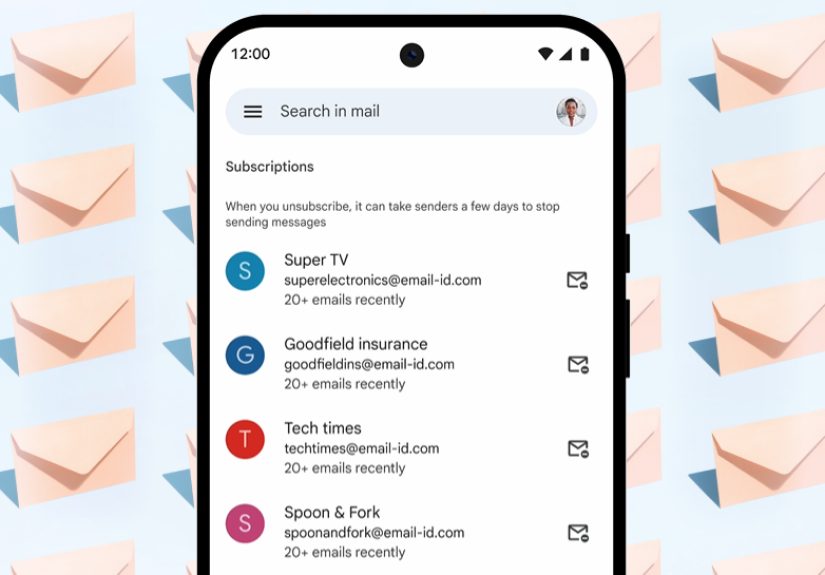
The feature behind the “inbox cleanup button” headline is Gmail’s Manage subscriptions page. It gathers your active subscriptions into a single dashboard, sorts them by the senders who email you most often, shows how many messages they’ve sent recently, and gives you a direct unsubscribe option beside each one.
In plain English, Gmail is no longer making you play detective in your own inbox. Instead of searching for old promotions from brands you forgot existed, the service now hands you a list of repeat offenders and says, more or less, “Start here.”
That matters because email clutter is rarely caused by one dramatic problem. It’s death by a thousand cheerful marketing messages. A sale alert from a retailer. A weekly digest from a site you stopped reading. Shipping updates from a purchase you made once. A beauty brand that thinks you need three reminders a day to buy toner. The inbox gets noisy little by little, then suddenly feels impossible.
How the new inbox cleanup button works
Where to find it
On desktop, you can open Gmail, expand the left-side menu, and look for Manage subscriptions. On mobile, it appears inside the Gmail app menu as the rollout reaches your account. If you do not see it yet, that does not necessarily mean you are cursed. Google rolled the feature out gradually.
What you see inside
Once you open the page, Gmail lists your active subscription senders. The most frequent senders usually float toward the top, which is exactly what you want. Nobody starts an inbox cleanup session thinking, “Please show me the polite monthly newsletter first.” You want the noisy crowd up front.
Gmail also shows how many messages a sender has delivered in recent weeks. That tiny detail is surprisingly useful. It turns a vague feeling of inbox overload into visible evidence. Maybe a store has sent you 17 emails recently. Maybe a newsletter you barely remember has sent 11. Suddenly the unsubscribe decision becomes much easier.
What happens when you click unsubscribe
When you unsubscribe, Gmail sends the unsubscribe request on your behalf. In many cases, that means a quick, direct action inside Gmail. In some cases, the sender may route you to a website to finish the process. Either way, Google has removed several steps from the cleanup ritual.
There are a few limits worth knowing. First, the sender may take a few days to stop emailing you, so do not expect absolute silence by lunchtime. Second, unsubscribing is not the same thing as deleting old messages. The button helps stop future clutter; it does not automatically vacuum years of old promotions out of your archive. Third, blocking a sender is different. Blocking generally routes future messages to spam, while unsubscribing is meant to stop the mailing itself.
Why this small button is a big deal
The genius of this feature is not technical fireworks. It is friction removal. Google looked at a tedious, repetitive task and cut it down to something manageable. That is often what the best software updates do. They do not always invent a new behavior; sometimes they simply stop wasting your time.
For years, inbox cleanup has been one of those chores people postpone forever. It sits in the same category as reorganizing your photos, renaming your downloaded files, or figuring out why you have seven browser tabs open for the same thing. You know it would improve your life. You also do not want to spend your evening doing it.
By putting subscriptions in one place, Gmail turns email cleanup from an overwhelming project into a series of obvious yes-or-no choices. Keep this. Lose that. Save the useful newsletter. Dump the digital confetti cannon. It is less emotional, less messy, and much faster.
There is also a trust angle here. Many users have relied on third-party cleanup tools for years, giving outside services access to their inboxes just to unsubscribe from junk. A built-in Gmail tool does not solve every problem, but it does reduce the need to hand over your inbox keys to an app with a cute logo and a privacy policy nobody actually read.
What this feature does not do
As helpful as the cleanup button is, it is not magic. It will not fix every annoying email habit on the internet, and it definitely will not reform the entire email marketing industry overnight.
- It does not instantly erase old clutter from your inbox or archive.
- It does not guarantee that every sender will stop immediately.
- It does not replace careful filtering, labels, or blocking when needed.
- It does not make you suddenly better at replying to the five important emails you have been avoiding.
That last problem remains painfully manual.
The feature is best understood as a front-end cleanup tool. It helps you reduce future incoming clutter, not solve every inbox management challenge in one dramatic gesture. Think of it as turning off the faucet before you mop the floor.
The bigger Gmail cleanup story
This update did not appear out of nowhere. Google has been building toward simpler inbox control for a while. Earlier Gmail changes made it easier to unsubscribe from individual emails directly. Google also tightened rules for high-volume senders, pushing bulk emailers to support one-click unsubscribe and process those requests quickly. That matters because inbox cleanup only works well when the senders on the other side are forced to behave like civilized adults.
Google has also spent years emphasizing safety and filtering. Gmail already blocks the vast majority of spam, phishing, and malware before it reaches users. More recently, the company has talked about AI-based defenses that cut scam emails further. In other words, Google is attacking inbox clutter from multiple angles: block the malicious stuff, reduce the annoying stuff, and make the user more powerful in the middle.
Then there is the newer AI layer. Google previewed Gemini-powered inbox cleanup commands that could help archive or delete certain emails with a prompt, and later introduced an AI Inbox concept that highlights priorities and to-dos. Those are part of Gmail’s larger “Gemini era,” but they are not quite the same thing as the simple cleanup button people can use today. The important distinction is this: Manage subscriptions is practical, concrete, and easy to understand. AI Inbox is broader, smarter, and potentially more ambitious, but also more experimental.
For many users, that makes the subscription tool the more immediately valuable update. It solves a problem people already understand without asking them to trust a robot to interpret their life.
How to use the cleanup button wisely
Start with frequency, not emotion
The best way to use the feature is to begin with the senders at the top. If a sender has blasted your inbox repeatedly over the past few weeks, that is your low-hanging fruit. Do not overthink whether you might someday want one coupon from them. If they are irritating you now, unsubscribe now.
Pause before removing genuinely useful mail
Not every recurring sender is junk. Some subscriptions are actually useful: security alerts, shipping updates, niche newsletters you still enjoy, school notices, appointment reminders, or work-related digests. Gmail lets you inspect a sender’s messages before you pull the plug, which is smart. Use that preview. It can save you from unsubscribing to something you actually need and then blaming technology for your own enthusiasm.
Pair unsubscribing with cleanup habits
The button works best when combined with a few classic Gmail habits. After unsubscribing, search for older messages from the same sender and archive or delete them. Create labels for newsletters you want to keep. Use filters for predictable senders. The button is the beginning of better inbox hygiene, not the whole routine.
What it means for brands, publishers, and marketers
This feature is also a warning shot to anyone who treats email like a volume game. If your entire strategy depends on sending more and more messages until somebody finally buys something, Gmail has just made it easier for users to quit you.
That is not bad news for good senders. In fact, it may help them. Easier unsubscribes can reduce frustration and lower the chance that annoyed recipients mark legitimate marketing mail as spam. For brands that send relevant, timely, well-targeted messages, the new tool may actually clean out the weaker competitors and leave more room for email people truly want.
But the margin for lazy email marketing just got thinner. If your subject lines are manipulative, your cadence is exhausting, or your list hygiene is terrible, users now have a cleaner exit door.
So, is Gmail’s inbox cleanup button worth the hype?
Yes, with one important caveat: it is worth the hype if you understand what kind of problem it solves.
If you expect one button to erase every old promotional email, organize your priorities, answer messages, and transform your inbox into a zen garden, you will be disappointed. That is not what this is. But if you want a faster, built-in, less annoying way to stop unwanted subscription emails, Gmail’s new cleanup feature is genuinely useful.
And usefulness matters more than novelty. The internet does not always need another flashy feature. Sometimes it just needs a smarter exit ramp.
Google’s cleanup button works because it respects a basic truth about modern email: most inbox stress is not caused by dramatic failures. It is caused by accumulation. Tiny decisions. Forgotten sign-ups. Old habits. Too many updates from too many places. By making those subscriptions visible and easier to remove, Gmail gives users something rare in digital life: a little more control without a lot more work.
That may not sound glamorous, but it is exactly the kind of upgrade people end up using.
Experiences: what this inbox cleanup button feels like in real life
Using Gmail’s cleanup tools feels a little like opening a closet you have avoided for years and discovering that half the mess is made of things you do not even like anymore. The first few minutes are almost funny. You see retailers you bought from once during a holiday sale, newsletters you signed up for while procrastinating, and productivity emails that somehow created the opposite of productivity. The feature does not just clean your inbox; it exposes your digital impulses with uncomfortable honesty.
For a lot of users, the biggest surprise is not that they have unwanted email. It is how much unwanted email has quietly become background noise. Once Gmail groups these senders together, you start noticing patterns. A handful of brands account for a weirdly large chunk of inbox traffic. A few newsletters arrive so often that they have basically become wallpaper. You stop seeing them as individual messages and start seeing them for what they are: recurring interruptions dressed up as updates.
The emotional effect is real. Every unsubscribe click feels tiny, but the cumulative experience is satisfying in the same way deleting old screenshots or clearing browser tabs can be satisfying. You are not solving life’s biggest problem, obviously. You are just removing a layer of low-grade friction that has been nibbling at your attention for months or years. And that matters more than people think, because digital clutter is still clutter. It still taxes your focus. It still creates hesitation every time you open your inbox.
There is also a practical shift that happens after a cleanup session. The inbox starts feeling more readable. Important emails have more breathing room. The messages you actually care about are easier to spot. Even if the change is not dramatic on day one, it compounds over time because you have reduced future noise. That is the hidden value of the tool: it is not just about today’s cleanup. It is about preventing next month’s inbox from becoming a landfill again.
Some users will probably want more. They will want automatic bulk deletion, smarter sorting, and stronger AI recommendations. Google seems to be moving in that direction with Gemini features, and that will attract people who want Gmail to act more like a personal assistant. But there is something refreshing about the current subscription cleanup tool because it stays simple. It shows you the senders. It shows you the volume. It gives you a button. You make the call.
That simplicity makes the experience feel trustworthy. You are not wondering why an algorithm hid a message or whether an AI summary misunderstood a thread. You are just reviewing obvious subscription clutter and deciding what deserves to survive. In a year full of increasingly complicated AI promises, that kind of plain, useful design feels almost luxurious.
And maybe that is the best compliment you can pay Gmail’s cleanup button: it does not try to be impressive. It tries to be helpful. In inbox management, that is a much bigger win.
Conclusion
Google’s new inbox cleanup button is not a gimmick. It is a practical Gmail upgrade that makes subscription overload easier to see, easier to manage, and much easier to stop. If your inbox has been buried under promo blasts, stale newsletters, and alerts from brands that think every Tuesday is a historic event, this is one of the most useful Gmail improvements in years. It will not do everything, but it does one important job very well: it helps you reclaim attention from messages that no longer deserve it.