Table of Contents >> Show >> Hide
- Why Office Chair Height Matters More Than People Think
- Way 1: Adjust the Chair Height Lever the Standard Way
- Way 2: Adjust Chair Height Based on Elbow and Desk Position
- Way 3: Use a Footrest or Workstation Adjustment When the Chair Range Is Not Enough
- How to Know Your Office Chair Height Is Correct
- Troubleshooting Common Office Chair Height Problems
- Real-World Experiences With Office Chair Height Adjustment
- Conclusion
Adjusting your office chair height sounds so simple that most people treat it like background noise. Pull a lever, shrug, answer emails, move on with life. But that tiny adjustment is the difference between “I’m getting things done” and “Why does my lower back feel like it wrote a breakup song?”
The truth is that office chair height affects nearly everything else in your workstation setup: your knees, hips, lower back, shoulders, wrists, and even how tempted you are to sit like a human pretzel by 2:37 p.m. When your chair sits too high, your feet dangle or you perch awkwardly on the edge. When it sits too low, your knees rise, your hips roll backward, and your posture starts negotiating with gravity.
The good news is that getting the right office chair height is not rocket science. It is more like basic adulting with better lumbar support. In this guide, you’ll learn three practical ways to adjust office chair height, how to tell when the height is actually correct, and what to do if your desk and chair clearly have unresolved issues with each other.
Why Office Chair Height Matters More Than People Think
Proper office chair height creates a neutral sitting position. That means your feet are supported, your thighs are close to parallel with the floor, your knees are around the same level as your hips, and your elbows can rest comfortably near desk height. In plain English: your body is not spending the whole workday compensating for bad furniture choices.
Good chair height also helps your lumbar support do its actual job. If the seat is too high, you may slide forward and lose back support. If it is too low, your pelvis can tuck under, which turns your lower spine into an unwilling participant in your desk routine. That is why ergonomic chair adjustment is never just about the seat. Chair height influences seat depth, armrest position, keyboard placement, and monitor height too.
Think of your setup as a three-part system: the chair, the desk, and the floor. If two of those play nicely together, the third one usually behaves. If all three are fighting, your posture loses.
Way 1: Adjust the Chair Height Lever the Standard Way
This is the classic method and the one most office workers should start with. Most modern office chairs have a pneumatic height adjustment lever under the seat, often on the right side. Pulling that lever while taking your weight off the chair raises the seat. Pulling it while sitting in the chair lowers the seat. It is simple, fast, and wildly underused by people who have somehow accepted discomfort as a personality trait.
How to Do It Correctly
Start by standing in front of the chair. A good rule of thumb is that the highest point of the seat should land just below your kneecap. This gives you a smart starting point before you even sit down.
Next, sit all the way back in the chair and place both feet on the floor. Pull the height lever to fine-tune the position. Your goal is to create a seated posture where:
- Your feet rest flat on the floor.
- Your thighs are roughly parallel to the floor or angled slightly downward.
- Your knees are about level with your hips or just a little lower.
- Your lower back stays in contact with the chair back.
Once the seat is set, check the edge of the chair. You should have a small gap between the front of the seat and the back of your knees. If the seat presses into the backs of your legs, you may need to adjust seat depth too. Chair height and seat depth are teammates, not strangers.
When This Method Works Best
This is the best method for standard ergonomic office chairs, home office task chairs, and most modern desk setups. If your chair has a gas lift cylinder, this is your go-to move.
Common Mistakes
One mistake is adjusting the chair by feel alone without checking what your legs and elbows are doing. Another is setting the chair too high because it “feels powerful,” only to discover your feet are hovering like uncertain astronauts. A third is ignoring what happens after the height change. Once you adjust the seat, your armrests, keyboard position, and monitor may need quick tweaks too.
Way 2: Adjust Chair Height Based on Elbow and Desk Position
The second method is less about the chair mechanism and more about matching your body to your workstation. This matters because the “right” office chair height is not only about your legs. It is also about whether your hands can work comfortably at desk level without making your shoulders creep upward like they are slowly trying to leave the chat.
Here is the basic idea: sit back in your chair with your shoulders relaxed and your elbows bent at about 90 degrees. Your forearms should rest comfortably at or just above the desk or keyboard height. If your elbows are too low, the chair may need to come up. If your elbows are too high, the chair may need to come down.
How to Use the Elbow-Height Method
- Sit upright with your back supported.
- Relax your shoulders completely.
- Bend your elbows so your arms hang naturally at your sides.
- Raise or lower the chair until your elbows line up comfortably with the work surface.
- Then check your feet. If they no longer rest flat, add a footrest.
This method is especially useful when you work at a fixed-height desk. In a perfect world, every desk would adjust to your body. In the real world, many desks are built like they were designed for one mysterious average person who apparently never existed.
If the desk is too high, you may need to raise your chair so your elbows align correctly. Once you do that, your feet may need support from a footrest. If the desk is too low, lowering the chair might help your shoulders, but then you could lose leg room or end up with your knees crowding the desk underside. That is your signal that the desk height itself is part of the problem.
Why This Method Matters
Many people stop once their feet touch the floor, but that is only part of ergonomic seating. If your chair height supports your feet but leaves your wrists bent upward and your shoulders lifted all day, you have solved one problem and adopted another. The elbow-height method helps balance the upper and lower body instead of making them compete.
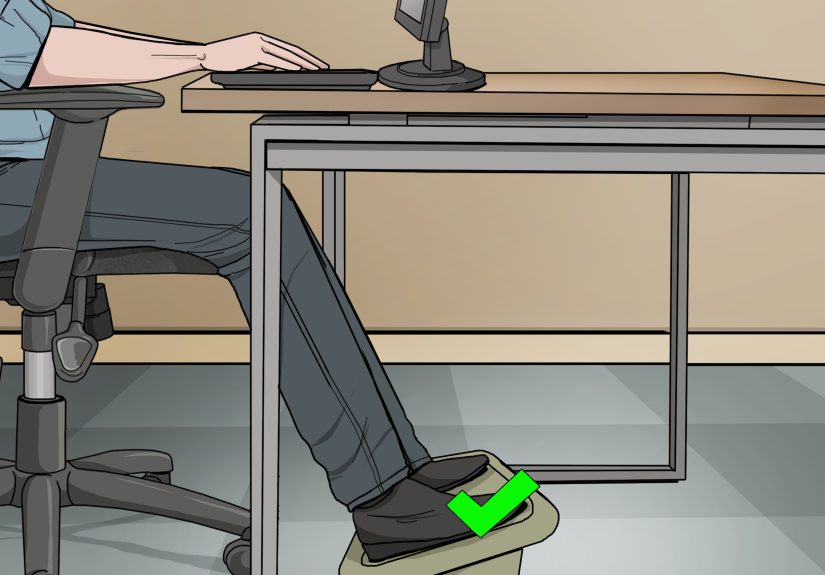
Way 3: Use a Footrest or Workstation Adjustment When the Chair Range Is Not Enough
This third method is the one people forget, but it is often the most practical. Sometimes the chair height adjustment range simply does not match your body and desk combination. Maybe you are shorter and the chair must go higher to meet the desk. Maybe you are taller and the desk is too low to fit your legs comfortably. Maybe your chair and desk were clearly introduced too quickly and are not compatible.
In those cases, the best way to adjust office chair height is indirectly: by changing the environment around the chair so your sitting height works in real life.
What Counts as a Height Adjustment Support
- Footrest: Ideal when your chair needs to be higher to match the desk, but your feet no longer reach the floor comfortably.
- Keyboard tray: Helpful when the desk is too high and you want to lower the working surface without raising the chair too much.
- Desk risers or blocks: Useful when a fixed desk is too low for your legs or elbow position.
- Monitor riser: Necessary after chair or desk changes so your screen does not end up too low.
- Adjustable desk: The most flexible long-term fix if your current furniture fights back daily.
This method is not “cheating.” It is ergonomic problem-solving. In fact, many people only reach a proper chair height after using a footrest or changing the desk height. The goal is not to force your body to fit the furniture. The goal is to build a setup that fits your body.
Best Situations for This Method
This approach is especially useful for shorter users, tall users, shared workstations, hot-desking environments, dining-table home offices, and any setup where the desk height is fixed. It is also helpful when multiple people use the same chair. In shared workspaces, a fast chair adjustment plus a reliable footrest can save a lot of awkward fidgeting.
How to Know Your Office Chair Height Is Correct
If you are wondering whether you nailed it, use this quick checklist:
- Your feet are fully supported on the floor or a footrest.
- Your knees are roughly level with your hips.
- Your thighs feel supported, not compressed.
- Your lower back touches the backrest.
- Your shoulders stay relaxed while typing.
- Your elbows bend naturally near 90 degrees.
- You are not sliding forward in the chair.
- You can sit close enough to the desk without your knees crashing into it.
If most of those are true, your office chair height is probably in a very good place. If not, keep adjusting. It usually takes a few rounds, not one dramatic lever pull and a speech.
Troubleshooting Common Office Chair Height Problems
Your Feet Do Not Reach the Floor
Raise the chair only if it is necessary for elbow height, then add a footrest. Do not let your feet dangle all day. Unsupported legs can create pressure at the backs of the thighs and make you scoot forward, which wrecks your back support.
Your Knees Hit the Underside of the Desk
The desk may be too low, or the chair may be too high. First check whether lowering the chair still lets your elbows stay near desk height. If not, the problem is probably the desk. A keyboard tray or adjustable desk can make a huge difference here.
Your Lower Back Still Hurts
Chair height may be only part of the issue. Check seat depth, lumbar support position, recline tension, and monitor distance. A perfectly adjusted chair height cannot rescue a workstation that still causes you to lean forward like you are trying to decode a secret message on your screen.
Your Shoulders Feel Tight After Typing
Your chair might be too low, your desk too high, or your armrests set incorrectly. Raise the chair until the elbows land better, then support the feet if needed. Also make sure the armrests do not block you from getting close to the desk.
Real-World Experiences With Office Chair Height Adjustment
In real life, people rarely discover the correct office chair height because a beam of ergonomic light descends from the ceiling. Usually, they discover it after a week of shoulder tension, numb legs, or the weird feeling that something is off even though the chair “looks fine.”
One common experience happens in home offices. Someone buys a decent chair, places it at a non-adjustable desk, and assumes the chair alone will save the day. Then they raise the chair so their arms can type comfortably, only to realize their feet are dangling. Suddenly they are using a shoebox, a stack of books, or a surprisingly heroic footrest. It looks a little improvised, but the body usually notices the improvement fast. The lower back relaxes, the hips feel more stable, and the workday stops feeling like a mild endurance event.
Another common scenario happens to taller workers at older desks. They lower the chair to get their feet flat and knees comfortable, but the desk sits too low for their legs. Now they are squeezed under the work surface like they lost a bet. In that case, the chair is not really the problem. The desk is. Many people report that once they raise the desk or switch to an adjustable one, their chair suddenly feels “better” even though the chair itself did not change at all. That is a perfect example of why workstation ergonomics is a system, not a single lever.
Shorter users often describe a different experience: they can finally reach the desk or keyboard after raising the chair, but the seat edge starts pressing into the backs of their legs. Then they realize seat depth matters too. Once they reduce the seat depth and add a footrest, the chair stops feeling oversized and starts feeling supportive. It is one of those small setup wins that makes a surprising difference by lunchtime.
Shared offices create their own comedy. One person likes the chair low, another likes it high, and the next person sits down without adjusting anything and silently suffers through three meetings. In hot-desk spaces, the workers who feel best are usually the ones who spend 20 seconds resetting the chair height, armrests, and screen instead of pretending they are “fine.” That tiny habit can prevent the slow accumulation of discomfort that shows up later as neck stiffness or aching hips.
There is also the experience almost everyone has after finally getting chair height right: they stop thinking about the chair. That may sound unromantic, but it is actually the goal. A well-adjusted office chair does not demand attention. Your feet stay planted, your shoulders stop hovering, your lower back stays supported, and your body no longer spends the day making emergency corrections. Good ergonomics is delightfully boring. It lets you focus on work instead of negotiating with your furniture every half hour.
And perhaps the most relatable experience of all is this: once you learn how correct office chair height should feel, it becomes impossible to ignore bad setups everywhere else. You sit in a conference room chair, a café chair, or a friend’s “totally ergonomic” home office throne and instantly think, “Ah yes, this seat was adjusted by chaos.” Congratulations. You now notice the things your back has been trying to tell you for years.
Conclusion
If you want a more comfortable workstation, start with the chair height. It is the foundation for good desk ergonomics, better posture, and less daily strain on your back, hips, shoulders, and legs. The three smartest ways to adjust office chair height are simple: use the height lever correctly, match the chair to your elbow and desk position, and use tools like a footrest or keyboard tray when the furniture range is not enough.
In other words, do not just yank the lever and hope for the best. Set the chair with intention. Check your feet. Check your elbows. Check the space behind your knees. Then make the small follow-up adjustments that turn a decent chair into a properly fitted one.
Your office chair does not need to be fancy, futuristic, or priced like a used scooter. It just needs to fit your body and your workstation. When it does, your entire setup starts working with you instead of against you. And that, frankly, is the kind of workplace drama we all deserve less of.